Table of Contents
ApowerUnlock: Complete Guide
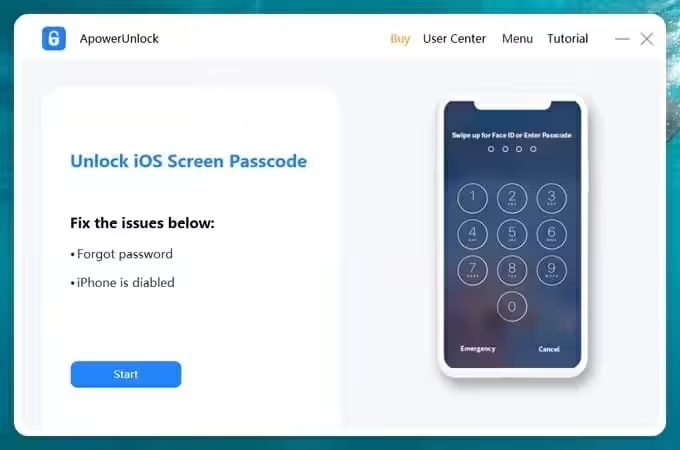
ApowerUnlock is an iOS unlocking utility from Apowersoft designed to help users regain access to supported iPhone and iPad devices when they have forgotten a screen passcode, entered the wrong passcode too many times, or cannot interact with a damaged screen. The current official product page describes support for removing screen passcodes, Touch ID and Face ID locks, while warning that a successful unlock removes the device’s data. It also explicitly states that the current Windows version does not support unlocking Apple ID. (Apowersoft)
That last point is important because some older Apowersoft articles describe Apple ID unlocking as a feature. Those older pages refer to legacy iOS versions and are not a reliable description of the current product. Apowersoft’s current product page says Apple ID unlocking is not supported by ApowerUnlock for Windows, and its older Apple ID documentation was limited to iOS versions below 11.4. (Apowersoft)
If you are researching ApowerUnlock iPhone, ApowerUnlock iPad, ApowerUnlock download, ApowerUnlock APK, ApowerUnlock free, or alternatives, this guide explains what the software actually does, what it cannot do, how its pricing works, what happens to your data, and when Apple’s official recovery methods are a better option.

What Is ApowerUnlock?
ApowerUnlock is a Windows-based utility for removing screen locks from supported Apple mobile devices.
Its primary purpose is to help a legitimate device owner regain access when the device’s normal screen passcode is unavailable.
According to Apowersoft’s current product page, ApowerUnlock can handle three types of device authentication:
- Passcode
- Touch ID
- Face ID
The company says it can be used when a user forgets an iPhone or iPad passcode, when a device becomes disabled after repeated incorrect attempts, or when a damaged screen prevents normal interaction. (Apowersoft)
However, an important limitation should be understood immediately:
ApowerUnlock’s screen-unlock process is not the same thing as bypassing Apple’s Activation Lock.
Removing a screen passcode does not give someone ownership of a device protected by another person’s Apple Account.
Apowersoft’s current page specifically warns that data is removed after a successful unlock and says its Windows version does not support unlocking Apple ID. (Apowersoft)
What Does ApowerUnlock Do?
ApowerUnlock focuses primarily on iPhone and iPad screen unlocking.
Common scenarios include:
Forgotten passcode
If you own an iPhone or iPad but cannot remember its screen passcode, the software is designed to help remove the screen lock.
Disabled iPhone or iPad
Entering an incorrect passcode repeatedly can cause an Apple device to become disabled. ApowerUnlock is designed for this type of screen-lock problem.
Broken or unresponsive screen
If the touchscreen is damaged and you cannot enter the passcode normally, an unlocking utility may provide another way to restore access, although the device’s data may still be erased during the process.
Used device with an unknown screen passcode
If you legitimately purchased a used iPhone or iPad and the previous owner has not removed their screen lock, ApowerUnlock may remove the local screen passcode, but it does not make an Activation-Locked device yours.
The current product page specifically warns that all data is removed after a successful unlock. (Apowersoft)
Is ApowerUnlock an iPhone Unlocker?
Yes, but the term “unlocker” needs clarification.
ApowerUnlock is primarily a screen-passcode removal tool.
It should not be interpreted as a universal tool for:
- Carrier unlocking
- Apple Account recovery
- Activation Lock removal
- Stolen-device bypassing
- iCloud security bypassing
- Cellular-network unlocking
These are different types of locks.
For example, if an iPhone displays an Activation Lock screen asking for the Apple Account credentials associated with the device, simply removing the screen passcode does not remove Apple’s ownership protection.
Apple designed Activation Lock specifically to prevent unauthorized use of a lost or stolen device.
ApowerUnlock iPhone: What Can It Unlock?
The current product page says ApowerUnlock supports three forms of iOS screen authentication:
1. Passcode
This is the normal numerical or alphanumeric lock-screen credential.
2. Touch ID
Older supported iPhones and iPads can use Apple’s fingerprint authentication system.
3. Face ID
Newer compatible iPhones and iPads can use facial recognition for device authentication.
Apowersoft describes ApowerUnlock as a tool for removing these types of screen locks when the user cannot access the device normally. (Apowersoft)
Can ApowerUnlock Unlock an iPad?
Yes, the software is designed to unlock supported iPad screen locks as well as iPhone screen locks.
Apowersoft’s current product page specifically describes ApowerUnlock as an iPhone/iPad unlocking utility. (Apowersoft)
The company’s installation and usage documentation also describes connecting an iPad to a Windows PC, downloading the appropriate firmware package and beginning the unlock process. (Apowersoft)
Compatible devices can include different generations of:
- iPad
- iPad Air
- iPad mini
- iPad Pro
- iPhone
- iPod touch
Exact compatibility can depend on the iOS/iPadOS version and device model, so users should check the current software requirements before beginning an unlock.
Is There a Free iPad Unlocker Available?
Yes, free and official recovery options exist, although they do not necessarily work in the same way as third-party unlocking software.
If you forgot an iPad passcode, Apple’s official recovery process can erase and restore the device. Depending on the device and circumstances, you may use:
- Finder on Mac
- Apple Devices on Windows
- Recovery Mode
- Find My
- Apple’s account-recovery tools
The important distinction is that Apple’s official methods are designed around resetting or restoring the device, rather than magically revealing the forgotten passcode.
Third-party software such as ApowerUnlock offers a guided interface around the recovery/unlock process, but it does not preserve the existing locked-device data in the normal passcode-forgetting scenario.
Is ApowerUnlock Free?
ApowerUnlock is not permanently free.
Apowersoft currently offers paid unlock credits/packages. Its official store currently lists these personal options:
- One iOS unlock: $19.95 promotional price
- Two iOS unlocks: $29.95 promotional price
- Five iOS unlocks: $59.95 promotional price
The store states that the packages allow the specified number of iPhone/iPad unlock operations within one year. Prices are promotional and can change. (Apowersoft)
Apowersoft also states that refunds can be declined once the purchased unlock opportunities have been consumed. (Apowersoft)
Therefore, users searching for “ApowerUnlock free” should distinguish between:
Free download/trial access and free unlimited unlocking.
They are not the same thing.
ApowerUnlock Pricing
The current official store provides several personal-use options.
| Plan | Current promotional price | Unlock operations |
|---|---|---|
| One unlock | $19.95 | 1 |
| Two unlocks | $29.95 | 2 |
| Five unlocks | $59.95 | 5 |
Apowersoft’s store says these licenses cover iPhone/iPad unlocking within one year. (Apowersoft)
The company also advertises a 30-day money-back guarantee, although its store specifically notes that refunds may be declined after the included unlock opportunities have been consumed. (Apowersoft)
Because pricing and promotions can change, it is best to verify the price shown by Apowersoft at the time of purchase.
Is ApowerUnlock Safe?
The answer depends on what you mean by “safe.”
Is the official software legitimate?
ApowerUnlock is an official Apowersoft product distributed through the company’s website and store.
Is unlocking completely risk-free?
No.
The current product page explicitly warns:
All the data will be removed once unlocked successfully. (Apowersoft)
That means you should never use an unlocking tool casually on a device containing important data.
If you already have an iCloud backup, computer backup or other copy of your files, restoring the device afterward is much less concerning.
If there is no backup, the situation is different.
Does ApowerUnlock Delete iPhone Data?
Yes, the current official product page warns that data will be removed after a successful unlock. (Apowersoft)
This is one of the most important things to understand before using ApowerUnlock.
Removing a forgotten passcode generally requires restoring or resetting the device.
Therefore, users should not think of ApowerUnlock as:
“A tool that reveals my forgotten passcode while keeping everything exactly as it is.”
Instead, think of it as:
A recovery/unlock utility that can remove the screen lock, with data loss expected.
If your data is already backed up to iCloud or another backup location, you can restore the device after the unlock.
Can ApowerUnlock Unlock a Disabled iPhone?
Yes.
A disabled iPhone is one of the scenarios the current ApowerUnlock product page specifically mentions. The company says the tool can help remove the screen lock after repeated incorrect password attempts. (Apowersoft)
However, “disabled” does not mean the device has become permanently unusable.
Apple provides official recovery procedures for disabled devices as well.
Before purchasing third-party software, you should consider Apple’s own recovery process.
A third-party utility can be more convenient for some users, but Apple’s official process does not require buying an unlocking product.
How Does ApowerUnlock Work?
The general process involves connecting the iPhone or iPad to a Windows computer and putting the device into an appropriate recovery state if necessary.
Apowersoft’s official guide describes the following general workflow:
- Install ApowerUnlock.
- Connect the iPhone or iPad to the PC.
- Install/use iTunes components when required.
- Allow the software to identify the device.
- Enter Recovery Mode or DFU Mode if the device cannot be normally detected.
- Download the appropriate firmware package.
- Unpack the firmware.
- Start the unlocking operation.
- Confirm the operation.
- Wait for the process to finish.
(Apowersoft)
The exact screens and device instructions can differ by iPhone/iPad generation.
Does ApowerUnlock Require iTunes?
Apowersoft’s official usage guide says that iTunes needs to be installed on the computer for ApowerUnlock to work in the described workflow. (Apowersoft)
This is particularly relevant because iPhone communication with Windows can depend on Apple’s device drivers and related components.
If ApowerUnlock cannot recognize your device, checking whether iTunes can recognize the same iPhone/iPad is one of the troubleshooting steps recommended by Apowersoft. (Apowersoft)
How to Use ApowerUnlock to Unlock an iPhone
For a device that you own or are authorized to manage, the general process is:
Step 1: Install ApowerUnlock
Download the official Windows installer from Apowersoft.
Step 2: Connect the iPhone
Use a reliable USB cable to connect the iPhone to the computer.
Step 3: Start ApowerUnlock
Open the program.
Step 4: Allow device detection
The software attempts to identify the connected iPhone.
Step 5: Enter Recovery Mode if necessary
If the phone cannot be detected because it is locked or disabled, Apowersoft’s documentation explains how to enter Recovery Mode or DFU Mode. (Apowersoft)
Step 6: Download firmware
ApowerUnlock identifies the device and downloads the appropriate firmware package. The company recommends having sufficient storage space for the download and extraction process. (Apowersoft)
Step 7: Start unlocking
Once the firmware has been prepared, begin the unlock process.
Step 8: Wait for completion
Do not disconnect the device unnecessarily during the process.
Step 9: Set up the iPhone again
After the device has been restored/unlocked, follow Apple’s setup process.
Step 10: Restore your backup
If you have an iCloud or computer backup, restore it during setup.
How to Put an iPhone Into Recovery Mode for ApowerUnlock
Recovery Mode procedures vary by iPhone generation.
For newer Face ID-equipped iPhones, Apple’s button combination is different from older Home-button devices.
Apowersoft’s recovery-mode documentation provides separate instructions for:
- iPhone 6s and older
- iPhone 7/7 Plus
- iPhone 8 and later
- iPad with Face ID
(Apowersoft)
Because button combinations can vary by model, users should follow the instructions displayed by the software or Apple’s current documentation rather than applying an old combination to every iPhone.
What Is DFU Mode?
DFU means Device Firmware Update.
It is a deeper recovery state that allows an iPhone or iPad to communicate with a computer without fully loading the normal iOS environment.
Apowersoft explains that DFU mode differs from ordinary Recovery Mode because the operating system does not load in the normal way. (Apowersoft)
DFU mode can be useful when:
- The device cannot boot normally.
- Recovery Mode does not work.
- The computer cannot interact with the device normally.
- A firmware restore is required.
The exact button sequence varies by device generation.
Can ApowerUnlock Unlock an iPhone Without a Passcode?
Yes, its primary purpose is to remove supported iPhone/iPad screen locks when the passcode is unavailable. (Apowersoft)
But this does not mean that the tool can access the existing contents of a locked device without consequences.
The current product page explicitly warns that successful unlocking removes data. (Apowersoft)
So the better explanation is:
ApowerUnlock can remove the screen lock without you knowing the old passcode, but the process can erase the device.
Can I Unlock My iPhone for Free?
If by “unlock” you mean remove a forgotten screen passcode, Apple provides official recovery methods that do not require purchasing ApowerUnlock.
The trade-off is that restoring a locked iPhone generally means erasing it.
If you have an iCloud backup, you can restore your data after setting up the device again.
If you mean carrier/network unlocking, that is completely different.
Carrier unlocking is normally handled by the mobile carrier according to its policies. A third-party screen-unlocking application should not be treated as a method for changing cellular-network restrictions.
How to Unlock an iPhone to Any Network for Free
This question is frequently confused with screen-passcode unlocking.
ApowerUnlock is not a carrier-unlocking service.
A network-locked iPhone is restricted to a particular mobile carrier.
To unlock it for another network, you normally need to meet the carrier’s eligibility requirements and request an official carrier unlock.
The screen passcode has nothing to do with the cellular-network lock.
Three different locks
| Lock | Example | Solution |
|---|---|---|
| Screen passcode | 6-digit iPhone passcode | Apple recovery / compatible unlock tools |
| Activation Lock | Apple Account required | Original owner/account recovery |
| Carrier lock | SIM/network restriction | Mobile carrier |
Understanding this difference prevents many incorrect searches for “free iPhone unlock.”
Can Apple Unlock an iPad for Free?
Apple generally does not “reveal” a forgotten iPad passcode.
Instead, Apple provides official procedures for erasing and restoring the device.
If you own the iPad and have access to the associated Apple Account, you can follow Apple’s supported recovery process.
If the iPad is protected by Activation Lock, you must authenticate using the Apple Account associated with the device or obtain legitimate assistance from Apple with appropriate proof of ownership.
A third-party utility cannot legitimately turn an Activation-Locked device into an ownership-free device.
Can I Unlock My iPad Without a Code?
Yes, you can restore a locked iPad without knowing the current screen passcode, but the normal result is data erasure.
ApowerUnlock is designed for this type of scenario. Its current product information states that successful unlocking removes all data. (Apowersoft)
Apple’s own recovery process can also erase the iPad and allow you to set it up again.
The best method depends on whether:
- You have a backup.
- You remember your Apple Account.
- Find My is enabled.
- The iPad is Activation Locked.
- The iPad is owned by you.
- You have access to a Mac or Windows PC.
Can I Unlock My iPad Myself?
Yes, if you are the legitimate owner, you can generally perform the recovery process yourself.
Options include:
Apple’s official recovery method
Best if you want the manufacturer’s supported process.
ApowerUnlock
Useful if you prefer a guided third-party interface.
Apple Account/Find My
Useful in situations where remote erasure is available.
The most important requirement is that you understand what will happen to the device’s data.
How Much Will It Cost to Unlock an iPad?
The cost depends on the method.
Apple official recovery
Apple does not normally charge you simply to use its official recovery process for a forgotten passcode.
ApowerUnlock
The current Apowersoft store lists:
- One unlock: $19.95 promotional price
- Two unlocks: $29.95 promotional price
- Five unlocks: $59.95 promotional price
(Apowersoft)
Repair shop
A third-party repair shop may charge a service fee, depending on the device and problem.
However, paying someone does not guarantee that an Activation-Locked iPad can be legitimately unlocked.
What App Can I Use to Unlock My iPad?
For screen-passcode problems, options include:
- Apple’s official recovery tools
- ApowerUnlock
- Other reputable iOS recovery utilities
The correct option depends on your situation.
If the problem is a forgotten screen passcode, ApowerUnlock is relevant.
If the problem is Activation Lock, you need the Apple Account associated with the device.
If the problem is a carrier lock, contact the carrier.
If the device has a hardware fault, an unlocking application may not solve the underlying issue.
How Do I Permanently Unlock My iPad?
If by “permanently unlock” you mean remove the screen passcode, you can erase and restore the iPad and create a new passcode during setup.
If you mean permanently remove Activation Lock, that is different.
Activation Lock is an Apple security feature linked to the device’s Apple Account/Find My status.
A legitimate owner needs to authenticate with the associated account or follow Apple’s official ownership-support process.
ApowerUnlock’s current Windows product page specifically states that it does not support Apple ID unlocking. (Apowersoft)
Therefore, users should be skeptical of websites advertising an “ApowerUnlock APK” or “ApowerUnlock Activation Lock bypass” as if it were an official feature.
Do Apple Charge to Unlock an iPad?
For a forgotten screen passcode, Apple’s recovery process itself does not normally require paying an unlock fee.
However, other circumstances can involve costs, such as:
- Out-of-warranty hardware repair
- Replacement devices
- Professional repair services
- Accessories
- Data-recovery services
Activation Lock itself is not something you pay Apple to bypass.
You need the appropriate Apple Account credentials or legitimate ownership assistance.
Can I Sell My iPad If It’s Locked?
You can sell an iPad only if you can transfer ownership properly.
Before selling a device, you should:
- Back up your data.
- Sign out of your Apple Account where appropriate.
- Turn off Find My.
- Erase the device.
- Confirm that the new owner can activate it.
- Remove it from your account if necessary.
Selling a device while it remains Activation Locked can create serious problems for the buyer.
A buyer should not be told that a third-party “unlocker” will automatically remove Apple’s ownership protection.
Can ApowerUnlock Remove Activation Lock?
The current official ApowerUnlock page says no for its Windows version. It explicitly states that ApowerUnlock for Windows does not support unlocking Apple ID. (Apowersoft)
Some older Apowersoft pages describe an Apple ID unlocking feature for older devices. Those pages specify restrictions involving iOS versions below 11.4, and they should not be interpreted as current support for modern iPhones and iPads. (Apowersoft)
This is an important distinction for anyone researching ApowerUnlock in 2026.
Current guidance
Screen passcode: Supported use case.
Touch ID/Face ID screen lock: Supported as part of screen unlocking.
Activation Lock/modern Apple Account bypass: Not supported by the current Windows product.
ApowerUnlock APK: Is There an Android Version?
The official ApowerUnlock product is designed for iOS devices and Windows PCs.
Apowersoft’s own download guide describes ApowerUnlock as software for unlocking iOS devices and instructs users to install it on a computer. (Apowersoft)
Therefore, searches such as:
- ApowerUnlock APK
- ApowerUnlock Android
- ApowerUnlock APK download
should be approached carefully.
There is no reason to install a random Android APK claiming to be the official ApowerUnlock simply because a search engine displays it.
An APK from an unofficial website could be:
- Modified
- Misleadingly named
- Bundled with unwanted software
- Completely unrelated to Apowersoft
For the legitimate ApowerUnlock workflow, use the official Windows software from Apowersoft.
ApowerUnlock Download: Where Should You Download It?
The safest choice is the official Apowersoft website.
Apowersoft provides an official ApowerUnlock product page and download option. (Apowersoft)
Avoid downloading the software from pages advertising:
- Cracked ApowerUnlock
- ApowerUnlock keygen
- ApowerUnlock serial key
- ApowerUnlock full version free
- ApowerUnlock mod APK
- “Unlimited unlocks” patches
A storage/device-unlocking application operates with significant system privileges, so an unofficial modified installer is not worth the risk.

ApowerUnlock vs Apple’s Official Recovery
| Feature | ApowerUnlock | Apple official recovery |
|---|---|---|
| Screen passcode recovery | Yes | Yes |
| iPhone | Yes | Yes |
| iPad | Yes | Yes |
| Data preservation | No guarantee; current product warns data is removed | Device is erased during normal forgotten-passcode recovery |
| Cost | Paid packages | Official recovery is generally free |
| Third-party software | Yes | No |
| Apple Account/Activation Lock | Not supported by current Windows product | Requires legitimate account/ownership process |
| Guided third-party interface | Yes | Apple’s own interface |
| Windows workflow | Yes | Yes, using Apple’s Windows software |
For many users, Apple’s official recovery method should be the first option because it does not require purchasing an additional unlock tool.
ApowerUnlock can be considered when you prefer its guided workflow or have a particular compatibility reason to use it.
ApowerUnlock vs H3lix and Jailbreak Tools
It is also important not to confuse ApowerUnlock with jailbreak software.
A jailbreak modifies iOS restrictions and is a different category of software.
ApowerUnlock is designed primarily to remove a screen lock and restore access to the device.
It is not simply a jailbreak utility.
Users searching for “unlock” sometimes mix together:
- Jailbreaking
- Screen unlocking
- Activation Lock
- SIM unlocking
- Apple Account recovery
These are completely different technologies.
Why Does ApowerUnlock Need Firmware?
When an iPhone or iPad is being restored, the computer may need the appropriate firmware package for that device.
Apowersoft’s official guide says ApowerUnlock automatically identifies the device model and downloads the corresponding firmware package. (Apowersoft)
The firmware is then unpacked before the unlocking/restoration operation begins.
This is why the process can require:
- Internet access
- Free disk space
- A reliable USB connection
- Some waiting time
- Recovery or DFU Mode
Apowersoft recommends reserving significant storage space for firmware downloading and extraction. (Apowersoft)
What If ApowerUnlock Cannot Detect My iPhone?
Apowersoft provides several troubleshooting recommendations.
Check the cable
A damaged or poor-quality USB cable can prevent communication.
Check the USB port
Try another USB port.
Check iTunes
Apowersoft recommends checking whether iTunes itself can recognize the iPhone. If iTunes cannot detect the device, ApowerUnlock may also fail to recognize it. (Apowersoft)
Enter Recovery Mode
If the iPhone is disabled and cannot reach the normal interface, Recovery Mode may allow the computer to communicate with it.
Use DFU Mode
DFU Mode can be another option when Recovery Mode does not work.
Apowersoft provides model-specific instructions for both Recovery Mode and DFU Mode. (Apowersoft)
What Happens If the Unlock Process Is Interrupted?
Apowersoft’s older usage guide states that if the device is disconnected during the process, the software should recognize the disconnection and report an unlock failure rather than automatically “bricking” the phone. It also describes an option to exit Recovery Mode. (Apowersoft)
Nevertheless, users should not deliberately disconnect the device during firmware operations.
A stable USB connection and adequate battery/power are strongly recommended.
Interruptions during any device-restoration operation can create unnecessary complications.
ApowerUnlock for Used iPhones and iPads
Buying a used iPhone or iPad creates an important distinction.
Screen locked but not Activation Locked
A screen-passcode issue may be recoverable through an erase/restore process.
Activation Locked
The device remains associated with the previous owner’s Apple Account.
The previous owner must properly remove the device from their account.
This is why you should verify Activation Lock status before purchasing a second-hand iPhone or iPad.
Do not buy a device based on the promise that “any unlock software can remove the previous owner’s account.”
ApowerUnlock’s current Windows product does not support Apple ID unlocking. (Apowersoft)
Is ApowerUnlock a Good iPhone Unlock Tool?
For its specific purpose, ApowerUnlock can be useful.
Its strongest characteristics are:
- Dedicated iOS focus
- iPhone/iPad support
- Passcode removal
- Touch ID/Face ID screen unlocking
- Guided Windows interface
- Firmware downloading
- Recovery/DFU support
- Paid one-time unlock packages rather than an unlimited subscription
However, it is not the right solution for every iPhone lock.
Good fit
Forgotten screen passcode → Yes
Disabled iPhone → Yes
Locked iPad screen → Yes
Broken screen preventing normal input → Potentially
Not the right solution
Modern Activation Lock → No
Carrier/SIM unlock → No
Recovering an unknown Apple Account password → No
Preserving data on a forgotten-passcode device → Do not assume it can
Advantages of ApowerUnlock
Easy interface
Apowersoft describes the software as having a simple interface intended to be usable without specialized technical knowledge. (Apowersoft)
iPhone and iPad support
The software is designed specifically for Apple’s mobile devices.
Multiple screen-lock types
It supports passcode, Touch ID and Face ID-related screen unlocking. (Apowersoft)
Recovery and DFU workflows
The official documentation explains how to use Recovery Mode and DFU Mode when the device cannot be normally detected. (Apowersoft)
Multiple pricing options
Users can currently purchase one, two or five unlock operations instead of necessarily purchasing an unlimited package. (Apowersoft)
Windows support
The software provides a PC-based unlocking workflow.
Disadvantages of ApowerUnlock
Data can be erased
This is the biggest consideration. The current official product page explicitly warns that successful unlocking removes all data. (Apowersoft)
It is not completely free
The product is sold through paid unlock packages. (Apowersoft)
It does not bypass modern Activation Lock
The current product page states that the Windows version does not support Apple ID unlocking. (Apowersoft)
Older online information can be confusing
Some older Apowersoft pages describe Apple ID unlocking for old iOS versions, but those instructions are not representative of current modern-device support. (Apowersoft)
Windows-centered workflow
The official ApowerUnlock installation and usage documentation is centered around Windows PCs.
Frequently Asked Questions
Is there a free iPad unlocker available?
Yes. Apple’s official recovery process can erase and restore a locked iPad without purchasing a third-party unlocking application. Free third-party read/recovery utilities also exist, but capabilities vary. ApowerUnlock itself is a paid product with unlock packages. (Apowersoft)
What is the best iPhone unlock tool?
There is no single best tool for every type of lock. For a forgotten screen passcode, Apple’s official recovery process should be considered first. ApowerUnlock is a third-party option designed specifically for iPhone/iPad screen unlocking.
How can I unlock my iPhone for free?
If you forgot the screen passcode, you can use Apple’s official recovery process to erase and restore the device. You will generally need to set it up again afterward and restore a backup if one is available.
How do I unlock an iPhone to any network for free?
Network unlocking is different from screen unlocking. You normally need to request an official carrier unlock after meeting the carrier’s eligibility requirements. ApowerUnlock is not a carrier/SIM unlocking tool.
Can I unlock my iPad without a code?
Yes, a forgotten-passcode iPad can be erased and restored using Apple’s official recovery process or compatible third-party tools such as ApowerUnlock. ApowerUnlock warns that successful unlocking removes device data. (Apowersoft)
Can I unlock my iPad myself?
Yes. If you are the legitimate owner, you can follow Apple’s recovery process yourself or use a third-party tool such as ApowerUnlock. If Activation Lock is enabled, you will still need the associated Apple Account credentials.
Can Apple unlock my iPad for free?
Apple can provide official recovery guidance, but it does not simply reveal or remove a forgotten passcode while preserving the locked device’s contents. The normal recovery process involves erasing the device.
How do I unlock my iOS device?
For a forgotten screen passcode, you can use Apple’s official recovery procedure or an appropriate third-party utility. ApowerUnlock’s workflow involves connecting the device to a Windows PC and, when required, using Recovery Mode or DFU Mode before downloading firmware and restoring the device. (Apowersoft)
How much will it cost to unlock my iPad?
ApowerUnlock currently lists personal packages from $19.95 for one unlock, with two-unlock and five-unlock options also available. Prices are promotional and can change. (Apowersoft) Apple’s official recovery process itself does not normally charge an unlocking fee.
What app can I use to unlock my iPad?
For a forgotten screen passcode, Apple’s official recovery tools are the first option to consider. ApowerUnlock is a third-party Windows utility specifically designed for iPhone/iPad screen unlocking.
How do I permanently unlock my iPad?
If you mean permanently remove a forgotten screen passcode, erase and restore the iPad and create a new passcode. If you mean remove Activation Lock, you must use the Apple Account associated with the device or follow Apple’s legitimate ownership-support process.
Do Apple charge to unlock an iPad?
Apple does not normally charge a fee simply to recover an iPad from a forgotten screen passcode using its official recovery process. Hardware repair or other services may have separate costs.
Can I sell my iPad if it’s locked?
You should only sell it after properly removing your Apple Account, disabling Find My where applicable and erasing the device. A device that remains Activation Locked can cause serious problems for the buyer.
Final Verdict
ApowerUnlock is a dedicated iPhone and iPad screen-unlocking utility for Windows, but it should not be treated as a universal Apple unlocking solution.
Its primary use case is straightforward: you own an iPhone or iPad, cannot enter the screen passcode, and need to erase/restore the device so you can use it again.
The current official product page says ApowerUnlock supports passcodes, Touch ID and Face ID, and it can help with forgotten passcodes, disabled devices and certain broken-screen situations. Most importantly, Apowersoft warns that successful unlocking removes the device’s data. (Apowersoft)
The current pricing model is also straightforward. Apowersoft currently lists one, two and five-unlock packages, with promotional prices of $19.95, $29.95 and $59.95, respectively. (Apowersoft)
However, users should be especially careful with the word “unlock.”
Screen passcode: ApowerUnlock is designed for this.
Disabled iPhone/iPad: ApowerUnlock can be used for this type of recovery.
Touch ID/Face ID screen lock: Supported as part of its screen-unlocking functionality.
Activation Lock/modern Apple Account: Not supported by the current Windows product. (Apowersoft)
Carrier/SIM lock: ApowerUnlock is not the appropriate tool.
Data preservation: Do not expect the forgotten-passcode unlock process to preserve the device’s existing data.
For many users, Apple’s official recovery process is the best starting point because it avoids purchasing third-party unlocking software. ApowerUnlock becomes more interesting when you specifically want its guided Windows-based workflow and are comfortable with the possibility of erasing the device.
Finally, avoid unofficial ApowerUnlock APKs, cracked versions, keygens and “Activation Lock bypass” downloads. The legitimate product is a Windows-based iOS utility distributed by Apowersoft. Using unofficial modified versions of software that interacts directly with an iPhone or iPad creates unnecessary security and reliability risks.
In short: ApowerUnlock can be a useful solution for forgotten iPhone and iPad screen passcodes, but it is not a magic tool for bypassing Apple’s ownership protections.
Download Now
ApowerUnlock Latest Version
- Download Link:
Send.cm - Download Link:
Usersdrive
File Details:
- Size: 24.2 MB
- System Type: Not specified
- Setup Type: Not specified
This output structure presents the download links for ApowerUnlock in a clean and organized format while adhering to the given guidelines.