
Table of Contents
Easy Data Transform: Features, Download, Review, Pricing, Free Trial, Mac, Windows, and Alternatives
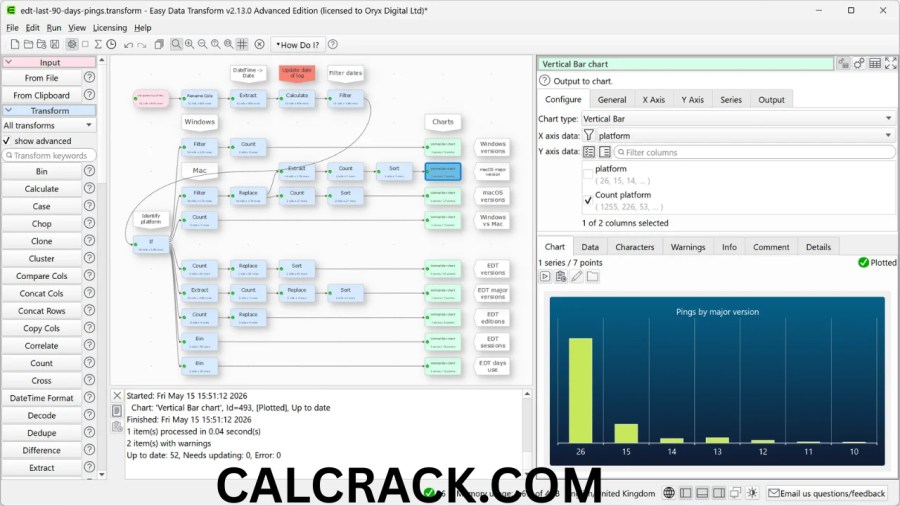
Easy Data Transform is a desktop data transformation and data-cleaning application designed for people who need to work with spreadsheets, CSV files, JSON, XML, text files, and other structured data without writing complicated code. Instead of relying entirely on formulas, scripts, or command-line tools, the software lets users build transformations visually by connecting individual steps. This makes it useful for cleaning, merging, filtering, reshaping, deduplicating, converting, and preparing datasets.
The software is developed for both Windows and Mac users and is currently offered as a one-time purchase rather than a recurring subscription. Its official website describes it as a visual data tool that can process thousands or millions of rows, while keeping data on the user’s computer rather than requiring it to be uploaded to a third-party cloud service. The current download page lists version 2.14.1 for Windows 11, 10, 8, and 7, and for macOS versions ranging from 10.13 through macOS 26. (Easy Data Transform)
Easy Data Transform is particularly interesting for users searching for an easy data transform download, easy data transform free option, or an easy data transform alternative to Excel-based workflows. It provides a seven-day fully functional trial, does not require an email address for the trial, and offers Core and Advanced editions after the trial period. (Easy Data Transform)
In this guide, we will explain what Easy Data Transform does, how its visual workflow works, what formats it supports, whether there is a free version, how the license works, what users can expect from the Windows and Mac editions, what the forum is used for, and which alternatives may be suitable for different types of data work. The goal is to provide a complete and practical overview for anyone researching Easy Data Transform before downloading or purchasing it.
What Is Easy Data Transform?
Easy Data Transform is a desktop application for cleaning, restructuring, combining, converting, and analyzing data without requiring traditional programming. Instead of writing a script for every operation, users can create a visual sequence of transformation steps.
For example, a typical workflow could start with a CSV file, remove unnecessary columns, clean spaces from text, filter unwanted rows, remove duplicates, combine the data with another file, and finally export the result as an Excel workbook. Each operation becomes part of the transformation workflow.
The software is designed around the idea of building complex processes from smaller steps. The official product description emphasizes drag-and-drop operation, visual results, reusable templates, batch processing, and local processing. (Easy Data Transform)
This makes Easy Data Transform different from using a spreadsheet manually. In Excel, users may repeatedly perform the same filters, formulas, copy-and-paste operations, and cleanup tasks. With Easy Data Transform, the transformation can be saved and reused.
The application also supports large datasets. According to the official FAQ, testing has included an 8 GB CSV containing 7 million rows and 330 columns, while the company states that it has also processed datasets containing 100 million rows. Actual performance will depend on the data structure and computer hardware. (Easy Data Transform)
How Does Easy Data Transform Work?
The basic idea behind Easy Data Transform is straightforward: import data, add transformation steps, inspect the results, and export the finished dataset.
A workflow may contain several different types of operations. For example:
- Import a CSV file.
- Remove unnecessary columns.
- Rename fields.
- Filter records.
- Clean unwanted characters.
- Standardize text.
- Join two datasets.
- Remove duplicate records.
- Reshape the data.
- Export the result to Excel or another supported format.
One important advantage is that transformations are visible rather than hidden inside a large formula or script. This can make complex workflows easier to understand, especially for users who are comfortable working with spreadsheets but do not want to learn Python, SQL, or another programming language.
The official site describes the workflow as a series of simple steps where users can see the results of each step. It also supports reusable .transform files, which means a transformation can be saved and used again later. (Easy Data Transform)
This approach can be especially useful when the same type of data arrives every week or month. Instead of rebuilding the process, the saved transformation can be applied again.
What Can Easy Data Transform Be Used For?
Easy Data Transform can be used for many everyday data preparation tasks. It is not limited to simple file conversion.
Common uses include cleaning customer lists, combining CSV files, preparing spreadsheet data for analysis, removing duplicates, converting file formats, reorganizing columns, filtering records, and preparing data for import into another application.
The software also supports data visualization in its Advanced Edition. Official documentation lists chart types such as scatter charts, line charts, smoothed line charts, area charts, vertical and horizontal bar charts, pie charts, and donut charts. Charts can be exported to PNG, JPEG, or PDF. (Easy Data Transform)
Another useful application is test-data generation. Easy Data Transform can generate synthetic or dummy datasets and export them into formats such as CSV, Excel, XML, JSON, and plain text. This can be useful when developers or analysts need realistic sample data without using confidential production information. (Easy Data Transform)
What File Formats Does Easy Data Transform Support?
Easy Data Transform supports a wide range of structured and semi-structured data formats.
According to the official FAQ, input formats include:
- Excel XLS
- Excel XLSX
- CSV
- TSV
- Other delimited text
- Fixed-width text
- JSON
- Plain text
- XML
- vCard
Supported output formats include:
- Excel XLS
- Excel XLSX
- CSV
- TSV
- Delimited text
- JSON
- XML
- vCard
- HTML
- Plain text
- Markdown
- YAML
This range makes the software useful when data needs to move between different applications or systems. (Easy Data Transform)
For example, someone could receive a TSV file, clean it, transform the columns, and export it as CSV or Excel. The official documentation also provides a specific TSV-to-CSV workflow and notes that batch processing can be used when many files need conversion. (Easy Data Transform)
Easy Data Transform Download
The official Easy Data Transform download page currently lists version 2.14.1. The Windows edition supports Windows 11, Windows 10, Windows 8, and Windows 7, while the Mac edition supports macOS 26 through macOS 10.13. The Mac application is a universal binary supporting both Apple Silicon and Intel processors. (Easy Data Transform)
The download is presented as a fully functional free trial. The official page states that the trial can be used for seven days and does not require an email address. (Easy Data Transform)
Users who are considering an Easy Data Transform download should therefore distinguish between downloading the software and purchasing a permanent license. Downloading the application is possible as a trial, but continued saving and exporting after the trial requires a license.
Is Easy Data Transform Free?
Easy Data Transform is not permanently free software.
It provides a fully functional seven-day trial, which means users can test the application before purchasing it. According to the official FAQ, the seven days do not have to be consecutive. After the trial expires, users can still open the software, but saving or exporting is restricted unless a license is purchased. (Easy Data Transform)
This makes the software different from completely free and open-source applications such as OpenRefine. OpenRefine describes itself as free and open source and provides tools for cleaning and transforming messy datasets. (OpenRefine)
Therefore, when someone searches for easy data transform free, the most accurate answer is that there is a free trial rather than a permanent free edition of the current v2 product.
Easy Data Transform Price and License
Easy Data Transform currently offers two editions: Core and Advanced.
The official pricing page lists the Core Edition at $99, €90, or £75 plus applicable tax. The Advanced Edition is listed at $198, €180, or £150 plus tax. These are one-time prices rather than subscription fees. (Easy Data Transform)
The Core Edition includes unlimited .transform files, inputs, transformations, and outputs. It also includes schemas, regular expressions, fuzzy matching, batch processing, command-line processing, and technical support.
The Advanced Edition includes those features and adds unlimited charts.
The official licensing policy says a standard license is for one named user and can be used on up to three PC or Mac computers. The license is described as indefinite for the purchased v2 version. (Easy Data Transform)
The vendor also advertises a 60-day money-back guarantee subject to its stated conditions. (Easy Data Transform)
Easy Data Transform Core vs Advanced Edition
The main difference between the Core and Advanced editions is charting.
Both editions provide the major transformation capabilities, including unlimited inputs, outputs, transformation steps, schemas, regular expressions, fuzzy matching, batch processing, command-line processing, and technical support. The Advanced Edition adds unlimited chart items. (Easy Data Transform)
For users primarily interested in cleaning and transforming CSV, Excel, JSON, XML, or text data, the Core Edition contains the primary data-preparation functionality.
Users who need integrated visualizations and chart exports may need the Advanced Edition.
This two-edition approach allows users to choose based on whether visualization is part of their workflow rather than requiring everyone to pay for charting features.
Does Easy Data Transform Work on Windows?
Yes. Easy Data Transform supports Windows.
The current download page lists Windows 11, Windows 10, Windows 8, and Windows 7 for version 2.14.1. The software also has support for Windows on ARM, although the official FAQ recommends testing the free trial on an ARM-based Windows 11 computer before purchasing. (Easy Data Transform)
This makes Easy Data Transform relevant to users searching for easy data transform Windows or looking for a Windows-based alternative to more complicated data-processing environments.
The Windows version is particularly useful for users already working with Excel and CSV files who want a dedicated visual transformation environment.
Does Easy Data Transform Work on Mac?
Yes. Easy Data Transform is available for Mac as well as Windows.
The current download page lists support for macOS 26 through macOS 10.13. The application is provided as a universal binary, supporting both Apple Silicon and Intel processors. (Easy Data Transform)
The official tour also states that the same license can be used on Windows and Mac, subject to the license’s computer limit. (Easy Data Transform)
This cross-platform approach is useful for households, teams, or individuals who work across both operating systems.
Is Easy Data Transform Good for Data Cleaning?
Data cleaning is one of the software’s main purposes.
The official documentation describes cleaning tasks such as removing unwanted characters, filtering rows with missing values, standardizing capitalization, normalizing whitespace, standardizing separators, and removing extreme values. (Easy Data Transform)
The software can also combine multiple transformations into a larger workflow. For example, a contact database might contain inconsistent names, extra spaces, duplicate records, missing values, and inconsistent formatting.
Instead of manually fixing every row, a user can construct a sequence that performs the cleanup consistently.
This repeatability is one of the most useful concepts behind data transformation software. Once a workflow has been created, it can be reused with new files containing the same general structure.
Can Easy Data Transform Combine Multiple Files?
Yes. Easy Data Transform supports combining multiple files and datasets.
A recent v2.14 release added the ability to input multiple files as a single dataset, including files or Excel sheets from folder hierarchies. The official release information describes this as a way to stack hundreds of files or sheets without individually specifying each one. (Easy Data Transform)
This is particularly useful for recurring reports.
For example, imagine a business receives one CSV file for each month. Instead of opening every file individually and copying the data into one spreadsheet, a transformation workflow can be designed to process the files together.
Batch processing also allows folders containing many files to be processed as part of one operation. (Easy Data Transform)
Is Easy Data Transform Good for Large Datasets?
Easy Data Transform is designed to handle large datasets, although the exact practical limit depends on the computer, data structure, and transformation complexity.
The official FAQ states that the software has been tested with an 8 GB CSV containing 7 million rows and 330 columns and has also processed datasets with 100 million rows. (Easy Data Transform)
The company also describes the application as fast and says its implementation uses C++ along with hashing and reference counting for performance.
Large files can still require substantial RAM and processing resources. A dataset with millions of rows is not automatically going to process at the same speed on every computer.
For that reason, users working with very large datasets should test their actual files using the trial rather than relying only on advertised maximums.
Is Easy Data Transform Safe?
From a data-handling perspective, Easy Data Transform has an important privacy characteristic: it is a desktop application that processes data locally.
The official website says that data does not leave the user’s computer unless the user chooses to move or share it elsewhere. The FAQ explains that data is stored on the local hard disk and identifies this as an advantage for confidential information. (Easy Data Transform)
This does not mean users should ignore ordinary security practices. Important files should still be backed up, operating systems should remain updated, and software should be obtained from a trustworthy source.
For organizations working with confidential spreadsheets or customer records, local processing can be an important consideration because it avoids automatically uploading source files to a third-party web service.
Easy Data Transform Review
An Easy Data Transform review should consider both its capabilities and the type of user it targets.
Its main approach is visual data transformation. Instead of forcing users to write scripts, the software lets them create a sequence of operations and inspect results along the way.
Another notable feature is repeatability. A workflow can be saved and reused, which can reduce repetitive spreadsheet work.
The software also supports a broad collection of file formats and provides tools for cleaning, joining, filtering, deduplicating, reshaping, batch processing, and visualization. The official documentation states that more than 70 transformation operations are available, while individual documentation pages demonstrate operations such as join, filter, dedupe, and other transformations. (Easy Data Transform)
The main consideration is cost. Unlike OpenRefine, which is free and open source, Easy Data Transform requires a paid license after its trial. (OpenRefine)
Therefore, the software is best evaluated according to the user’s workflow rather than simply asking whether it is “good.” Someone who repeatedly performs complicated local transformations may value the reusable visual workflow, while someone who only needs occasional spreadsheet cleanup may prefer an existing free tool.
Easy Data Transform vs Excel Power Query
Microsoft Power Query is one of the most obvious alternatives because it is designed specifically for importing, cleaning, combining, and transforming data.
Power Query is integrated into Excel and other Microsoft products. Microsoft describes it as a data transformation and preparation engine with a graphical interface. It records transformations as steps that can be refreshed when source data changes. (Microsoft Support)
Easy Data Transform and Power Query both support step-by-step data preparation, but their environments are different.
Easy Data Transform is a dedicated desktop data-transformation application available for Windows and Mac. Power Query is part of the Microsoft ecosystem and works closely with Excel, Power BI, and other Microsoft products.
Power Query can be particularly convenient for users who already have Excel and want to keep the workflow inside Excel. Easy Data Transform may appeal to users who want a separate application focused specifically on data transformation.
Neither tool needs to be treated as a universal replacement for the other. The choice depends on file types, existing software, workflow requirements, automation needs, and user familiarity.
Easy Data Transform Alternatives
There are several alternatives worth considering depending on the type of work involved.
OpenRefine
OpenRefine is a free and open-source application for cleaning and transforming messy data. Its official feature list includes faceting, clustering, reconciliation, transformation, and an undo/redo history. (OpenRefine)
OpenRefine can be useful when the primary task is cleaning inconsistent data values and investigating messy datasets.
Microsoft Power Query
Power Query is useful for users who already work heavily with Excel or Microsoft products. It can connect to multiple sources, transform data through recorded steps, combine datasets, and refresh queries. (Microsoft Support)
KNIME
KNIME is another visual workflow platform that can go beyond straightforward data cleaning into analytics and machine learning. Its broader capabilities can be useful for advanced analytical workflows, although that broader scope may also mean more complexity than someone needs for simple file transformation.
Command-Line Data Tools
Users comfortable with command-line workflows can also consider tools designed specifically for CSV and text processing. These can be lightweight and highly automatable, but they generally require more technical knowledge than a visual application.
The important point is that an easy data transform alternative should be selected according to the task. A tool designed for one-time cleanup may not be the right choice for recurring automated workflows, while a complete analytics platform may be unnecessary for simple CSV conversion.
Easy Data Transform Forum
The Easy Data Transform forum is an official discussion area for users who need help, want to discuss transformations, or want to follow product news.
The forum currently includes discussions about transformation problems, feature requests, releases, tutorials, and examples. Recent posts include topics involving multiple Excel worksheets, combining CSV files, data cleaning, time-sheet transformations, and feature requests. (Easy Data Transform)
The forum can be particularly useful when a transformation is difficult to explain in general terms.
The official support system also includes documentation, an FAQ, email support, and the forum. The company states that support requests are answered by a human involved in developing the software. (Easy Data Transform)
Can Easy Data Transform Be Used Offline?
Easy Data Transform is primarily a desktop application, and its local-processing design means users do not have to upload their datasets to a web-based transformation service.
The official FAQ explains that the software is desktop based partly because it can provide a responsive interface and because confidential data does not need to be uploaded to a third-party server. (Easy Data Transform)
Users should still distinguish between processing data locally and actions that require an internet connection, such as downloading software, obtaining a license, or accessing online support.
For ordinary transformation work, the local desktop model is one of the key characteristics of the product.
Easy Data Transform for Beginners
Easy Data Transform is designed to reduce the need for programming knowledge.
A beginner can start with a familiar file such as an Excel workbook or CSV, import it, select a transformation, inspect the result, and continue adding steps.
This visual approach can be easier to understand than writing a Python script or learning SQL for users whose primary experience is spreadsheets.
However, “no coding required” does not mean “no learning required.” Complex transformations can still involve concepts such as joins, filtering, deduplication, schemas, data types, and reshaping.
The advantage is that users can learn these concepts through a visual interface instead of first learning a programming language.
Who Should Use Easy Data Transform?
Easy Data Transform can be relevant to several types of users:
- Spreadsheet users handling repetitive cleanup tasks
- Business analysts preparing reports
- Researchers working with structured datasets
- Small businesses combining CSV files
- Developers generating test data
- Users converting data between different formats
- Teams processing recurring files
- Users who prefer visual workflows instead of programming
- People handling sensitive data who prefer local processing
- Mac and Windows users who want the same transformation environment
It may be less suitable for someone who only needs to make a few simple spreadsheet edits once. Excel, Google Sheets, or another familiar application may already be enough for that situation.
How to Get Started With Easy Data Transform
Getting started is relatively simple.
First, install the trial version for Windows or Mac. The official download page provides the current v2.14.1 downloads. (Easy Data Transform)
Next, import a small copy of the dataset you actually need to process.
Then create the transformation step by step. Start with simple operations such as filtering, cleaning, renaming, or removing duplicates before building more complicated workflows.
After each step, inspect the output. This helps catch incorrect assumptions early.
Once the transformation produces the desired result, save the .transform workflow so that it can be reused.
For recurring data, test the workflow against several different source files. A workflow that works with one dataset may need additional handling if future files contain missing columns, different data types, or unusual values.
Frequently Asked Questions
What is Easy Data Transform used for?
Easy Data Transform is used for cleaning, merging, filtering, deduplicating, reshaping, converting, analyzing, and visualizing structured data without requiring traditional programming. It supports reusable visual workflows for recurring data tasks. (Easy Data Transform)
Is Easy Data Transform free?
It offers a fully functional seven-day free trial, but the current v2 product is not permanently free. After the trial, a license is required to continue saving and exporting data. (Easy Data Transform)
How much does Easy Data Transform cost?
The current official pricing lists the Core Edition at $99 plus tax and the Advanced Edition at $198 plus tax. Both are one-time purchases rather than subscriptions. (Easy Data Transform)
Does Easy Data Transform work on Windows 11?
Yes. The current v2.14.1 download supports Windows 11, as well as Windows 10, 8, and 7. (Easy Data Transform)
Does Easy Data Transform work on Mac?
Yes. The current download supports macOS 26 through 10.13 and is available as a universal binary for Apple Silicon and Intel Macs. (Easy Data Transform)
Can Easy Data Transform handle CSV files?
Yes. CSV and other delimited text formats are supported for both input and output. The software can also perform transformations such as filtering, joining, deduplication, and cleaning. (Easy Data Transform)
Can Easy Data Transform combine multiple files?
Yes. It supports multiple files as a single dataset and provides batch-processing capabilities for working with many files. (Easy Data Transform)
Is Easy Data Transform good for large datasets?
The vendor states that the software can handle datasets with millions of rows and reports testing with an 8 GB CSV containing 7 million rows and 330 columns. It has also processed datasets containing 100 million rows in testing. (Easy Data Transform)
Does Easy Data Transform require coding?
No. Its main interface is designed around visual transformation steps rather than traditional programming. Advanced users can still use features such as regular expressions and command-line processing when appropriate. (Easy Data Transform)
Is Easy Data Transform safe for private data?
The application is designed for local desktop processing, and its FAQ says data is stored on the user’s local hard disk rather than automatically being uploaded to a third-party server. (Easy Data Transform)
What is an alternative to Easy Data Transform?
Potential alternatives include Microsoft Power Query, OpenRefine, KNIME, and command-line data-processing tools. The appropriate option depends on whether the priority is spreadsheet integration, free open-source cleaning, visual analytics, or automation.
Is OpenRefine better than Easy Data Transform?
They are different tools. OpenRefine is free and open source and has strong features for messy-data cleaning, faceting, clustering, and reconciliation. Easy Data Transform is a commercial desktop application focused on visual, reusable transformation workflows for Windows and Mac. (OpenRefine)
Can I use Easy Data Transform on three computers?
The standard license is for one named user and can be used on up to three PC or Mac computers for that user’s own use. It cannot normally be shared with another person. (Easy Data Transform)
Does Easy Data Transform have a forum?
Yes. The official Easy Data Transform forum provides a place for questions, transformation examples, feature discussions, product news, and troubleshooting. (Easy Data Transform)
Does Easy Data Transform have a Mac version?
Yes. The Mac edition is a universal application supporting both Apple Silicon and Intel processors. (Easy Data Transform)
What is the difference between Easy Data Transform Core and Advanced?
Both editions include the main transformation features. The Advanced Edition adds unlimited chart functionality, while the Core Edition does not include charts. (Easy Data Transform)
Can Easy Data Transform convert files between formats?
Yes. It can import and export formats including Excel, CSV, TSV, JSON, XML, vCard, HTML, Markdown, YAML, and plain text, depending on the direction of the conversion. (Easy Data Transform)
Can Easy Data Transform generate test data?
Yes. It can generate synthetic or test datasets and export them into several formats, including CSV, Excel, XML, JSON, and plain text. (Easy Data Transform)
Does Easy Data Transform support batch processing?
Yes. Batch processing is included in both Core and Advanced editions and can be used to process folders of files through a reusable transformation workflow. (Easy Data Transform)
Does Easy Data Transform have a review or trial before purchase?
Yes. The official product provides a seven-day fully functional trial, allowing users to test the software with their own data before purchasing. (Easy Data Transform)
Final Thoughts on Easy Data Transform
Easy Data Transform is a dedicated visual tool for people who need to clean, combine, convert, reshape, and process data without building everything through code. Its Windows and Mac support, broad file-format compatibility, reusable workflows, batch processing, local data handling, and large-dataset capabilities make it suitable for many recurring data-preparation tasks. (Easy Data Transform)
The software is not permanently free, but its seven-day fully functional trial gives users an opportunity to test their own files before paying. The current Core and Advanced editions use one-time licensing rather than subscriptions, with Advanced adding integrated charting capabilities. (Easy Data Transform)
For users searching for Easy Data Transform download, Easy Data Transform free, Easy Data Transform Mac, Easy Data Transform Windows, Easy Data Transform license, Easy Data Transform review, or Easy Data Transform alternative, the most important factor is the type of workflow they need. Users who want a visual desktop environment for repeatable transformations can evaluate the trial, while users looking for completely free solutions can also investigate options such as OpenRefine. Microsoft Excel users may already have another powerful option through Power Query. (OpenRefine)
Overall, Easy Data Transform focuses on one specific problem: making complicated data preparation more visual, repeatable, and accessible without requiring users to become programmers. That makes it a useful option to consider when spreadsheet-based manual work starts becoming repetitive or difficult to maintain.
Download Now
Easy Data Transform
- Download from Send.cm: Download Link
- Download from Userscloud: Download Link
File Details:
- Size: 47.6 MB
- System Type: (Information not provided)
- Setup Type: (Information not provided)