Table of Contents
Elcomsoft iOS Forensic Toolkit: Complete Guide, Features, Pricing, Free Alternatives, and iPhone Forensics
If you are researching Elcomsoft iOS Forensic Toolkit, you are likely looking for professional software that can acquire and analyze evidence from iPhones, iPads, and other Apple devices. Unlike ordinary iPhone recovery applications, Elcomsoft iOS Forensic Toolkit is designed primarily for digital forensics, evidence acquisition, file-system extraction, logical acquisition, and investigation workflows.
The toolkit is developed by ElcomSoft and is aimed at forensic investigators, law-enforcement agencies, security professionals, corporate investigators, and other authorized users. Its capabilities are significantly more advanced than those of typical consumer iPhone data-recovery programs.
The product has also evolved considerably over time. For example, Elcomsoft iOS Forensic Toolkit 6.60 was a historical release focused on jailbreak-free extraction for iOS 9 through iOS 13.7, while the current official product page lists newer releases, including version 10.10 from June 2026. (Elcomsoft)
This guide explains what Elcomsoft iOS Forensic Toolkit is, what it can do, how its editions differ, its supported operating systems, pricing, trial availability, free alternatives, and how it compares with other mobile forensic solutions.
What Is Elcomsoft iOS Forensic Toolkit?
Elcomsoft iOS Forensic Toolkit is a professional command-line forensic acquisition solution for Apple devices. It is designed to help investigators acquire information from iPhones, iPads, iPod touch devices, and supported Apple hardware while preserving the integrity of the acquisition process.
The toolkit supports several acquisition approaches, including logical acquisition, agent-based extraction, and bootloader-based methods, depending on the device, operating-system version, hardware generation, and platform being used.
According to ElcomSoft, the toolkit can perform full file-system and extended logical acquisition of iPhone, iPad, and other supported Apple devices. Recent versions have expanded support for newer iOS and iPadOS releases, including iOS 26 on compatible devices. (articles.elcomsoft.com)
This makes the software very different from consumer applications advertised simply as “iPhone data recovery.”
A normal recovery application might focus on recovering accidentally deleted photographs or messages. A forensic acquisition toolkit has a broader objective: collecting and preserving digital evidence that can subsequently be examined using forensic analysis software.
Why Is Elcomsoft iOS Forensic Toolkit Used?
There are several reasons professional investigators may use Elcomsoft iOS Forensic Toolkit.
First, modern Apple devices use strong encryption and increasingly sophisticated security mechanisms. Accessing useful evidence can therefore require specialized acquisition techniques.
Second, a forensic investigation may need much more than photographs and contacts. Investigators can potentially need:
- File-system information
- Application data
- System information
- Device metadata
- Keychain-related information
- Logs
- Media files
- Local backup information
- Encryption-related information
- Other artifacts supported by the specific acquisition method
Third, forensic acquisition should be performed carefully. Simply connecting an iPhone to a computer and copying visible files is not equivalent to performing a professional forensic acquisition.
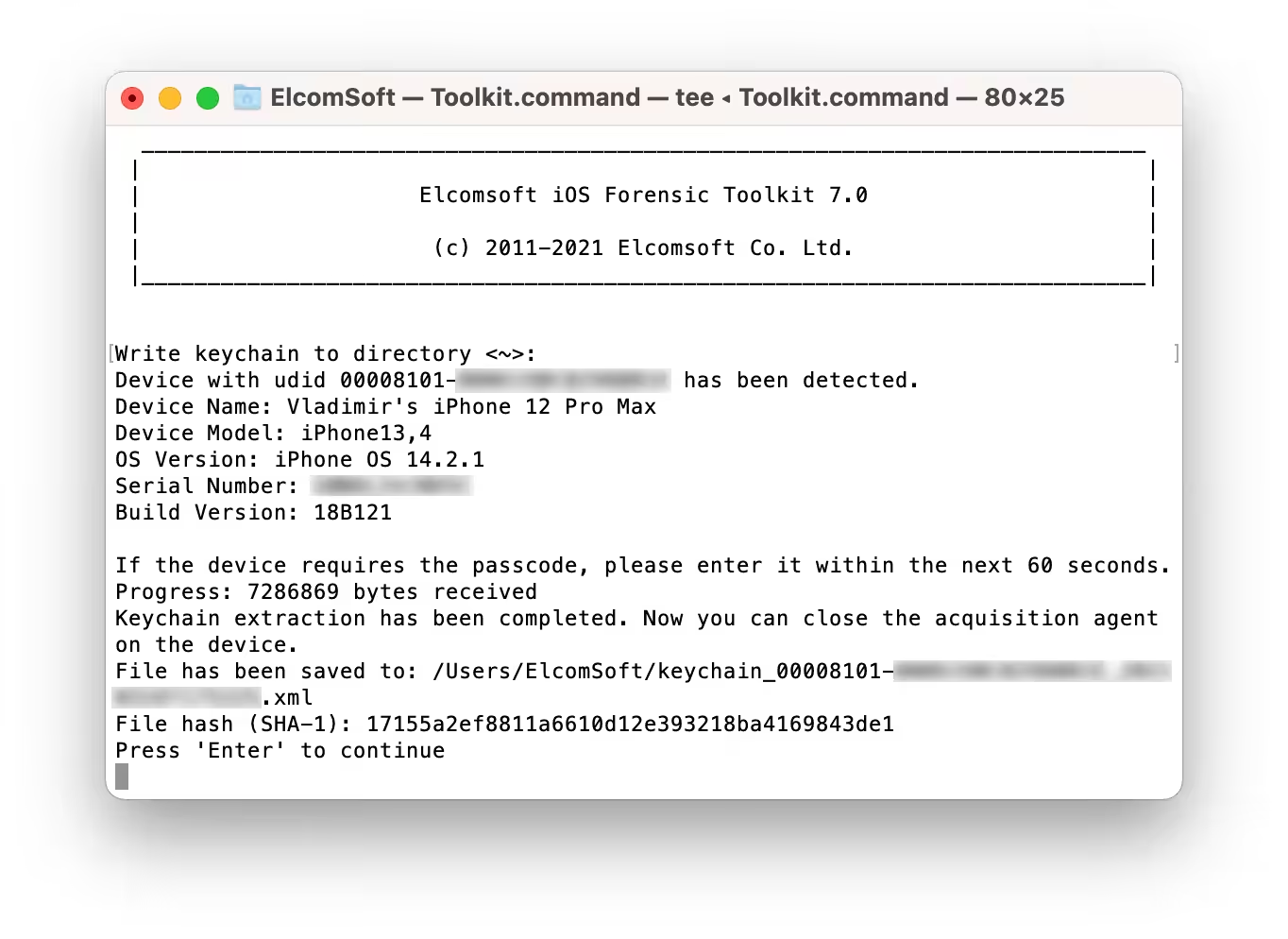
Elcomsoft’s documentation describes EIFT as a tool for acquiring iOS devices and producing device images that can subsequently be examined by compatible forensic software.
Elcomsoft iOS Forensic Toolkit Features
The feature set varies according to the version, device, operating system, and platform. Therefore, investigators should always check the current compatibility documentation before selecting a forensic workflow.
Some of the major capabilities include the following.
Physical and Logical Acquisition
One of the most important distinctions in mobile forensics is between logical and lower-level acquisition.
Logical acquisition generally retrieves information exposed through supported operating-system interfaces or backup mechanisms.
Lower-level acquisition can provide access to substantially more information, including file-system data, when supported by the particular device and operating-system combination.
Elcomsoft describes EIFT as supporting both physical and logical acquisition paths for supported 64-bit Apple devices. (Elcomsoft)
File-System Extraction
File-system extraction is one of the key capabilities that separates a forensic toolkit from ordinary iPhone recovery software.
A file-system acquisition can provide investigators with a much broader evidence set than a simple export of photographs or contacts.
Depending on the supported device and iOS version, EIFT can create an image of the relevant file system that can then be examined using compatible forensic tools.
Keychain and Device Secrets
Apple devices store sensitive credentials and cryptographic material within protected areas of the operating system.
Supported EIFT acquisition methods can extract certain keychain information and encryption-related data where the particular device and operating system permit it.
Older EIFT releases demonstrated this capability with jailbreak-free acquisition across supported iOS versions. For example, version 6.60 introduced expanded file-system and keychain support for iOS 13.5.1 through iOS 13.7. (Elcomsoft)
Jailbreak-Free Acquisition
One of the major developments in EIFT has been acquisition without requiring a conventional jailbreak for supported configurations.
Elcomsoft introduced agent-based acquisition specifically to provide a direct acquisition method that could avoid some of the risks and limitations associated with traditional jailbreak-based approaches. (Elcomsoft)
However, “jailbreak-free” does not mean every iPhone and every iOS version can automatically be acquired in the same way.
Compatibility depends on:
- iPhone model
- Apple chip generation
- iOS version
- Device state
- Passcode state
- Acquisition method
- Computer platform
- Current EIFT version
Elcomsoft iOS Forensic Toolkit 6.60
A lot of searches still specifically mention Elcomsoft iOS Forensic Toolkit 6.60, particularly because that version was an important historical release.
Version 6.60 was released in December 2020 and extended jailbreak-free extraction coverage through iOS 13.7. It provided agent-based file-system acquisition and keychain decryption for supported devices and operating-system versions. (Elcomsoft)
However, users searching for “Elcomsoft iOS Forensic Toolkit 6.60” should understand that it is not the current version of the product.
Elcomsoft’s current product page lists version 10.10, released in June 2026, with newer extraction capabilities and support updates. (Elcomsoft)
Therefore, downloading an old 6.60 package simply because it appears in search results may not provide the compatibility required for a modern iPhone.
What Is the Latest Elcomsoft iOS Forensic Toolkit Version?
According to Elcomsoft’s current product page, Elcomsoft iOS Forensic Toolkit 10.10 was released on June 24, 2026.
The update added alternative extraction-agent sideloading methods that do not require pairing and officially added support for iOS 16.7.16 across supported platforms. It also included fixes for encrypted image mounting and Windows antivirus false-positive issues. (Elcomsoft)
Earlier 2026 updates expanded support substantially further. Version 10.02, for example, added official agent-based extraction support for iOS/iPadOS 26 and 26.0.1 on most compatible devices, with specific hardware exceptions. (articles.elcomsoft.com)
This illustrates why investigators should generally evaluate the current release and compatibility matrix, rather than relying on information about older versions such as 6.60.
Does Elcomsoft iOS Forensic Toolkit Work on Windows?
Yes.
The current EIFT supports Windows 10 and Windows 11. The Windows edition requires the latest version of iTunes according to Elcomsoft’s system requirements. (Elcomsoft)
Windows can therefore be a practical platform for investigators who already operate a Windows-based forensic workstation.
However, the Windows version does not necessarily have exactly the same capabilities as the macOS or Linux editions.
Elcomsoft explains that the three editions share a common interface and many capabilities, but there are platform-specific differences. The Windows edition, for example, has fewer low-level acquisition options than macOS and Linux. (ElcomSoft blog)
Does Elcomsoft iOS Forensic Toolkit Work on Mac?
Yes.
The macOS edition supports macOS 11 Big Sur through macOS 26 Tahoe according to the current system requirements. (Elcomsoft)
Mac can be particularly useful for Apple-device forensic work because certain EIFT capabilities are platform-specific.
Elcomsoft’s comparison explains that the macOS edition is the most feature-rich of the three major platforms, while Linux is close behind and Windows has some limitations. (ElcomSoft blog)
Does Elcomsoft iOS Forensic Toolkit Support Linux?
Yes.
The current product supports several Linux distributions, including:
- Debian
- Ubuntu
- Linux Mint
- Kali Linux
- Arch Linux ARM64 in a custom configuration
- Astra Linux 1.8 or later
Additional dependencies may be required depending on the Linux distribution. (Elcomsoft)
For forensic laboratories that already use Linux-based investigation environments, this can make EIFT more flexible than Windows-only mobile tools.
Elcomsoft iOS Forensic Toolkit Pricing
Pricing is an important consideration because EIFT is a professional forensic product rather than a typical free iPhone recovery application.
Elcomsoft currently lists the full version of Elcomsoft iOS Forensic Toolkit at $2,199, before applicable taxes. (Elcomsoft)
This price helps explain the target market. The software is primarily designed for professional forensic use rather than casual consumers who simply want to recover a few deleted photographs.
The purchase information also states that both trial and full versions require a USB dongle to run. (Elcomsoft)
Because licensing, support, upgrade packages, and hardware requirements can change, anyone considering purchasing the software should verify the current terms directly with Elcomsoft before ordering.
Is Elcomsoft iOS Forensic Toolkit Free?
No, the full version is not free.
Elcomsoft offers a trial version, but its purchase information states that the trial and full versions require the appropriate USB dongle. (Elcomsoft)
This is different from open-source forensic projects such as Autopsy, which can be used without purchasing an EIFT license.
The distinction is important:
Free forensic software does not necessarily provide the same iPhone acquisition capabilities as a specialized commercial mobile forensic product.
A free investigation platform may be excellent for analyzing an already acquired forensic image but may not be able to acquire a modern locked iPhone itself.
Is There a Free Trial of Elcomsoft iOS Forensic Toolkit?
Elcomsoft provides trial licensing for EIFT, but users should not interpret “trial” as “free consumer software.”
The official purchase information states that both trial and full versions require a USB dongle. (us.elcomsoft.com)
This makes the trial model different from applications that simply provide a downloadable installer with a limited number of free scans.
If you are evaluating EIFT professionally, checking the current trial conditions directly with Elcomsoft is the safest approach.
What Are Some Free Tools for iPhone Forensics?
There are several free or open-source tools that can be useful in digital forensics, although their capabilities differ significantly.
Examples include:
- Autopsy
- The Sleuth Kit
- Wireshark
- FTK Imager
- Various open-source mobile forensic utilities
- Platform-specific analysis tools
The important point is that not all free forensic tools acquire iPhones.
Some are primarily designed to analyze forensic images, disk images, network captures, or other evidence that has already been collected.
For example, a free forensic analysis platform can be extremely useful after an investigator has legally acquired an iPhone image using a specialized acquisition tool.
What Is the Best Free Forensic Software?
There is no single best free forensic application for every investigation.
Autopsy is one of the best-known free digital forensic platforms for examining evidence. It provides a graphical interface for digital investigation workflows and works with the broader Sleuth Kit ecosystem.
However, Autopsy should not automatically be considered an equivalent replacement for Elcomsoft iOS Forensic Toolkit.
The two tools serve different roles.
EIFT is primarily focused on Apple-device acquisition, while forensic analysis platforms can be used to examine evidence after acquisition.
Therefore, a professional workflow may involve more than one application.
What Is the Best Forensic Data Recovery Software?
The best forensic data recovery software depends on what type of evidence needs to be recovered.
For desktop drives, different forensic products may be appropriate.
For mobile devices, investigators generally need a tool designed specifically for the device and operating system.
For iPhones, EIFT is aimed at acquisition rather than being marketed as a simple “deleted file recovery” utility.
A forensic investigator should consider:
- Device model
- iOS version
- Locked or unlocked status
- Available acquisition methods
- Encryption
- Evidence requirements
- Chain-of-custody procedures
- Required output format
- Compatibility with analysis software
This is much more important than simply choosing the software with the biggest “recovery” number in its advertising.
Can Forensic Data Recovery Be Done on an iPhone?
Yes, forensic acquisition and recovery of evidence from iPhones is possible, but the exact amount of recoverable information depends heavily on the device and its security state.
Modern iPhones use hardware-backed security, encryption, secure boot mechanisms, and other protections.
Consequently, there is no universal method that can recover everything from every iPhone.
EIFT supports several acquisition methods, and the appropriate method depends on the specific hardware and software combination.
Modern versions have expanded support for newer iOS releases, while older releases such as EIFT 6.60 targeted much older iOS versions. (Elcomsoft)
Can Forensics Recover Deleted iPhone Videos?
Sometimes, but there is no guarantee.
Whether a deleted video can be recovered depends on factors such as:
- How the video was deleted
- Whether it remains in a recoverable application database
- Whether it was synchronized elsewhere
- Whether a backup exists
- Device encryption
- iOS version
- Available forensic acquisition method
- Whether the relevant storage area has been overwritten or otherwise made inaccessible
A professional forensic examination may reveal remnants, metadata, database records, thumbnails, backups, or related artifacts even when the original media file is no longer directly accessible.
However, claims that forensic software can always recover permanently deleted iPhone videos should be treated skeptically.
Can Police Recover Deleted iPhone Data?
Law-enforcement agencies and forensic laboratories may be able to recover certain deleted or otherwise inaccessible information from an iPhone, but success is not guaranteed.
The result depends on the device, operating-system version, encryption, security state, available backups, and forensic techniques available to the investigators.
Modern iPhones are specifically designed to protect user data through strong security mechanisms.
Therefore, “deleted” does not automatically mean either “recoverable” or “impossible to recover.”
In legitimate investigations, forensic specialists generally work with legally obtained evidence and documented acquisition procedures.
What Are the Top 5 Digital Forensic Tools?
There is no universally accepted top-five list, because forensic tools specialize in different areas.
A practical list of widely recognized forensic technologies might include:
- Elcomsoft iOS Forensic Toolkit — specialized Apple-device acquisition.
- Autopsy — digital forensic examination and analysis.
- The Sleuth Kit — open-source forensic analysis framework.
- FTK — professional digital forensic investigation platform.
- Cellebrite forensic solutions — mobile-device acquisition and analysis.
The correct choice depends on the investigation.
For example, someone examining a Windows hard drive has very different requirements from someone attempting to acquire evidence from a modern iPhone.
Is FTK Free to Use?
FTK products vary, and the term “FTK” can refer to different products.
It is therefore important to distinguish between commercial forensic platforms and individual free utilities associated with the FTK ecosystem.
FTK Imager, for example, has historically been available as a free forensic imaging and preview utility, while full-featured FTK forensic investigation products are commercial solutions.
FTK Imager is useful for creating and previewing forensic images, but it is not a direct replacement for EIFT’s specialized iOS acquisition capabilities.
Is Autopsy Forensic Tool Free?
Yes.
Autopsy is widely known as a free and open-source digital forensics platform.
It can be particularly useful for examining forensic evidence after acquisition.
However, someone searching for “free Elcomsoft iOS Forensic Toolkit alternative” should understand the difference between acquisition and analysis.
Autopsy can be an excellent free analysis solution, but that does not mean it can reproduce every EIFT acquisition capability on a modern iPhone.
What Are Some Free Alternatives to Cellebrite?
There is no single free application that completely duplicates the entire Cellebrite ecosystem.
However, investigators can combine open-source and free tools depending on the job.
Potential options include:
- Autopsy
- The Sleuth Kit
- FTK Imager
- Open-source mobile forensic projects
- Specialized backup-analysis utilities
Commercial tools such as EIFT can also provide capabilities that are not normally available through free software.
The best alternative depends on whether you need:
- Acquisition
- Backup analysis
- File-system analysis
- Deleted-data investigation
- Password-related analysis
- Cloud evidence
- Application artifacts
- Reporting
What Is the Best Software for Mobile Forensics?
There is no single answer for every mobile investigation.
Popular professional solutions include products from ElcomSoft, Cellebrite, Magnet Forensics, and other forensic vendors.
Elcomsoft iOS Forensic Toolkit is particularly relevant when the investigation focuses on Apple devices and requires specialized acquisition capabilities.
Its advantage is specialization. Rather than attempting to be a general-purpose consumer recovery application, EIFT is built around forensic acquisition of Apple devices.
What Is the Best iPhone Data Recovery Tool?
For ordinary consumers, the best iPhone recovery tool depends on the type of lost information.
For example, someone who accidentally deleted photographs may first want to check:
- Recently Deleted
- iCloud Photos
- iCloud Backup
- Finder/iTunes backups
- Other legitimate synchronized copies
A professional forensic investigator has different requirements.
Forensic acquisition software such as EIFT is designed for evidence acquisition rather than simply recovering a few consumer files.
Therefore, it is important not to confuse iPhone recovery software with iPhone forensic software.
Elcomsoft iOS Forensic Toolkit vs Consumer Recovery Software
The difference can be summarized simply.
| Feature | EIFT | Typical iPhone Recovery App |
|---|---|---|
| Professional forensic acquisition | Yes | Usually no |
| File-system acquisition | Supported configurations | Usually limited |
| Logical acquisition | Yes | Sometimes |
| Forensic workflow | Yes | Limited |
| Consumer-friendly interface | Limited | Usually yes |
| Deleted photo recovery | Depends on acquisition/evidence | Often marketed as primary function |
| Professional licensing | Yes | Usually subscription/license |
| Target audience | Investigators and forensic professionals | Consumers |
| Cost | High | Usually lower |
This comparison explains why a $2,199 forensic toolkit cannot be directly compared with a $30 consumer recovery application.
They are built for different purposes.
Elcomsoft iOS Forensic Toolkit vs Cellebrite
Cellebrite is one of the best-known names in mobile forensics, while Elcomsoft has a strong reputation for password recovery, cloud acquisition, and device forensics.
The better solution depends on the investigator’s requirements.
EIFT can be attractive when an organization wants specialized Apple acquisition capabilities and already uses Elcomsoft products.
Cellebrite may be preferable for organizations that need a broader commercial mobile-forensics ecosystem.
Cost, device support, reporting, workflow integration, training, and licensing should all be considered before choosing either platform.
Elcomsoft iOS Forensic Toolkit vs Autopsy
This is not really an equal comparison because the products perform different jobs.
EIFT is primarily an acquisition tool.
Autopsy is primarily an investigation and analysis platform.
A forensic laboratory could potentially use specialized acquisition software to collect evidence and then use an analysis platform to examine the resulting image or artifacts.
This distinction is particularly important for people searching for a “free EIFT alternative.”
Installing Autopsy does not automatically turn a computer into a replacement for a specialized iPhone acquisition system.
Is Elcomsoft iOS Forensic Toolkit Safe?
From a software perspective, EIFT is a professional forensic product developed and distributed by ElcomSoft.
However, “safe” has a different meaning in digital forensics than it does for normal consumer software.
A forensic tool should be evaluated based on:
- Evidence preservation
- Acquisition methodology
- Documentation
- Repeatability
- Compatibility
- Integrity verification
- Logging
- Examiner procedures
Elcomsoft describes agent-based extraction as a forensic acquisition method designed to avoid unnecessary modification of user data in supported configurations. (Elcomsoft)
Investigators should nevertheless follow their organization’s forensic procedures and applicable laws.
Who Should Use Elcomsoft iOS Forensic Toolkit?
EIFT is most appropriate for professional users such as:
- Digital forensic investigators
- Law-enforcement forensic units
- Corporate security teams
- Incident-response specialists
- Security researchers
- Digital-evidence laboratories
- Authorized forensic consultants
- Investigators working with Apple-device evidence
It is generally excessive for someone who simply wants to restore a deleted photograph from their personal iPhone.
Who Should Not Buy EIFT?
A regular smartphone owner probably does not need EIFT.
If your goal is simply to recover:
- Deleted photographs
- Lost contacts
- A missing message
- An old backup
- A accidentally deleted document
then a normal backup/recovery workflow may be much more appropriate.
The high licensing cost, USB dongle requirement, technical nature, and professional target audience make EIFT unsuitable for most casual users. (Elcomsoft)
Important Considerations Before Downloading Elcomsoft iOS Forensic Toolkit
Before downloading any version of EIFT, check the following.
Check the Version
Avoid assuming that an old version such as 6.60 is appropriate simply because it appears prominently in search engines.
Version 6.60 was designed around much older iOS releases. Current EIFT versions have substantially expanded compatibility. (Elcomsoft)
Check Device Compatibility
The iPhone model matters.
Two iPhones running different chips can have completely different acquisition capabilities even when their operating-system versions appear similar.
Check the Operating System
Check whether you are using Windows, macOS, or Linux.
EIFT has platform-specific differences, so the same acquisition method may not be available on every operating system. (ElcomSoft blog)
Use Official Sources
Forensic software should be obtained from the legitimate vendor whenever possible.
Third-party downloads can contain modified installers, outdated releases, bundled software, or malware.
This is particularly important for forensic software because investigators need confidence in the integrity of their tools.
Elcomsoft iOS Forensic Toolkit System Requirements
The current official requirements include:
Windows: Windows 10 and Windows 11.
macOS: macOS 11 Big Sur through macOS 26 Tahoe.
Linux: Debian, Ubuntu, Mint, Kali Linux, Arch Linux ARM64 in a custom configuration, and Astra Linux 1.8 or later. (Elcomsoft)
The Windows version also requires the latest iTunes installation according to Elcomsoft’s published requirements.
Mac users should note that Elcomsoft does not guarantee that the macOS version will work correctly inside a virtual machine. (Elcomsoft)
Advantages of Elcomsoft iOS Forensic Toolkit
The main advantages include:
- Specialized Apple-device forensic acquisition
- Support for logical and lower-level acquisition methods
- Windows, macOS, and Linux editions
- Continuous development for newer iOS releases
- File-system acquisition capabilities
- Support for advanced forensic workflows
- Agent-based extraction
- Professional forensic focus
- Integration with other forensic analysis workflows
- Support for a wide range of Apple hardware and operating systems
The product has continued to receive updates during 2026, including expanded iOS 26 support and newer extraction-agent capabilities. (ElcomSoft blog)
Limitations of Elcomsoft iOS Forensic Toolkit
Despite its advanced capabilities, EIFT is not perfect for every situation.
The biggest limitations are:
- High price
- Technical learning curve
- USB dongle requirement
- Device-specific restrictions
- iOS-version dependencies
- Platform-specific feature differences
- Not designed for ordinary consumers
- Advanced acquisition does not guarantee recovery of every deleted file
Modern Apple security also means that no legitimate forensic product can honestly promise universal access to every iPhone under every condition.
Is Elcomsoft iOS Forensic Toolkit Worth It?
For professional forensic investigators, EIFT can be a powerful solution when its supported acquisition methods match the target Apple device.
The current $2,199 full-version price means it is clearly positioned toward professional users rather than ordinary consumers. (Elcomsoft)
For a law-enforcement agency, forensic laboratory, or corporate investigation team that regularly handles iPhones, the specialized capabilities may justify the cost.
For a home user trying to recover deleted photographs, however, it is usually unnecessary.
Final Verdict on Elcomsoft iOS Forensic Toolkit
Elcomsoft iOS Forensic Toolkit is a specialized professional solution for acquiring digital evidence from Apple devices. It is substantially different from ordinary iPhone recovery software because its primary purpose is forensic acquisition rather than simple consumer data recovery.
The software supports Windows, macOS, and Linux, with capabilities varying by platform. Current releases have expanded considerably beyond older versions such as EIFT 6.60, including newer iOS and iPadOS support. (Elcomsoft)
If you are researching Elcomsoft iOS Forensic Toolkit 6.60, remember that it is a historical version associated with older iOS releases. Modern investigators should check the current version and compatibility information instead.
For free forensic work, tools such as Autopsy and other open-source projects can be valuable, particularly for evidence analysis. However, free software should not automatically be considered a complete replacement for specialized iOS acquisition technology.
Ultimately, the right choice depends on the investigation, target device, iOS version, required evidence, budget, and whether you need acquisition, analysis, or both.
People Also Ask About Elcomsoft iOS Forensic Toolkit
What are some free tools for iPhone forensics?
Free forensic options include Autopsy, The Sleuth Kit, FTK Imager, and various open-source mobile-forensics projects. Their capabilities differ, and most should not be considered complete replacements for a specialized iPhone acquisition solution such as Elcomsoft iOS Forensic Toolkit.
What is the best free forensic software?
Autopsy is one of the most popular free and open-source digital forensic platforms. It is particularly useful for analyzing digital evidence, although it does not provide every specialized iPhone acquisition capability offered by commercial tools.
What is the best forensic data recovery software?
There is no universal best forensic recovery application. The correct tool depends on the evidence source. For iPhones, specialized mobile forensic acquisition software is generally more appropriate than ordinary consumer recovery applications.
Can forensic data recovery be done on an iPhone?
Yes. Forensic acquisition can recover or extract certain types of information from supported iPhones, but the results depend on the device model, iOS version, security state, encryption, backups, and available acquisition techniques.
Can forensics recover deleted iPhone videos?
Sometimes. Deleted videos may remain in backups, application databases, thumbnails, metadata, or other recoverable artifacts. However, forensic software cannot guarantee recovery of every permanently deleted video.
Is FTK free to use?
Some FTK-related utilities, such as FTK Imager, have been available as free tools, while full-featured FTK forensic products are commercial. It is therefore important to identify the specific FTK product being discussed.
What are the top 5 digital forensic tools?
Commonly discussed forensic technologies include Elcomsoft iOS Forensic Toolkit, Autopsy, The Sleuth Kit, FTK, and Cellebrite solutions. The best choice depends on whether the investigation involves computers, mobile devices, cloud data, or another evidence source.
Is Autopsy forensic tool free?
Yes. Autopsy is a free and open-source digital forensic platform. It can be particularly useful for examining and analyzing forensic evidence, although it is not a one-to-one replacement for specialist iPhone acquisition tools.
What are some free alternatives to Cellebrite?
Autopsy, The Sleuth Kit, FTK Imager, and various open-source mobile forensic projects can be useful alternatives for particular tasks. However, no single free application necessarily duplicates the full acquisition and analysis capabilities of a commercial Cellebrite environment.
Can police recover deleted iPhone data?
In some circumstances, authorized forensic investigators may recover deleted or otherwise inaccessible information. Success depends on the iPhone model, iOS version, encryption, backups, security state, and available forensic acquisition methods.
What is the best software for mobile forensics?
There is no universal winner. Elcomsoft iOS Forensic Toolkit is a strong option for specialized Apple-device acquisition, while Cellebrite and other commercial platforms may be better suited to broader mobile-forensics workflows.
What is the best iPhone data recovery tool?
For ordinary users, the best approach may be checking Apple’s built-in recovery options and backups first. For professional investigations, specialized forensic acquisition software such as Elcomsoft iOS Forensic Toolkit can provide much deeper acquisition capabilities than consumer recovery applications.
Download Now
ElcomSoft iOS Forensic Toolkit
- Download Option 1:
Drop.Download - Download Option 2:
Userscloud
File Details:
- File Size: 123.3 MB
- System Type: (Information not provided)
- Setup Type: (Information not provided)