Table of Contents
Musify Download: Complete Guide
If you are searching for Musify download, you may also see related searches such as Musify download APK, Musify download Windows, Musify download for PC, Musify download Mac, Musify download failed, Musify download GitHub, Musify download iOS, Musify download free, and Musify download for Android.
These searches show that people are interested in more than simply installing the app. They also want to know whether Musify is free, whether it is legal, whether it supports offline listening, where to download it safely, and whether it works on Windows, Mac, iPhone, or Android.
There is one important point to understand before downloading anything: “Musify” is used by more than one music application. The open-source Android project maintained by Valeri Gokadze is the Musify project commonly associated with GitHub and F-Droid. It offers online music search, offline listening, playlists, lyrics, an equalizer, SponsorBlock support, no ads, and no subscription. The project is licensed under GPL-3.0. (GitHub)
At the same time, Google Play contains other unrelated apps using the Musify name. For example, one current Musify app focuses on offline playback and real-time audio effects, while another is a local media player. (Google Play)
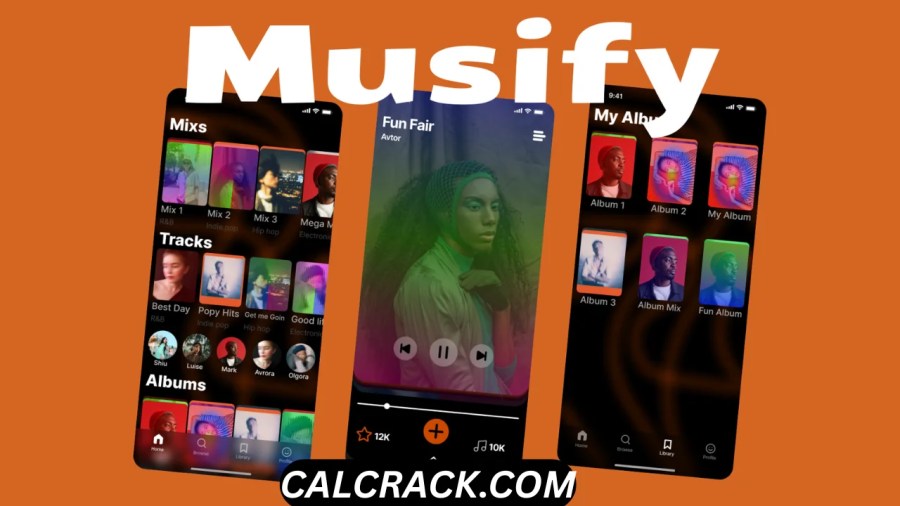
This guide explains the Musify download process, features, offline listening, compatibility, safety, legality, and the questions people commonly ask before installing Musify.
Musify Download: Quick Answer
Musify is a free, open-source Android music application that supports online music search and offline listening. The open-source project is available through GitHub and F-Droid, and its current F-Droid listing shows version 10.3.2, added on August 23, 2026, requiring Android 7.0 or newer. (F-Droid)
If you want the open-source version, the safest starting points are the project’s official GitHub repository and its F-Droid listing:
- Musify on GitHub
- Musify on F-Droid
The project is Android-only at present. Its official FAQ says there are no immediate plans for other platforms, including Windows, macOS, or iOS, and that the project is not currently planned for Google Play. (GitHub)
So if you are searching for Musify download for Windows, Mac, or iOS, you should be careful with websites offering an “official Musify APK” or an unfamiliar installer. An Android APK is not a Windows, macOS, or iOS application.
What Is Musify?
Musify is a music application designed primarily for Android that combines online music search with offline listening and music-player features.
The open-source Musify project describes itself as a music streaming application and lists features including online song search with suggestions, offline listening, playlist support, data import and export, lyrics, an equalizer, SponsorBlock, no advertisements, no subscriptions, and a built-in updater. (GitHub)
It is developed as open-source software under the GNU General Public License version 3.0 or later. This means the source code is publicly available under the terms of the GPL license. (GitHub)
Musify is particularly interesting for Android users who want an alternative to conventional music apps. Instead of requiring a paid subscription for its basic application features, the project emphasizes free software, customization, offline listening, and community development.
However, Musify should not be confused with every application that uses the same name.
Google Play currently has several different apps called Musify. One, Musify: Full Music Effects, describes itself as an offline music player and audio editor with speed control, pitch shifting, equalizer and bass controls, crossfade, audio effects, and audio export. (Google Play)
Another app, Musify Player, focuses on local audio and video playback and offers features such as an equalizer, visualizer, sleep timer, and Google Drive backup. (Google Play)
Therefore, always check the developer and package name before downloading Musify.
Is Musify Free?
Yes, the open-source Musify project is free.
The official Musify GitHub repository identifies the software as free software licensed under GPL v3.0. Its listed features include no ads and no subscriptions. (GitHub)
That makes Musify attractive to people searching for a free music app for Android without wanting to pay a recurring subscription just to use the application.
But there is an important difference between:
- a free application,
- free music,
- legally downloadable music, and
- music that can be redistributed.
These are not the same thing.
Musify being free does not mean that every song accessible through it is copyright-free. The project’s own disclaimer says that Musify and its contributors do not host, own, or distribute copyrighted audio. It also explains that the application accesses content through plugins and external sources and places responsibility for lawful use on the user. (GitHub)
In other words, you can use free software without automatically receiving free rights to copyrighted music.
Is Musify free without a subscription?
Yes. The open-source project’s feature list explicitly says no subscriptions. (GitHub)
Does “free” mean there are no limitations?
Not necessarily.
The application’s functionality can depend on external music sources. F-Droid currently identifies Musify as depending on YouTube for music, which means some functionality is tied to an external, non-free network service. (F-Droid)
So Musify may be free as software while its online functionality remains dependent on external services.
Is Musify Legal?
The Musify software is open-source, but the legality of particular music use depends on the content and how you use it.
This is one of the most important questions surrounding Musify download searches.
The Musify project explicitly states that it does not host, own, or distribute copyrighted audio. According to its disclaimer, content is accessed through plugins and external sources, while songs, audio files, trademarks, and related content remain the property of their respective owners. The project says users are responsible for complying with local laws, copyright regulations, and the terms of the relevant content providers. (GitHub)
Therefore, it would be misleading to say that every song available through Musify is automatically legal to download.
A better way to understand it is:
Musify software: free and open-source software under GPL-3.0. (GitHub)
Music accessed through Musify: subject to the copyright and licensing rules applicable to that content and source.
Redistribution of copyrighted music: may require authorization from the copyright holder.
If you live in a country with copyright restrictions, you should follow the laws that apply to you. The safest approach is to use music that you have permission to access, download, store, or share.
Is Musify Free Offline?
Yes. Musify supports offline listening.
Offline listening is one of the primary features listed by the open-source Musify project. (F-Droid)
This means you can prepare music for offline use and then listen without maintaining an active internet connection.
Offline playback can be useful when:
- You have limited mobile data.
- You are traveling.
- Your internet connection is unreliable.
- You are on an airplane or in an area without coverage.
- You want to reduce streaming data usage.
- You want music available while exercising or commuting.
However, Musify’s offline feature has an important limitation that users sometimes misunderstand.
The project’s developers have explained that offline music in Musify is intended to be played within Musify, rather than functioning as an ordinary folder of unrestricted music files that another music player can automatically access. The project also explains that users can download songs or playlists for offline use while online and then switch to offline mode. (GitHub)
That distinction matters if you are searching for “Musify download MP3”.
Offline listening does not necessarily mean that Musify gives you a normal MP3 file that you can freely move between devices or applications.
How Does Musify Offline Download Work?
The basic idea is straightforward.
Step 1: Install Musify
Install the correct version of Musify from a trusted distribution source.
Step 2: Connect to the internet
Online access is needed to search for and retrieve supported content.
Step 3: Find the music
Use Musify’s online search functionality to locate the song or playlist you want.
Step 4: Save supported content for offline listening
Musify supports downloading songs or playlists for offline use. The developers have specifically stated that offline content can be downloaded while the app is in online mode. (GitHub)
Step 5: Switch to offline mode
After your content is available for offline listening, you can use Musify without relying on an active internet connection.
Keep in mind that availability can change because Musify relies on external sources. F-Droid currently notes that the open-source project depends on YouTube for music. (F-Droid)
Musify Download for Android
Android is currently the main platform for Musify.
The official Musify FAQ says that the application is currently available only for Android because of limited resources and time. It also says there are no immediate plans for other platforms. (GitHub)
The current F-Droid listing shows Musify 10.3.2, added on August 23, 2026, and states that the release requires Android 7.0 or newer. It provides builds for arm64-v8a, armeabi-v7a, and x86_64. (F-Droid)
This makes Android the clearest choice if you specifically want the open-source Musify project.
Recommended Android download sources
For the open-source version, start with:
Official Musify GitHub repository
Musify F-Droid listing
F-Droid currently recommends installing through its client rather than manually downloading the APK. Its listing explains that direct APK installation does not provide update notifications and is considered a less secure installation method. (F-Droid)
Musify Download APK: Is It Safe?
An APK is not automatically dangerous, but the source matters.
An APK is simply an Android application package. The security issue is not the file format itself; it is whether the package is authentic and comes from a trustworthy source.
For example, F-Droid states that its current Musify build is built and signed by the original developer and corresponds to the published source tarball. (F-Droid)
That provides more confidence than downloading a random file called:
Musify-v10.3.2-mod.apk
from an unknown website.
Be careful with modified APKs
Search results can contain terms such as:
- Musify Mod APK
- Musify Pro APK
- Musify Premium APK
- Musify Unlocked APK
- Musify Latest APK
These labels do not prove that the file is official.
A modified APK can potentially contain:
- unwanted advertising,
- additional trackers,
- outdated components,
- malicious code,
- unnecessary permissions,
- altered functionality, or
- an entirely different application.
If you want the open-source Musify project, verify the package and developer rather than relying only on the filename.
Is Musify a Safe App to Use?
Musify can be a reasonable choice when downloaded from a trustworthy source.
The open-source nature of the project gives technically minded users an opportunity to inspect its source code, while F-Droid provides build and metadata information.
F-Droid’s current listing identifies the author as Valeri Gokadze, the license as GPL-3.0 or later, and the current package as com.gokadzev.musify.fdroid. It also lists permissions related to network access, foreground media playback, and keeping the device awake during playback. (F-Droid)
F-Droid also maintains reproducibility information for previous Musify builds. Its verification page currently shows successful reproducible builds for several versions, including 10.2.0 and earlier releases. (F-Droid Verification)
That does not mean that every website distributing a file named “Musify APK” is safe.
Before installing, check:
- Developer name
- Package name
- Version number
- Official project source
- Permissions
- Update history
- Digital signature or build information
- Whether the APK has been modified
A trustworthy installation source is especially important if you are searching for Musify download free.
Musify Download Windows: Does It Work on PC?
The open-source Musify project does not currently have an official Windows version.
The project’s FAQ states that Musify is currently available only for Android and that there are no immediate plans for other platforms. (GitHub)
Therefore, if you search for:
Musify download Windows
you should not assume that a website offering a Windows .exe installer is associated with the official Musify project.
There is an important technical distinction here:
- APK = Android application package.
- EXE = common Windows executable format.
- DMG/APP = common macOS application distribution formats.
- IPA = iOS application package.
The official open-source Musify project currently targets Android, so an “official Musify Windows APK” would not make technical sense.
Can you use an Android app on Windows?
Some Android compatibility solutions can run Android applications on compatible Windows systems, but that is different from having an official Windows version.
If a third-party website provides an unofficial Windows wrapper or emulator package, research it carefully before installing it.
Musify Download for PC
People searching for Musify download for PC generally want one of two things:
- A native Windows music application.
- A way to run the Android version on a computer.
The official Musify project currently does not provide a native Windows release. Its FAQ specifically says that it is Android-only. (GitHub)
If you simply want to listen to music on a PC, a native desktop music player or a legitimate web-based music service may be easier.
If you specifically want the Android Musify experience, you would need a compatible Android environment, but that should be considered a workaround rather than official Windows support.
Musify Download Mac
There is currently no official macOS version of the open-source Musify project.
The project’s official FAQ says that Musify is currently available only for Android and that there are no immediate plans for other platforms. (GitHub)
Therefore, searches for Musify download Mac may lead to unofficial websites.
Be especially careful if a website asks you to download a “Musify for Mac” installer and claims that it is the official application.
A safer approach is to check the official GitHub repository before installing any desktop version.
Musify Download iOS
The open-source Musify project does not currently offer an official iOS version.
Again, the official FAQ says that the application is currently Android-only. (GitHub)
This means you should not confuse Musify with Musi, which is a separate app and name.
The similarity between “Musi” and “Musify” can create misleading search results, especially when users search for Musi download, Musify iOS, or Musify download iPhone.
If a website claims that it has an official “Musify iOS APK,” be cautious. APK is an Android package format, not an iPhone application format.
Why Does Musify Download Fail?
If you are experiencing a Musify download failed message, several causes are possible.
Because Musify depends on online sources for music-related functionality, a problem may not necessarily mean that the application itself is broken.
Common causes include:
1. Weak internet connection
A slow or unstable connection can interrupt an online request.
Try switching between Wi-Fi and mobile data to determine whether connectivity is responsible.
2. External source problems
Musify relies on external services for music content. F-Droid explicitly notes that the open-source project depends on YouTube for music. (F-Droid)
If an external service changes its behavior, a particular feature may temporarily stop working.
3. Outdated Musify version
Using an old version can cause compatibility problems after external services or Android components change.
The project is actively maintained, and F-Droid currently lists version 10.3.2. (F-Droid)
4. Storage problems
If your Android device is running out of storage, downloads may fail.
Check available storage before attempting a large offline download.
5. Temporary application issue
Force-closing and reopening the application can sometimes resolve a temporary error.
6. Network restrictions
VPNs, DNS filtering, firewalls, restricted networks, or other connection settings can interfere with external services.
A simple troubleshooting sequence
If Musify download fails:
- Check your internet connection.
- Restart Musify.
- Check your phone’s available storage.
- Make sure Musify is updated.
- Try again later if the external source appears unavailable.
- Avoid replacing the official app with a random “fixed” APK.
The last point is important. When an app stops downloading content, downloading an unofficial modified APK is not necessarily a solution and may create a security problem.
What Features Does Musify Offer?
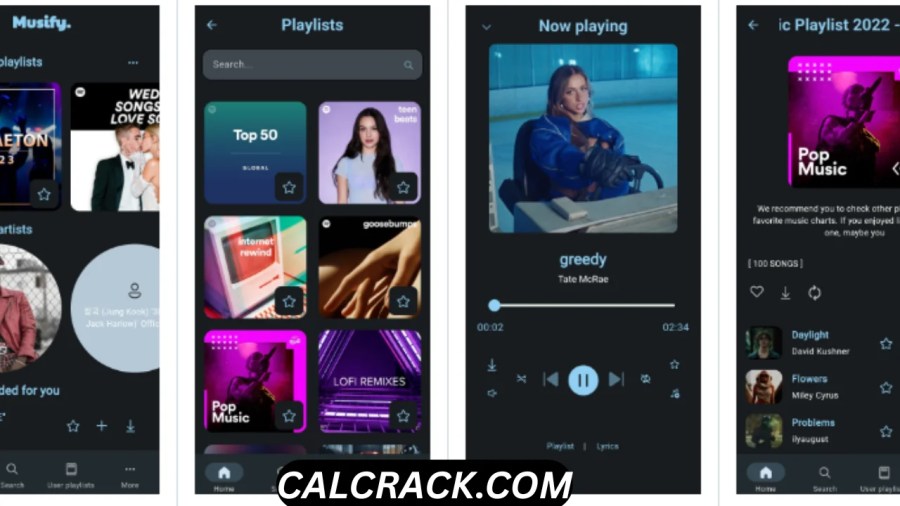
The open-source Musify project has a relatively broad feature set for an Android music application.
Online song search
Musify supports online song searches and search suggestions. (GitHub)
This makes it more than a basic local MP3 player.
Offline listening
Offline listening is one of its major features. Users can download supported songs or playlists while online and then listen in offline mode. (GitHub)
Playlists
Musify supports custom playlists and playlist-related data management.
Import and export
The application provides import and export functionality so users can preserve their application data. (GitHub)
Lyrics
Lyrics support is included in the official feature list.
Equalizer
The built-in equalizer includes presets, giving users more control over their listening experience.
SponsorBlock
Musify lists SponsorBlock support as one of its features. (GitHub)
No ads
The open-source project advertises itself as having no ads.
No subscription
There is no subscription requirement for the open-source project.
Material UI
The application uses Material UI, accent colors, and Android 12+ dynamic colors. (GitHub)
Multiple languages
The current project documentation lists support for 21 languages. (GitHub)
What Are the Advantages of Musify?
Musify’s appeal comes from the combination of several features in a single Android application.
Free and open-source
Users can access the application without paying for the software, while its source is publicly available under GPL-3.0. (GitHub)
Offline listening
The offline feature is useful for travel, limited data plans, and areas with unreliable connectivity.
No subscription
Users who do not want another monthly subscription can use the open-source application without a subscription requirement.
No ads
The project’s feature list specifically states that there are no ads. (GitHub)
Customization
The equalizer, playlists, lyrics, dynamic colors, and other features provide a customizable listening experience.
Active development
The project continues to receive releases. F-Droid currently lists version 10.3.2, while previous versions have also been released throughout 2026. (F-Droid)
What Are the Disadvantages of Musify?
Musify is not perfect, and users should understand its limitations.
No official Play Store version of the open-source project
The official FAQ says the project is not currently planned for Google Play. (GitHub)
This may be inconvenient for users who only install applications through Google Play.
Android-only
The project currently supports Android rather than Windows, macOS, or iOS. (GitHub)
Dependence on external services
F-Droid identifies a dependency on YouTube for music. (F-Droid)
This means some functionality can be affected by changes outside the Musify project’s control.
Offline music is app-specific
Developers have explained that offline music is designed to be played within Musify rather than being exposed as ordinary files for other music applications. (GitHub)
Copyright responsibility
The project makes clear that users are responsible for complying with copyright laws and the terms of external content providers. (GitHub)
Is Musify Better Than Spotify?
There is no universal winner because the applications have different goals.
Musify is appealing if you want:
- Open-source software
- Android-focused development
- Offline listening
- No subscription for the application
- No advertisements in the open-source project
- Equalizer controls
- Custom playlists
- A community-developed project
A mainstream streaming service can be more suitable if you prioritize:
- A commercial licensed music catalog
- Official artist pages
- Highly developed recommendations
- Cross-platform support
- Account synchronization
- A polished commercial ecosystem
Musify is therefore best viewed as an alternative music application, not necessarily a direct replacement for every commercial streaming service.
What Are Some Apps Similar to Musify for Android?
There are several categories of alternatives.
Local music players
If you already own music files, a local player may be the simplest choice.
This approach is particularly useful if you want:
- MP3 playback
- FLAC playback
- Folder browsing
- Playlists
- Equalizer controls
- Offline playback
- No dependence on online music services
Open-source music players
Open-source alternatives can appeal to users who prefer transparent software and community-driven development.
Streaming applications
If you want access to a large online catalog with official licensing arrangements, a mainstream streaming application may be more appropriate.
Other Musify-branded applications
Be aware that there are unrelated applications using the Musify name.
For example, Google Play currently lists Musify: Full Music Effects, which is an offline music player and audio editor offering speed control, pitch shifting, equalizer, bass booster, crossfade, audio effects, and exporting. (Google Play)
Musify Player is another separate application focused on local media playback, including audio and video, with features such as equalizer, visualizer, sleep timer, and Google Drive backup. (Google Play)
These should not automatically be considered the same application as the open-source gokadzev/Musify project.
What Is the Best Free Music Download App for Android?
The answer depends on what you mean by download music.
If you mean saving music for legitimate offline listening, look for an application that provides:
- Offline playback
- Reliable downloads
- Playlist support
- Good library management
- Equalizer controls
- Clear licensing terms
- Regular updates
- A trustworthy download source
If you already have music files that you are allowed to use, a local music player may be the simplest option.
If you want access to an online music catalog, a legitimate streaming service with an offline feature may be a better fit.
Musify is attractive because it combines online search, offline listening, playlists, lyrics, equalizer support, and other features without an application subscription. (GitHub)
However, the legality of downloading a specific song depends on the rights and terms associated with that content.
Can I Download Music on My Android?
Yes, Android can store and play music files.
But the important question is whether you are authorized to download the specific music.
There is a major difference between:
- downloading music you created,
- downloading music that is explicitly licensed for free download,
- downloading music you purchased where the terms allow local copies,
- downloading music made available by an authorized service, and
- downloading copyrighted music from an unauthorized source.
The fact that an application can technically retrieve audio does not automatically grant permission to copy or redistribute that audio.
Musify’s own disclaimer makes this distinction clear by stating that the application does not host or own copyrighted audio and that users are responsible for following copyright regulations and content-provider terms. (GitHub)
So, yes, you can download music on Android, but make sure the source gives you the necessary rights to do so.
Is There Any Way to Download Musi?
Musi and Musify are different applications.
This is worth highlighting because search engines can produce overlapping results for these names.
Musify refers to several music applications, including the open-source Android project discussed in this article.
Musi is a separate app and should not be confused with Musify.
If you are searching for “Musi download,” “Musi APK,” or “Musi iPhone,” do not assume that a website offering a file under the name Musify is providing the same application.
Likewise, an APK advertised as a Musi iOS download should immediately raise questions because APK is an Android package format.
How to Download a Free Music App Safely
Finding a free music application is easy. Finding the correct and trustworthy version is more important.
Follow these steps.
1. Identify the exact app
Check the full application name and developer.
2. Use the official project page
For open-source Musify, the GitHub repository is the best place to verify the project.
Musify official GitHub repository
3. Prefer reputable app repositories
F-Droid currently distributes the open-source Musify application and provides version, permissions, license, source, and build information. (F-Droid)
Musify on F-Droid
4. Avoid suspicious modified APKs
Do not assume “Pro,” “Premium,” or “Unlocked” means official.
5. Check permissions
A music application generally needs permissions appropriate to its functions. If an APK requests excessive or unrelated access, investigate before installing it.
6. Keep the application updated
Using an old release can create compatibility problems, especially when the app relies on external services.
Musify vs Musify: Why Search Results Are Confusing
One reason Musify download searches can be confusing is that the brand name is not exclusive to one application.
For example, the open-source project uses the package associated with gokadzev, while Google Play has unrelated Musify applications with different developers and features. (Google Play)
This means that two websites can both say “Download Musify” while actually referring to completely different software.
Before installing, compare:
| Check | What to look for |
|---|---|
| App name | Exact application name |
| Developer | Verify the developer |
| Package name | Compare it with the official source |
| Platform | Android, Windows, macOS, or iOS |
| Version | Check the current release |
| Source | GitHub, F-Droid, Google Play, etc. |
| Permissions | Make sure they are reasonable |
| Updates | Check whether development is active |
This simple checklist can prevent many installation mistakes.
Does Musify Have Ads?
The open-source Musify project says it has no ads.
The official feature list explicitly includes No ads and No subscriptions. (GitHub)
However, do not apply that statement to every application called Musify.
Google Play’s Musify ecosystem includes unrelated apps with different developers and different business models.
The current Musify: Full Music Effects listing also describes itself as having no ads or subscriptions, but it is a different application from the open-source GitHub project. (Google Play)
Therefore, always verify which Musify application you are installing.
Does Musify Require an Account?
The open-source project’s feature list does not describe a conventional subscription-based account system as a requirement. Its emphasis is on free access, offline listening, playlists, and data import/export. (GitHub)
That is one of the reasons privacy-conscious Android users may be interested in the application.
Nevertheless, external services can have their own requirements, and functionality that depends on an external service should not automatically be assumed to operate independently of that service.
Can Musify Replace a Local Music Player?
It depends on how you manage your music.
Musify provides online search and offline listening, but the project’s developers have specifically said that local music syncing is not supported. Instead, users can download songs or playlists through Musify for offline use. (GitHub)
Therefore, if your primary goal is:
“I have a folder full of MP3 and FLAC files and want an application to scan and organize them.”
a dedicated local music player may be more appropriate.
If your goal is:
“I want online music search plus offline listening in one Android application.”
Musify may be more interesting.
Musify Download: Final Verdict
Musify is a useful free Android music application for users who want online music search, offline listening, playlists, lyrics, equalizer controls, and an open-source development model.
The current open-source project is actively maintained, and F-Droid lists version 10.3.2, added on August 23, 2026, with Android 7.0 or newer as the minimum requirement. (F-Droid)
Its biggest strengths are:
- Free and open-source software
- No ads
- No subscription
- Offline listening
- Online music search
- Playlist support
- Lyrics
- Equalizer presets
- SponsorBlock
- Import and export
- Material UI
- Android 12+ dynamic colors
- 21 supported languages (GitHub)
Its main limitations are equally important:
- The open-source version is currently Android-only.
- It is not currently planned for Google Play.
- It relies on external music sources.
- Offline music is designed for playback within Musify.
- Users remain responsible for complying with copyright laws and content-provider terms. (GitHub)
For someone searching Musify download APK, the most important recommendation is to verify the source before installing. F-Droid currently provides a recognized distribution channel and states that its build is signed by the original developer and corresponds to the source tarball. (F-Droid)
For someone searching Musify download Windows, Musify download for PC, Musify download Mac, or Musify download iOS, the answer is different: the open-source Musify project currently does not provide native versions for those platforms. Its official FAQ says it is Android-only for now. (GitHub)
Finally, if you are searching Musify download free because you want free music, remember the most important distinction: a free music application does not automatically make copyrighted music free to download or redistribute. Musify itself states that it does not own or host copyrighted audio and that users are responsible for lawful use. (GitHub)
People Also Ask — Quick Answers
Is Musify free?
Yes. The open-source Musify project is free software under GPL-3.0 and lists no ads and no subscriptions. (GitHub)
Is Musify legal?
The software is open-source, but the legality of particular music downloads or uses depends on the content, source, copyright law, and applicable terms. Musify places responsibility for lawful use on the user. (GitHub)
Is Musify free offline?
Yes. Musify supports offline listening, including downloading supported songs or playlists for offline use. (F-Droid)
Is Musify a safe app to use?
The open-source version can be obtained from recognized sources such as GitHub and F-Droid. Avoid random or modified APKs, and verify the developer and package before installing. (F-Droid)
Is there any way to download Musi?
Musi and Musify are different applications. Do not treat a Musi download as a Musify download.
What is the Musify app?
The open-source Musify project is an Android music application with online search, offline listening, playlists, lyrics, equalizer features, and other music tools. (GitHub)
How do I download a free music app?
Use an official developer page, Google Play, F-Droid, or another reputable distribution channel. Avoid unknown APK sites and modified packages.
What is Musify?
Musify is a name used by multiple music applications. The open-source project maintained by Valeri Gokadze is an Android music app offering online search and offline listening. (F-Droid)
What are some apps similar to Musify for Android?
You can consider local music players, other open-source music players, or licensed streaming services with offline functionality, depending on whether you prioritize local files, online catalogs, privacy, or customization.
What is the best free music download app for Android?
There is no single best choice. For music you already have permission to store, a local player may be ideal. For online catalogs, a legitimate streaming service may be more suitable. Musify is a strong option for Android users interested in free software and offline listening.
Can I download music on my Android?
Yes, Android supports music downloads and local playback. However, you should only download copyrighted music when you have permission or another valid legal basis to do so.
Musify Download: Key Takeaway
If your search intent is simply “Musify download,” start by identifying which Musify you actually want. For the open-source Android project, verify the official GitHub repository or F-Droid listing before installing. The current project supports Android 7.0+, offers offline listening, and remains free and open-source. (F-Droid)
If you see Musify download APK, Musify Pro APK, or Musify Mod APK on an unfamiliar website, don’t assume it is official. If you see Musify download Windows, Mac, or iOS, remember that the official open-source project currently supports Android only. (GitHub)
For the safest experience, use the recognized project sources, keep your installation updated, and use music in accordance with the rights and terms applicable to the content.
Musify is best understood as a free, open-source Android music application with offline listening—not as a blanket license to download any copyrighted music for free.
Download Now
Musify
- Download Option:
Theuser.cloud - Download Option:
Usersdrive
File Details:
- Size: 108.2 MB