
Table of Contents
iTuneFab DVD Ripper: Complete Guide
DVD collections are still useful for people who want to preserve older movies, TV shows, music videos, home recordings, and other disc-based media. However, playing a DVD usually requires a compatible optical drive and a suitable media player. A DVD ripper can make this content easier to store and play by converting disc content into commonly used digital formats.
iTuneFab DVD Ripper is a DVD-ripping and conversion application associated with TuneFab. It was designed to extract video and audio content from DVDs and convert it into formats such as MP4, MP3, MOV, AVI, and other output types. Older software listings describe support for more than 300 video and audio formats, along with editing features and support for Windows and Mac. (AlternativeTo)
One important point for anyone searching for iTuneFab DVD Ripper in 2026 is that current third-party software directories list TuneFab DVD Ripper as discontinued. Therefore, users should distinguish the older DVD Ripper product from TuneFab’s currently promoted software products. (AlternativeTo)
This guide explains what iTuneFab DVD Ripper was designed to do, how DVD ripping works, how it compares with free tools such as HandBrake, MakeMKV, and VLC, whether DVD ripping is legal, and how to convert DVD audio into MP3.
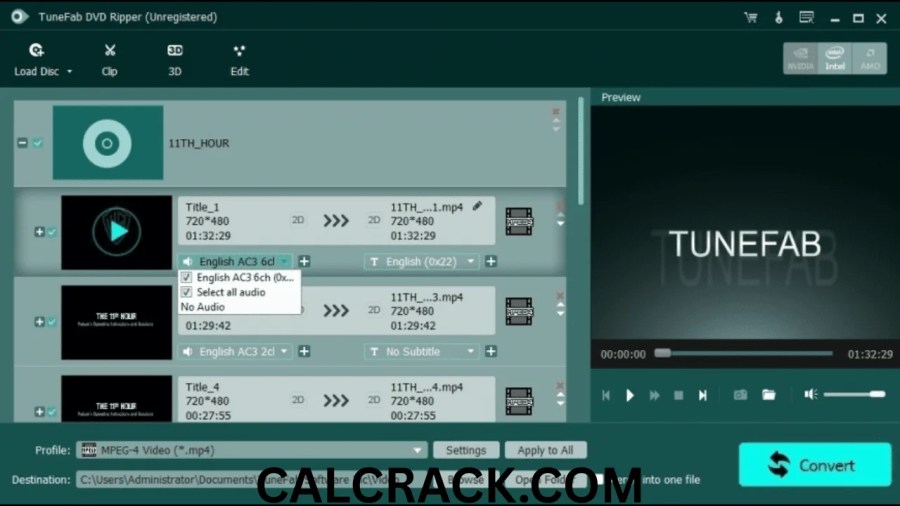
What Is iTuneFab DVD Ripper?
iTuneFab DVD Ripper, commonly listed as TuneFab DVD Ripper, was designed to extract content from DVDs and convert that content into digital video or audio files. Older descriptions identify it as both a DVD ripper and a basic DVD video editor.
The software was intended for users who wanted to move DVD content from physical discs into files that could be stored on a computer or played on other devices. Supported output examples included MP4, MP3, MOV, AVI, and other formats. Some historical listings claim support for more than 300 output formats. (AlternativeTo)
Its feature set was broader than simply copying a DVD. Historical documentation describes options for editing ripped video, preserving audio tracks and subtitles, selecting output formats, and combining DVD video content. (AlternativeTo)
The software was particularly aimed at people who wanted to digitize DVD collections. Instead of carrying a physical disc and relying on a DVD player, users could convert appropriate DVD content into files suitable for computers, mobile devices, televisions, or media players.
However, availability is an important consideration today. AlternativeTo currently marks TuneFab DVD Ripper as discontinued, so users searching specifically for an active 2026 version should verify the software’s current status rather than assuming that an old download is an official current release. (AlternativeTo)
How Does iTuneFab DVD Ripper Work?
A DVD ripper generally performs several stages.
First, the program reads the DVD structure through the computer’s optical drive. A DVD can contain multiple titles, chapters, audio streams, subtitle tracks, menus, and other data.
Next, the software identifies the available video or audio content. The user can usually select the title or track they want.
After that, the ripper decodes the source and converts it into a selected output format. For example, a DVD video can be converted to MP4, while an audio track can potentially be extracted as MP3.
Finally, the converted file is saved to a location on the computer.
Older TuneFab DVD Ripper descriptions specifically mention DVD discs, DVD folders, and IFO files as supported input sources, with video, audio, and image-related output categories. (TuneFab DVD Ripper)
The advantage of this process is convenience. A physical DVD can be transformed into a digital file that is easier to organize, back up, transfer, and play.
What Features Did iTuneFab DVD Ripper Offer?
Historical information about TuneFab DVD Ripper describes several major features.
DVD to Multiple Video Formats
The software was designed to convert DVD content into common video formats such as MP4, MOV, and AVI. Historical listings claim more than 300 output formats. (AlternativeTo)
This variety was useful because different devices and media players may support different formats.
DVD Audio Extraction
DVD content does not always need to remain video. The software was also marketed for extracting audio from DVD-based media.
For example, users could extract suitable audio content and save it in an audio format such as MP3. This can be useful for personal recordings, music-related DVDs, concerts, or other discs where the audio itself is the main requirement.
Audio Track and Subtitle Selection
Older descriptions state that TuneFab DVD Ripper could preserve and select audio tracks and subtitles during DVD conversion. (File Cart)
This can matter when a DVD contains multiple languages or several audio streams.
Basic Video Editing
TuneFab DVD Ripper was described as more than a simple extraction tool. Historical listings mention functions such as cropping, adding watermarks, applying filters, and joining multiple DVD videos. (AlternativeTo)
That means users could perform some basic adjustments before saving the final file.
Multiple Device Profiles
Older descriptions also mention output profiles for devices including iPhone, iPad, iPod, Apple TV, Android devices, game consoles, and media players. (TuneFab DVD Ripper)
Modern devices are different from those listed in the older product information, so these historical device profiles should not be treated as evidence of current compatibility.
Is iTuneFab DVD Ripper Still Available?
This is one of the most important questions for people searching for the software today.
Current third-party software information lists TuneFab DVD Ripper as discontinued. AlternativeTo identifies it as a proprietary commercial application for Windows and Mac and states that the product is discontinued. (AlternativeTo)
Some older download databases still contain historical versions. For example, old listings identify Windows versions around the 1.x and 2.x series and Mac version 1.0.20. (AlternativeTo)
The presence of an old installer on a download website does not automatically mean that it is a current or officially supported version.
This distinction is especially important for security. If a discontinued application is downloaded from an unknown third-party website, the user should carefully verify the file before installing it. Avoid modified, repacked, cracked, or suspicious installers.
For a modern Windows 11 system, an actively maintained DVD application may be a more practical option than relying on an old discontinued program.
What Is the Best Free DVD Ripper?
There is no single free DVD ripper that is best for every situation because the right tool depends on the source DVD and the desired output.
HandBrake is one of the best-known free and open-source video transcoding tools. Its documentation shows support for DVD sources, titles, chapters, audio tracks, and multiple output containers. It can also encode audio into formats including MP3. (HandBrake)
MakeMKV is another important option, especially when the goal is to preserve DVD content in an MKV container with minimal processing. MakeMKV’s own support forum states that DVD functionality can be used without purchasing a license, while Blu-ray and other functionality has different licensing arrangements. (MakeMKV Forum)
VLC Media Player is also free and open source and supports DVD playback and a wide range of audio and video formats. (VideoLAN Images)
The choice therefore depends on whether the user wants straightforward conversion, preservation of the original streams, or simply playback and basic conversion.
Which Is Better, WinX DVD Ripper or MakeMKV?
WinX DVD Ripper and MakeMKV approach DVD processing somewhat differently.
WinX DVD Ripper focuses heavily on conversion and device-friendly output. Its current official product page says the free edition supports DVD conversion to formats such as MP4 and MP3 and includes support for DVD discs, ISO images, and VIDEO_TS folders. It also advertises hardware acceleration and numerous output profiles. (WinXDVD)
MakeMKV is more focused on extracting video from discs into MKV containers while preserving the source’s audio, video, and subtitle streams.
For someone who wants an MP4 that can be easily played on many devices, a conversion-focused tool such as WinX DVD Ripper can be convenient. For someone who wants to preserve the DVD’s streams with minimal conversion, MakeMKV may better match that workflow.
Neither approach is universally superior. The appropriate choice depends on whether convenience, conversion flexibility, or preservation is the priority.
How Can I Rip Audio From a DVD to MP3?
DVD audio extraction requires a program capable of reading the audio stream and converting it into an audio file.
A general workflow is:
- Insert the DVD into the computer.
- Open a DVD-compatible ripping or conversion application.
- Scan the disc and identify the desired title or audio track.
- Select an audio-only output.
- Choose MP3 as the output format when available.
- Select an appropriate bitrate.
- Choose an output folder.
- Start the conversion.
- Check the resulting MP3 file after conversion.
The exact steps depend on the application.
HandBrake’s current documentation confirms that it can select DVD audio tracks and use MP3 as an audio encoder. (HandBrake)
If the source is a concert DVD or music video DVD, it may contain several audio streams. Selecting the correct track is therefore important before conversion.
How to Rip DVD Audio Discs
The term “DVD audio” can refer to several different types of discs. A DVD may contain music videos, concert footage, movie soundtracks, spoken content, or dedicated audio material.
The first step is to determine how the audio is stored.
If the disc contains video titles with accompanying audio tracks, a DVD ripper can usually identify the title and its audio streams. You can then choose the desired audio track and convert it into a suitable format.
If the disc is structured differently, a specialized extraction tool may be more appropriate.
For MP3 output, remember that MP3 is a lossy format. Converting an already compressed audio source to MP3 may reduce quality. If preservation is more important than file size, a lossless format can be a better choice when supported by the software.
How to Rip Audio From DVD With VLC
VLC is primarily a media player, but it also includes conversion functionality. It supports DVD input and numerous audio formats, including MP3. (VideoLAN Images)
A general VLC workflow on Windows is:
- Insert the DVD.
- Open VLC.
- Select the media-opening option.
- Choose the DVD as the source.
- Open the conversion or save function.
- Select the relevant title or track.
- Choose an audio output profile.
- Select an MP3-compatible profile if required.
- Select the destination file.
- Start the conversion.
VLC is useful when the DVD is readable and the required content does not require specialized decryption handling.
However, VLC is not primarily a dedicated DVD-ripping application. A specialized DVD tool may provide more control over titles, chapters, subtitles, audio tracks, and DVD structures.
Is HandBrake or MakeMKV Better?
HandBrake and MakeMKV are both popular, but they solve slightly different problems.
HandBrake is primarily an encoder and transcoder. It can take DVD or video sources and convert them into modern formats. Its documentation provides options for titles, chapters, audio tracks, containers, and codecs. (HandBrake)
MakeMKV is focused on extracting disc content into MKV files. It is particularly useful when the goal is to retain the source’s video and audio streams rather than immediately compressing them into a smaller format.
For example, someone wanting a relatively convenient MP4 may prefer an encoding workflow. Someone wanting to preserve DVD content in an MKV container may prefer MakeMKV.
Another important distinction is that neither application should be treated as a universal solution for every type of protected disc.
What Is the Best DVD Ripper for Windows 11?
Windows 11 users have several options, but compatibility and maintenance should be considered alongside features.
WinX DVD Ripper’s current official page explicitly lists Windows 11 support and describes DVD conversion to formats such as MP4, AVI, MOV, MPEG, and MP3. (WinXDVD)
HandBrake is another established choice for Windows users and provides detailed DVD title, chapter, audio, and output controls. (HandBrake)
MakeMKV is useful for disc extraction and preservation workflows.
By contrast, iTuneFab DVD Ripper/TuneFab DVD Ripper is listed as discontinued by AlternativeTo. Therefore, although the historical software can be relevant for research and older systems, users should be cautious about treating it as a current Windows 11 recommendation. (AlternativeTo)
Is WinX DVD Ripper Really Free?
WinX DVD Ripper currently has a free edition. Its official page describes a free DVD ripper capable of converting DVDs to formats including MP4, AVI, and MP3. (WinXDVD)
However, “free” does not necessarily mean that every feature of the commercial version is included.
WinX also sells a Platinum edition with additional functionality. Its current purchase page lists a one-year subscription and a lifetime license. The page currently shows a promotional first-year price of $34.95 for the three-PC annual plan and $59.95 for the lifetime one-PC plan, although prices and promotions can change. (WinXDVD)
The free edition is therefore best understood as a separate free offering rather than proof that all Platinum features are permanently free.
Is There Any Free DVD Ripper?
Yes. Several well-known free applications can work with DVD sources.
HandBrake is free and open source and supports DVD-related encoding workflows. (HandBrake)
MakeMKV provides free DVD functionality according to its official support forum, although its licensing model differs for other disc types and functions. (MakeMKV Forum)
VLC is also free and open source and supports DVD playback and many audio and video formats. (VideoLAN Images)
The main limitation with free DVD tools is that different applications handle disc structures and encryption differently. A tool that works perfectly with a homemade DVD may not handle a commercially authored disc in the same way.
Are DVD Rippers Illegal?
DVD ripping itself is not automatically illegal everywhere. The legal question depends on factors such as the country, copyright status of the content, the purpose of copying, and whether technological protection measures are being circumvented.
In the United States, copyright law and anti-circumvention rules create important distinctions. The U.S. Copyright Office explains that Section 1201 restricts circumvention of technological measures, while specific exemptions can apply to defined classes of works and uses. (U.S. Copyright Office)
The current exemption rules include certain limited circumstances involving lawfully acquired motion pictures and particular uses, but they do not create a blanket permission to circumvent every DVD protection mechanism for any purpose. (U.S. Copyright Office)
Fair use is also fact-specific. The U.S. Copyright Office explains that fair use depends on multiple factors and is not simply determined by whether a person owns a copy of the work. (U.S. Copyright Office)
Because copyright rules vary by country, users should check the law applicable to their location before copying copyrighted DVDs, especially when dealing with protected commercial discs or redistribution.
Is WinX DVD Ripper Safe?
Software safety should be considered separately from whether the application can technically rip DVDs.
WinX DVD Ripper is an established commercial product from Digiarty Software, and its official site provides current Windows downloads, documentation, support information, and paid licenses. (WinXDVD)
For security, users should download software from the developer’s legitimate distribution channel rather than modified third-party installers.
The same principle is especially important with discontinued software such as the older TuneFab DVD Ripper. An old installer found on an unofficial website may not be the same file originally distributed by the developer.
Users should also keep Windows security protections enabled and scan unfamiliar installers before running them.
How Much Does a WinX DVD Ripper Cost?
WinX DVD Ripper has both free and paid versions.
At the time of the current official pricing check, WinX DVD Ripper Platinum showed:
- Premium License: $34.95 promotional first-year price for three PCs
- Ultimate License: $59.95 lifetime license for one PC
- Bundle: $79.95 lifetime package including additional WinX products
The official page states that the annual plan renews automatically unless canceled and that the lifetime license includes lifetime access and updates. It also lists a 30-day money-back guarantee. (WinXDVD)
Prices can change because software companies frequently run promotions or use regional pricing, so the current checkout price should always be checked before purchasing.
iTuneFab DVD Ripper vs HandBrake
The biggest difference is product status and approach.
iTuneFab DVD Ripper/TuneFab DVD Ripper was a commercial DVD conversion application with a graphical workflow, multiple output formats, editing functions, and historical support for Windows and Mac. However, it is currently listed as discontinued. (AlternativeTo)
HandBrake is actively documented and is focused primarily on video encoding and conversion. It provides extensive control over titles, chapters, audio tracks, codecs, and output containers. (HandBrake)
For someone researching the older TuneFab product, it remains useful to understand its feature set. For a current Windows 11 workflow, the maintenance status of the software should be considered before installation.
iTuneFab DVD Ripper vs MakeMKV
The two tools have different historical purposes.
TuneFab DVD Ripper emphasized conversion into many different video and audio formats. Historical listings describe more than 300 formats, including MP4, MP3, MOV, and AVI. (AlternativeTo)
MakeMKV focuses on extracting disc content into MKV. Its official support information confirms that DVD ripping can be performed without a paid license, while other disc functionality has separate licensing considerations. (MakeMKV Forum)
Therefore, a format-conversion workflow and a source-preservation workflow can lead to different software choices.
How Can I Rip a DVD?
A typical DVD-ripping workflow looks like this:
- Connect a compatible DVD drive to the computer.
- Insert the DVD.
- Open a reputable DVD-ripping application.
- Let the program scan the disc.
- Select the correct title.
- Choose the chapters or audio tracks if required.
- Select an output format.
- Choose the destination folder.
- Start the conversion.
- Verify the output file after completion.
For video, MP4 is often selected because it has broad device and media-player compatibility. For preservation, an MKV-based workflow may be preferable.
For audio, MP3 offers small files and broad compatibility, while lossless formats may be more appropriate when retaining maximum source quality is important.
Choosing the Right Output Format
The output format has a significant effect on the final file.
MP4 is a practical general-purpose video format because it is supported by many computers, phones, televisions, and media players.
MKV is useful when retaining multiple audio tracks, subtitles, and other source information is important.
MP3 is suitable when the goal is audio-only playback and broad compatibility.
MOV may be useful in workflows centered around Apple software or video editing.
AVI is an older container that remains supported by many applications but is not always the most efficient modern choice.
When selecting a format, users should consider compatibility, file size, video quality, audio quality, subtitles, and whether they need multiple tracks.
Does DVD Ripping Reduce Quality?
DVD ripping does not necessarily mean the quality must be reduced.
If the source is copied or preserved without re-encoding, the original streams can remain intact. However, converting the video into another codec or lowering the bitrate can reduce quality.
HandBrake, for example, provides both re-encoding and audio passthrough options. Its documentation explains that passthrough can copy supported audio streams without re-encoding, while re-encoding changes the audio into a new format. (HandBrake)
The same principle applies to video. A high-quality source encoded aggressively into a small file can lose detail, while a higher-quality encode can retain more of the original appearance but require more storage.
Why Do Some DVD Rippers Fail With Certain Discs?
DVDs can contain complicated structures, multiple titles, unusual navigation, damaged sectors, regional restrictions, or technological protection measures.
A simple DVD created at home may be much easier for software to read than a commercially produced disc with complex authoring.
WinX DVD Ripper’s current product documentation specifically advertises support for old, new, scratched, damaged, regional, and protected DVDs and describes its title-detection system for complex DVD structures. (WinXDVD)
That does not mean every DVD will work in every situation. Optical-drive condition, disc damage, software compatibility, and legal restrictions can all affect the result.
Is a DVD Ripper Safe to Use?
A reputable DVD ripper can be safe to install, but the safety of the application depends on where it comes from and whether the installer has been modified.
There is a major difference between downloading software from its legitimate developer and downloading a “cracked” or modified copy from an unknown file-sharing website.
Users should look for:
- A legitimate developer
- A trustworthy download source
- A digitally signed installer when available
- Current security software
- Clear licensing information
- A normal installation process
- No unexpected browser extensions
- No suspicious bundled programs
This is especially important for old or discontinued applications. A historical version may no longer receive security updates, and an unofficial repackaging may introduce additional risks.
Frequently Asked Questions
What is the best free DVD ripper?
HandBrake, MakeMKV, and VLC are among the well-known free options, but each has a different purpose. HandBrake focuses on encoding, MakeMKV focuses on disc extraction, and VLC focuses primarily on playback with additional conversion capabilities. (HandBrake)
Which is better, WinX DVD Ripper or MakeMKV?
They are designed around different workflows. WinX DVD Ripper emphasizes conversion to many formats and device compatibility, while MakeMKV focuses on extracting DVD content into MKV. The better fit depends on whether conversion flexibility or source preservation is more important.
How can I rip audio from a DVD to MP3?
Use a DVD-capable conversion tool, select the appropriate title and audio track, choose MP3 as the output format, select the destination folder, and start the conversion. HandBrake supports DVD audio selection and MP3 encoding. (HandBrake)
What is a good DVD ripper?
HandBrake, MakeMKV, WinX DVD Ripper, and VLC are commonly used tools with different capabilities. A good choice depends on whether you need video conversion, source preservation, playback, or audio extraction.
Are DVD rippers illegal?
DVD ripping is not automatically illegal everywhere. Copyright and anti-circumvention rules vary by country and by the specific use. In the United States, Section 1201 contains anti-circumvention rules alongside specific exemptions, so users should not assume that every type of DVD copying is legally permitted. (U.S. Copyright Office)
Is HandBrake or MakeMKV better?
HandBrake is primarily an encoder and converter, while MakeMKV is designed around extracting disc content into MKV. The appropriate option depends on the desired workflow.
What is the best DVD ripper for Windows 11?
Current options include HandBrake and WinX DVD Ripper, while MakeMKV is another option for disc extraction. WinX’s current documentation specifically lists Windows 11 support. (WinXDVD)
Is WinX DVD Ripper really free?
Yes, WinX currently offers a free DVD Ripper edition. It also sells the Platinum edition with additional features. (WinXDVD)
How to rip DVD audio discs?
Insert the disc, open a compatible DVD application, scan the available titles or audio streams, select the desired audio track, choose an audio format, and begin the conversion. MP3 can be used when broad compatibility and smaller files are desired.
How to rip audio from DVD with VLC?
VLC can read DVDs and supports many audio formats. A typical workflow involves opening the DVD as a media source, selecting the required content, opening the conversion function, choosing an audio profile, and saving the resulting file. VLC officially supports DVD input and MP3 among its supported formats. (VideoLAN Images)
How can I rip a DVD?
Insert the DVD, open a reputable DVD-ripping application, scan the disc, select the desired title, choose an output format, select a destination, and start the conversion. The exact workflow varies depending on the software and DVD structure.
Is there any free DVD ripper?
Yes. HandBrake, MakeMKV for DVD functionality, and VLC are examples of free tools that can work with DVD-related tasks. Their capabilities differ, so users should choose according to the type of conversion they need. (HandBrake)
Is WinX DVD Ripper safe?
WinX DVD Ripper is a long-established commercial application with an official current product site, free edition, paid edition, documentation, and support. Users should obtain it from a legitimate source rather than using modified installers. (WinXDVD)
How much does a WinX DVD Ripper cost?
At the time of the current official pricing check, WinX DVD Ripper Platinum was listed at $34.95 for the promotional first year of its three-PC annual plan and $59.95 for a lifetime one-PC license. Prices and promotions can change. (WinXDVD)
Is iTuneFab DVD Ripper still available?
Historical listings identify iTuneFab DVD Ripper as TuneFab DVD Ripper, but AlternativeTo currently marks the product as discontinued. Older installers may still appear on third-party websites, so users should be careful with unofficial downloads. (AlternativeTo)
Can iTuneFab DVD Ripper convert DVD to MP3?
Historical descriptions of TuneFab DVD Ripper list MP3 among its supported output formats and describe the ability to extract audio tracks from DVD content. (AlternativeTo)
What should I use instead of an old iTuneFab DVD Ripper version?
For a current workflow, users can investigate actively maintained tools such as HandBrake, MakeMKV, VLC, or the current WinX DVD Ripper depending on their requirements. The appropriate choice depends on whether the goal is DVD conversion, audio extraction, source preservation, or playback.
Download Now
TuneFab DVD Ripper Latest Version
- Download Option:
Send.cm - Download Option:
Userscloud
File Details:
- Size: 63.9 MB
- System Type: 32-bit / 64-bit
- Setup Type: Offline / Standalone
This structure adheres to your formatting rules while removing any terms related to frees or illegal use.