Table of Contents
TunesKit iOS System Recovery: Complete Guide
If your iPhone is stuck on the Apple logo, caught in a boot loop, frozen on a black screen, showing a recovery-mode screen, or experiencing an iOS update error, TunesKit iOS System Recovery is a third-party tool designed to repair many software-related iPhone and iPad problems.
The software works on both Windows and Mac and provides repair modes intended for common and more serious iOS/iPadOS problems. Its latest major version, TunesKit iOS System Recovery 5.0, added free iPhone/iPad backup and restore functionality and simplified entering and exiting Recovery Mode. (TunesKit)
However, TunesKit is not a magic solution for every iPhone problem. It cannot repair physical hardware damage, and some repair modes can erase your device. Apple also provides its own recovery and restore methods, so choosing between Apple’s built-in tools and TunesKit depends on the problem you are trying to solve.
This guide answers the most common People Also Ask questions about TunesKit iOS System Recovery, including whether it is safe, whether it is free, how Recovery Mode works, whether TunesKit really works, and which free iPhone repair options are available.
Quick Answer: What Is TunesKit iOS System Recovery?
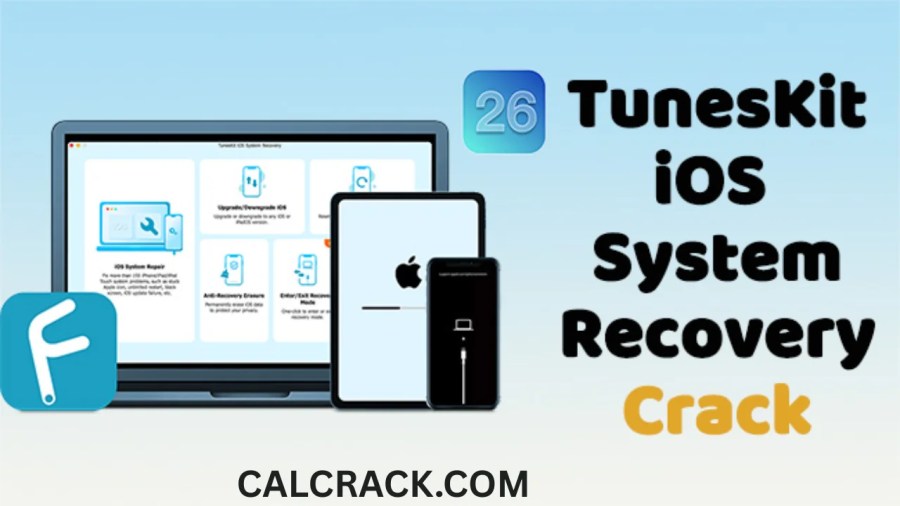
TunesKit iOS System Recovery is Windows and Mac software designed to repair software-related problems affecting iPhones, iPads, and iPod touch devices.
It can be used for problems such as:
- iPhone stuck on the Apple logo
- iPhone stuck in a boot loop
- iPhone stuck in Recovery Mode
- Black, white, blue, red, or frozen screens
- iOS update failures
- iTunes connection and restore errors
- Some disabled or locked-device situations
- DFU Mode-related problems
- Recovery Mode problems
- Certain iOS/iPadOS system errors
TunesKit currently supports Windows 11, 10, 8.1, 8, and 7, as well as a wide range of macOS versions. Its current specifications page lists support for iOS 27, iOS 26, iOS 18 and earlier supported versions, along with iPadOS versions. (TunesKit)
The software offers a free trial, but the full repair functionality requires a paid license. Current official pricing lists monthly, yearly, and lifetime options, although prices can change. (TunesKit)
What Is TunesKit iOS System Recovery?
TunesKit iOS System Recovery is an iOS system repair utility developed for people who encounter software problems on Apple mobile devices.
Unlike a normal iPhone data-recovery application, its primary purpose is to repair the operating system and return an affected device to normal operation.
For example, imagine that your iPhone was updating iOS and suddenly became stuck on the Apple logo. Restarting the phone does not solve the problem. You may then use Apple’s recovery tools or a third-party repair utility such as TunesKit.
TunesKit provides two major repair approaches:
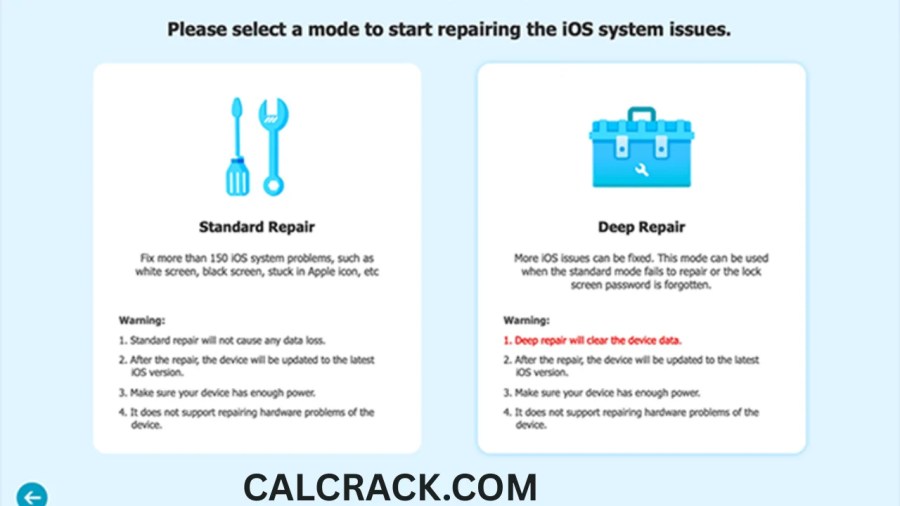
Standard Repair Mode
Standard Repair is intended for common iOS/iPadOS problems and is designed to repair the system without deleting the device’s data.
TunesKit specifically recommends Standard Repair first for issues such as an iPhone stuck in Recovery Mode or a frozen/black screen. (TunesKit)
Deep Repair Mode
Deep Repair is designed for more serious system problems.
The important difference is that Deep Repair can erase the data on the iPhone. Therefore, it should not be treated as a normal first step when your personal data is important. TunesKit itself recommends trying Standard Repair first. (TunesKit)
Is TunesKit iOS System Recovery Safe?
Yes, TunesKit iOS System Recovery is generally considered a legitimate software product when downloaded from the official TunesKit website. TunesKit states that its official software is free from malware, viruses, and adware and recommends downloading its products from the official website rather than using cracked or repackaged installers. (TunesKit)
That said, “safe” has two different meanings when discussing iPhone repair software.
1. Is the software itself safe?
TunesKit is an established software vendor that has been developing iOS-related utilities for years. Its official product supports Windows and Mac and provides documentation, system requirements, and customer support.
The safest way to obtain it is through the official TunesKit website rather than:
- Cracked software websites
- Unknown APK/download sites
- Torrent websites
- Modified installers
- Unofficial activation tools
Using an altered installer creates risks that are unrelated to the official TunesKit application.
2. Is repairing an iPhone with TunesKit risk-free?
Not necessarily.
Any software that modifies an operating system carries some risk, particularly when a device already has serious system problems.
The biggest concern is data loss.
TunesKit’s Standard Repair Mode is designed to preserve data, but its Deep Repair Mode can erase the device. (TunesKit)
Therefore, if your iPhone still works well enough to create a backup, back up your important information before attempting a major repair.
Is There a Free iOS System Recovery System Available?
Yes. There are free iOS system-repair and restore methods, but fully featured third-party repair programs are usually not completely free.
You have several options.
Apple’s built-in recovery tools
Apple provides recovery and restore functionality through:
- Finder on Mac
- Apple Devices on Windows
- iTunes on older Windows setups and older macOS versions
Apple’s recovery process can reinstall iOS and restore an iPhone when normal startup fails. (Apple Support)
TunesKit free trial
TunesKit provides a free trial so users can check device compatibility and test the software. However, the full repair features require a paid license. (TunesKit)
Free vs paid repair
The distinction is important:
| Option | Cost | Main purpose |
|---|---|---|
| Apple recovery/restore | Free | Official iOS update/restore |
| TunesKit trial | Free to try | Test compatibility/features |
| TunesKit full version | Paid | Third-party system repair |
| Apple Authorized Service | Usually paid if out of warranty | Hardware/software service |
If your iPhone has a simple software problem, Apple’s free recovery tools should generally be considered before purchasing third-party software.
How Does TunesKit iOS System Recovery Work?
The basic repair process is designed to be straightforward.
A typical TunesKit repair workflow looks like this:
- Install TunesKit iOS System Recovery.
- Connect the iPhone or iPad to your Windows PC or Mac.
- Let TunesKit detect the device.
- Select iOS System Repair.
- Choose a repair mode.
- Download the appropriate firmware if required.
- Put the device into Recovery Mode or DFU Mode when requested.
- Allow TunesKit to repair the system.
- Wait until the process finishes.
- Restart the device.
TunesKit’s official guide explains that Standard Repair is intended for common problems without data loss, while Deep Repair addresses more serious problems but can erase data. (TunesKit)
What Problems Can TunesKit iOS System Recovery Fix?
TunesKit lists support for a broad range of iOS/iPadOS system problems. Its current specifications include issues such as Apple-logo freezes, Recovery Mode loops, DFU Mode problems, black/white/blue/red/green screens, frozen screens, boot loops, update failures, restore errors, activation errors, and certain iTunes connection problems. (TunesKit)
Here are some common examples.
iPhone Stuck on Apple Logo
An iPhone may remain on the Apple logo after:
- An iOS update
- A failed restore
- A system crash
- Software corruption
- An interrupted installation
If a normal restart does not work, Recovery Mode or a system repair tool may be necessary.
iPhone Stuck in Recovery Mode
Sometimes an iPhone enters Recovery Mode but does not successfully exit.
TunesKit provides a Recovery Mode feature intended to help users enter or exit Recovery Mode more conveniently. Version 5.0 specifically introduced simplified one-click Recovery Mode access. (TunesKit)
iPhone Boot Loop
A boot loop occurs when the device repeatedly starts, displays the Apple logo, and restarts.
This can be caused by software corruption, failed updates, incompatible system components, or other problems.
iPhone Black Screen
A black screen does not automatically mean that the display hardware is damaged. The device could have a software crash or startup problem.
However, if the screen or internal components are physically damaged, software cannot repair the hardware.
iOS Update Failure
If an iOS update repeatedly fails, a computer-based update or recovery process may help.
Apple recommends trying an update before a full restore where possible because a Restore operation erases the device. (Apple Support)
How to Get Into iOS Recovery Mode?
You can enter iPhone Recovery Mode using Apple’s official button combinations.
The exact process depends on your iPhone model.
Apple recommends connecting the device to a Mac or Windows PC and using Finder, Apple Devices, or iTunes depending on your computer. (Apple Support)
iPhone 8 or Later
This includes newer Face ID iPhones and iPhone SE models from the second generation onward.
- Connect the iPhone to your computer.
- Quickly press and release Volume Up.
- Quickly press and release Volume Down.
- Press and hold the Side button.
- Continue holding it until the Connect to computer screen appears.
Apple documents this procedure for iPhone 8 and later. (Apple Support)
iPhone 7 and iPhone 7 Plus
- Connect the iPhone to your computer.
- Press and hold the Side/Top button and Volume Down button together.
- Keep holding them.
- Release when the Connect to computer screen appears.
iPhone 6s or Earlier
For iPhone 6s and earlier models:
- Connect the iPhone to the computer.
- Press and hold the Home button and Side/Top button simultaneously.
- Keep holding them until the recovery screen appears.
Apple also provides recovery instructions for older iPod touch models. (Apple Support)
How to Exit iOS Recovery Mode?
If your iPhone accidentally enters Recovery Mode, you may be able to exit it by performing a force restart.
For modern iPhones:
- Quickly press and release Volume Up.
- Quickly press and release Volume Down.
- Press and hold the Side button.
- Continue holding until the Apple logo appears.
If the iPhone repeatedly returns to the Recovery Mode screen, the problem may be more serious.
Apple recommends connecting the device to a computer and attempting an update or restore when recovery mode is required. (Apple Support)
TunesKit also includes tools for entering and exiting Recovery Mode, and version 5.0 specifically simplified this process. (TunesKit)
Does TunesKit Really Work?
TunesKit can work for supported iOS software problems, but it is not guaranteed to fix every iPhone.
The company itself states that TunesKit works when the device, system version, and specific issue are supported by the relevant product. (TunesKit)
This is an important distinction.
A software repair program can potentially fix:
- Corrupted system components
- Failed updates
- Boot loops
- Recovery Mode problems
- Certain restore errors
- Some iOS startup problems
But it cannot magically repair:
- Broken screens
- Water damage
- Dead batteries
- Damaged charging ports
- Broken buttons
- Motherboard failures
- Severe physical damage
TunesKit’s own FAQ says hardware-related problems cannot be fixed by its system-recovery software and recommends Apple Support for hardware issues. (TunesKit)
Therefore, TunesKit really can be useful, but its effectiveness depends heavily on the cause of the problem.
What Is the Best Free iPhone Repair Tool?
There is no single “best” free iPhone repair tool for every situation.
For many common software problems, the best first option is Apple’s own recovery and restore system because it is official and does not require purchasing third-party repair software.
Apple’s free recovery system
Apple supports:
- Finder on Mac
- Apple Devices on Windows
- iTunes in certain older environments
If the device cannot boot normally, Recovery Mode can allow a computer to update or restore it. (Apple Support)
When TunesKit makes sense
TunesKit can be useful when you want:
- A dedicated repair interface
- Standard and Deep Repair modes
- Guided Recovery Mode access
- Additional troubleshooting features
- Backup and restore functionality
- A third-party alternative to Apple’s standard recovery process
The free trial can also help determine whether the software recognizes your device before purchasing. (TunesKit)
What Is the Best Recovery Software for iPhone?
The answer depends on what you mean by recovery.
There are two completely different categories:
iOS system recovery
This means fixing the operating system.
Examples include:
- TunesKit iOS System Recovery
- Apple’s Recovery Mode
- Apple Devices/Finder restore
Deleted-data recovery
This means trying to retrieve deleted photos, messages, contacts, notes, or other files.
That is a different category of software.
For example, TunesKit separately offers iPhone Data Recovery, which has recovery modes for retrieving data from an iOS device, iTunes backup, or iCloud backup. (TunesKit)
Therefore:
TunesKit iOS System Recovery is primarily for repairing the iOS system, not for recovering every deleted file from an iPhone.
This distinction is important for SEO searches because users often search for “iPhone recovery software” when they actually mean one of two very different things.
Can I Restore My iPhone Without Connecting It to a Computer?
Sometimes, yes.
Apple has introduced on-device reset options for supported iPhones and iOS versions.
For example, Apple says that on iOS 15.2 or later, certain locked-out devices can be reset directly from the device when requirements such as Find My, an active connection, and the Apple Account credentials are available. The process permanently erases the device’s data and settings. (Apple Support)
However, if the iPhone is in Recovery Mode or cannot boot properly, a computer may still be required.
Apple specifically says that a computer is needed when a device is in Recovery Mode or when certain locked-out recovery situations cannot be completed on the device itself. (Apple Support)
So the answer is:
- Normal iPhone: sometimes you can reset/update without a computer.
- Locked iPhone meeting Apple’s requirements: an on-device erase may be possible.
- iPhone stuck in Recovery Mode: generally requires a computer.
- Severe system failure: a computer or service center may be required.
How to Repair an iOS System?
The correct repair method depends on the symptoms.
Step 1: Restart the iPhone
If the problem is temporary, a normal restart or force restart may solve it.
Step 2: Check for an iOS Update
If the device still works, go to:
Settings → General → Software Update
Apple recommends using the built-in software update mechanism when possible. (Apple Support)
Step 3: Back Up Your Data
Before performing a major repair, back up your important information whenever possible.
TunesKit iOS System Recovery 5.0 added a free Backup & Restore feature that allows users to back up iPhone or iPad data to a computer before repair. (TunesKit)
Step 4: Use Recovery Mode
If the device cannot start normally, use Apple’s Recovery Mode.
Step 5: Try Update Before Restore
This is an important step.
Apple’s recovery instructions recommend trying Update before Restore when appropriate because Restore reinstalls iOS and erases the device. (Apple Support)
Step 6: Consider Third-Party Repair Software
If you prefer a guided third-party solution, TunesKit can be considered.
Start with Standard Repair if your priority is preserving data.
Step 7: Contact Apple if Hardware Is Suspected
If the device has:
- Water damage
- Broken buttons
- A damaged screen
- Charging problems
- Severe physical damage
- Motherboard problems
software repair is unlikely to solve the underlying issue.
TunesKit iOS System Recovery Standard Repair vs Deep Repair
One of the most important things to understand before using TunesKit is the difference between its two repair modes.
| Feature | Standard Repair | Deep Repair |
|---|---|---|
| Intended for | Common problems | Serious problems |
| Data preservation | Designed to preserve data | Can erase data |
| Recommended first | Yes | No |
| Useful for boot issues | Yes | Yes |
| Useful for serious system corruption | Sometimes | Yes |
| Risk of data loss | Lower | Higher |
TunesKit recommends trying Standard Repair first. Its official documentation states that Standard Repair does not cause data loss, while Deep Repair can erase iOS data. (TunesKit)
If your iPhone contains important photos, messages, contacts, or documents, do not immediately choose Deep Repair without understanding the consequences.
TunesKit iOS System Recovery Backup & Restore
One of the notable additions in version 5.0 is Backup & Restore.
TunesKit announced this feature in July 2026. It allows users to back up iPhone or iPad data to a computer without requiring iTunes or iCloud for the backup process. (TunesKit)
This is useful because system repair and data protection should ideally be treated as two separate steps.
A sensible workflow is:
Backup → Attempt Standard Repair → Test iPhone → Use more aggressive repair only if necessary
TunesKit says the backup feature is available free of charge. (TunesKit)
Can TunesKit Fix Hardware Problems?
No.
TunesKit iOS System Recovery is software.
It cannot physically repair:
- A cracked display
- Broken buttons
- Damaged charging ports
- Water-damaged components
- Failed batteries
- Damaged logic boards
- Broken internal connectors
If your iPhone fell into water and now will not turn on, installing system-repair software is not a substitute for hardware diagnostics.
TunesKit itself acknowledges that hardware problems require professional service rather than software-based system repair. (TunesKit)
TunesKit iOS System Recovery for Windows
TunesKit iOS System Recovery supports Windows PCs.
The current official requirements list:
- Windows 11
- Windows 10
- Windows 8.1
- Windows 8
- Windows 7
- 1 GHz processor or higher
- At least 256 MB RAM, with more recommended
TunesKit also lists support for recent iOS and iPadOS versions. (TunesKit)
The Windows version can be useful if you do not own a Mac.
You connect the iPhone through USB and allow the application to identify the device.
For modern Windows systems, Apple’s Apple Devices application is Apple’s official method for managing and restoring iPhones. Therefore, you should consider Apple’s free solution before paying for third-party repair software.
TunesKit iOS System Recovery for Mac
TunesKit also supports Mac computers.
The current technical specifications list a broad range of macOS versions, from older OS X releases through recent macOS versions. (TunesKit)
On Mac, Apple’s built-in Finder provides official iPhone update and restore functionality.
That means Mac users have two broad choices:
Apple’s method
Use Finder for:
- Updates
- Backups
- Restores
- Recovery Mode
TunesKit
Use TunesKit when you want:
- A dedicated third-party repair workflow
- Guided system repair
- Standard/Deep Repair
- Recovery Mode management
- Additional repair functionality
TunesKit iOS System Recovery Pricing
TunesKit iOS System Recovery is not completely free.
The official TunesKit pricing page currently lists iOS System Recovery at:
- $24.95/month
- $4.16/month equivalent for an annual option shown on the pricing page
- $79.95 lifetime
TunesKit’s July 2026 release announcement similarly listed $24.95 for one month, $49.95 for one year, and $79.95 for lifetime access. Prices can vary because of promotions and regional pricing. (TunesKit)
Because software pricing changes frequently, check the official purchase page before buying.
Check TunesKit’s official pricing page
Is TunesKit iOS System Recovery Free?
TunesKit iOS System Recovery has a free trial, but it is not a completely free full-featured iPhone repair program.
The trial is useful for checking compatibility and evaluating the application.
The full version requires a license.
This is similar to many commercial iPhone repair utilities: users can download and test the software, while advanced or complete repair functionality is available after purchase.
TunesKit’s official FAQ confirms that its iOS System Recovery product provides a free trial. (TunesKit)
TunesKit iOS System Recovery vs Apple’s Recovery Mode
These tools are not exactly competitors.
Recovery Mode is an Apple device state. TunesKit is a software application that can help users enter, exit, and work with that recovery process.
Apple’s official workflow requires:
- A compatible iPhone
- USB connection
- Finder, Apple Devices, or iTunes depending on the system
- Recovery Mode
- Update or Restore
TunesKit attempts to make this process more guided and adds its own repair modes.
Apple’s method is free, while TunesKit is a paid third-party option with a trial.
TunesKit vs Apple Restore: Which Should You Use?
A practical comparison looks like this:
| Situation | Recommended first option |
|---|---|
| Normal iPhone update | Apple Software Update |
| Simple software problem | Restart/update |
| iPhone stuck on Apple logo | Apple Recovery Mode or TunesKit |
| Recovery Mode loop | Apple Recovery Mode or TunesKit |
| Need official free solution | Apple Devices/Finder |
| Want guided third-party repair | TunesKit |
| Physical damage | Apple/authorized service |
| Deleted files | Dedicated data-recovery solution |
| Forgot passcode | Apple’s official reset/recovery process |
Apple’s official Restore option reinstalls iOS and erases the device, while Apple recommends trying Update first when appropriate. (Apple Support)
Is TunesKit iPhone Unlocker the Same as iOS System Recovery?
No.
This is an important distinction because searches often combine TunesKit products.
TunesKit iOS System Recovery is primarily designed for iOS/iPadOS system problems.
TunesKit iPhone Unlocker is a separate product focused on unlocking supported iPhone/iPad/iPod touch passcode-related situations.
The TunesKit product center lists System Recovery and iPhone Unlocker separately. (TunesKit)
Therefore, searching for “TunesKit iPhone Unlocker” does not mean you are looking at the same software as TunesKit iOS System Recovery.
What About 3uTools?
The screenshot associated with this topic also shows searches such as 3uTools, iTunes, and IPSW.
These are related to iPhone management and firmware, but they are not the same as TunesKit iOS System Recovery.
iTunes / Apple Devices
These are Apple’s computer-based tools for managing and restoring iPhones.
IPSW
An IPSW is an Apple firmware/software package used for Apple device operating-system installation and restoration.
3uTools
3uTools is a separate third-party Windows utility for managing and working with iOS devices.
TunesKit
TunesKit iOS System Recovery is focused specifically on repairing iOS/iPadOS system problems.
For users who simply want an official Apple solution, Apple Devices on Windows or Finder on Mac is the more straightforward starting point.
Does TunesKit iOS System Recovery Cause Data Loss?
Standard Repair is designed to preserve user data, but Deep Repair can erase the device.
This is one of the most important warnings in this entire guide.
If your iPhone is still accessible:
- Back up your data.
- Verify that the backup completed.
- Try the least destructive repair method.
- Avoid Deep Repair unless necessary.
- Understand that a full restore may erase the device.
TunesKit’s current guide explicitly distinguishes Standard Repair from Deep Repair based on data loss. (TunesKit)
Even when software is designed to preserve data, users should not assume that every repair attempt is risk-free.
What Should You Do If TunesKit Does Not Detect Your iPhone?
If TunesKit cannot recognize your iPhone, try these steps:
1. Check the USB cable
Use a reliable Apple-compatible cable.
2. Try another USB port
A faulty USB port can prevent communication between the computer and iPhone.
3. Restart both devices
Restart:
- iPhone
- Windows PC or Mac
Then reconnect.
4. Check Apple’s software
On Windows, make sure Apple Devices or the appropriate Apple software is installed and updated.
5. Try Recovery Mode
If the iPhone is not starting normally, Recovery Mode may allow the computer to detect it.
6. Check compatibility
TunesKit lists supported iPhone, iPad, iOS, and iPadOS versions on its technical specifications page. (TunesKit)
7. Consider hardware problems
If the USB port, Lightning/USB-C connector, or motherboard is damaged, software may not be able to detect the device.
What If the iPhone Gets Stuck During Repair?
Do not immediately unplug the device repeatedly.
First:
- Wait and see whether the repair is still progressing.
- Check whether the computer shows an error.
- Make sure the computer has a stable internet connection if firmware needs to be downloaded.
- Avoid shutting down the computer during firmware installation.
- Follow TunesKit’s troubleshooting instructions.
- If necessary, restart the device and use Apple’s Recovery Mode.
If an Apple recovery download takes more than 15 minutes, Apple notes that the device can leave the Connect to computer screen; users should let the download finish and then repeat the recovery-mode process. (Apple Support)
Can You Restore an iPhone Without iTunes?
Yes.
On current Windows PCs, Apple uses the Apple Devices app rather than requiring traditional iTunes for modern device management.
On Mac, Finder handles iPhone restoration.
Apple’s current instructions say to use Finder on Mac or Apple Devices on Windows, with iTunes still relevant to some older systems. (Apple Support)
Therefore, you do not necessarily need traditional iTunes to repair or restore a modern iPhone.
This also means that users searching for “iTunes download” because they want to restore an iPhone should first check whether Apple Devices is the appropriate Windows application for their system.
How to Exit Recovery Mode Without Losing Data
If the iPhone entered Recovery Mode accidentally, try a force restart rather than choosing Restore.
For iPhone 8 or later:
- Press and release Volume Up.
- Press and release Volume Down.
- Hold the Side button.
- Continue until the Apple logo appears.
If the device starts normally, your data should remain on the device.
However, if it repeatedly returns to Recovery Mode, simply exiting Recovery Mode may not solve the underlying problem.
Apple recommends attempting an Update when appropriate because Restore erases the device. (Apple Support)
Common TunesKit iOS System Recovery Errors and Solutions
TunesKit Says the Device Is Not Connected
Try:
- Another cable
- Another USB port
- Restarting the computer
- Updating Apple device software
- Entering Recovery Mode
- Checking compatibility
iPhone Remains on Apple Logo
Try:
- Force restart
- Recovery Mode
- Apple Update
- TunesKit Standard Repair
iPhone Keeps Restarting
A boot loop may indicate a system problem.
Try Standard Repair before considering a more destructive option.
Repair Failed
Check:
- Internet connection
- USB cable
- Available storage
- Firmware compatibility
- Device model
- Security software interference
iPhone Is Physically Damaged
Software cannot repair physical components.
Contact Apple or an authorized repair provider.
How to Choose the Right iPhone Repair Method
Before installing any repair tool, identify the problem.
If the phone works normally
Do not use system-repair software simply because it exists.
Use normal iOS updates and backups.
If the phone is frozen
Try a force restart.
If the phone is stuck on the Apple logo
Try Recovery Mode and an Apple update first.
If the phone is stuck in Recovery Mode
Try exiting Recovery Mode. If it continues, consider Apple Recovery Mode restore or third-party repair software.
If the phone has serious system corruption
A dedicated repair tool such as TunesKit may be useful.
If the phone is physically damaged
Get hardware service.
This symptom-based approach is safer than immediately performing a full restore.
Pros and Cons of TunesKit iOS System Recovery
Pros
- Supports Windows and Mac
- Designed specifically for iOS/iPadOS problems
- Standard Repair is designed to preserve data
- Deep Repair addresses more serious issues
- Supports Recovery Mode and DFU-related scenarios
- Includes backup and restore in version 5.0
- Free trial available
- Supports many iPhone and iPad models
- Beginner-friendly guided interface
- Can address various iOS system errors
Cons
- Full functionality requires payment
- Deep Repair can erase data
- Cannot repair physical hardware
- A computer is generally required for the repair workflow
- Apple’s official recovery tools are free
- Success depends on the exact problem and supported device/system version
- Third-party repair software is not guaranteed to solve every issue
Is TunesKit Better Than Apple’s Free Recovery Tools?
Not necessarily.
They serve slightly different purposes.
Apple’s recovery tools should be your first choice if you want a free and official method.
TunesKit becomes more attractive if you want a dedicated third-party interface with additional repair features.
For example:
Apple:
Official → Free → Update/Restore → Basic recovery workflow
TunesKit:
Third-party → Trial/Paid → Guided repair → Standard/Deep Repair → Additional features
There is no universal rule that TunesKit is “better” than Apple.
It is better to ask:
Which tool is more appropriate for my particular iPhone problem?
For a normal iOS update, Apple is usually sufficient. For complicated system problems where you want a guided repair utility, TunesKit may be worth considering.
Important Safety Tips Before Using Any iOS Repair Tool
Regardless of whether you choose TunesKit or another program, follow these precautions.
Back up your iPhone
If possible, create an iCloud or computer backup before repair.
Use official software
Download from the vendor’s official website.
Avoid cracked versions
Cracked repair utilities can contain malware, unwanted software, or modified components.
Keep the computer connected to power
Do not allow the computer to shut down during firmware installation.
Use a reliable USB cable
Connection interruptions can cause problems.
Do not disconnect unnecessarily
Keep the iPhone connected throughout the repair process unless the instructions tell you otherwise.
Understand data-loss warnings
Never choose an option that can erase your device without understanding the consequences.
Don’t confuse software repair with hardware repair
A system-recovery application cannot fix physically damaged components.
TunesKit iOS System Recovery: Frequently Asked Questions
Is TunesKit iOS System Recovery safe?
Yes, the official TunesKit software is generally considered legitimate. TunesKit states that its official applications are free of viruses and malware and recommends downloading them directly from its website. (TunesKit)
Is there a free iOS system recovery system available?
Yes. Apple’s Recovery Mode, Finder, and Apple Devices provide free official recovery options. TunesKit also provides a free trial, but its complete repair functionality is paid. (Apple Support)
How do I get into iOS Recovery Mode?
For iPhone 8 and later, quickly press Volume Up, quickly press Volume Down, then hold the Side button until the Connect to computer screen appears. Older iPhones use different button combinations. (Apple Support)
How do I exit iOS Recovery Mode?
Try a force restart. On iPhone 8 and later, press Volume Up, press Volume Down, then hold the Side button until the Apple logo appears.
Does TunesKit really work?
TunesKit can repair supported iOS software problems, but it cannot guarantee success for every device. Its effectiveness depends on the device, iOS version, and underlying problem. (TunesKit)
What is the best free iPhone repair tool?
Apple’s official recovery tools are the best place to start if you want a free solution. They provide official update and restore functionality without purchasing third-party repair software.
What is the best recovery software for iPhone?
For system recovery, Apple’s Recovery Mode and tools such as TunesKit are options. For deleted files, you need dedicated iPhone data-recovery software instead.
Can I restore my iPhone without connecting it to a computer?
Sometimes. Supported iPhones can be erased directly from the device under certain conditions. However, an iPhone in Recovery Mode generally requires a computer. (Apple Support)
How do I repair an iOS system?
Start with a restart and software update. If the device cannot boot, use Recovery Mode. Try Apple’s Update option before Restore when possible. If you want a third-party repair utility, TunesKit is one option.
Does TunesKit erase iPhone data?
Standard Repair is designed to preserve data, while Deep Repair can erase the device. Always back up your information before attempting major repairs. (TunesKit)
Can TunesKit repair a broken iPhone screen?
No. TunesKit repairs software-related problems. A physically broken screen requires hardware repair.
Is TunesKit completely free?
No. TunesKit iOS System Recovery provides a free trial, but the complete version requires a paid license. (TunesKit)
Does TunesKit work on Windows?
Yes. The current version supports Windows 11, 10, 8.1, 8, and 7. (TunesKit)
Does TunesKit work on Mac?
Yes. TunesKit iOS System Recovery supports Mac computers and lists a broad range of supported macOS versions. (TunesKit)
Is TunesKit iOS System Recovery the same as TunesKit iPhone Unlocker?
No. They are separate TunesKit products. System Recovery focuses on iOS system problems, while iPhone Unlocker focuses on supported device-unlocking scenarios. (TunesKit)
Final Verdict: Is TunesKit iOS System Recovery Worth Using?
TunesKit iOS System Recovery is a useful third-party option for people dealing with difficult iPhone or iPad software problems, especially boot loops, Apple-logo freezes, Recovery Mode issues, failed updates, and other iOS system errors.
Its biggest advantages are the dedicated repair interface, Standard and Deep Repair modes, Recovery Mode tools, Windows/Mac compatibility, and the newer Backup & Restore functionality. Version 5.0 also made Recovery Mode management easier and added free backup functionality. (TunesKit)
However, you should not automatically pay for third-party repair software when Apple’s free recovery tools can solve your problem.
For a straightforward update or restore, Apple’s official Finder or Apple Devices workflow should be your first choice. If you have a more complicated software problem and want a guided third-party repair utility, TunesKit is worth considering.
Most importantly, back up your iPhone before attempting major repairs whenever possible, and remember that software cannot repair physical hardware damage.
For current compatibility, the official TunesKit specifications list support for Windows 11/10/8.1/8/7, recent iOS/iPadOS versions, and a wide range of iPhone and iPad models. (TunesKit)
Bottom line: TunesKit iOS System Recovery can be a convenient solution for supported iOS software problems, but use the least destructive repair method first, understand the data-loss implications of Deep Repair, and consider Apple’s free recovery tools before purchasing a third-party solution.
Download Now
TunesKit iOS System Recovery
- Download from Theuser.cloud
Download Link - Download from Usersdrive
Download Link
File Details:
- Size: 19.2 MB
- System Type: (Not specified)
- Setup Type: (Not specified)