Table of Contents
TunesKit iPhone Unlocker: Complete Guide
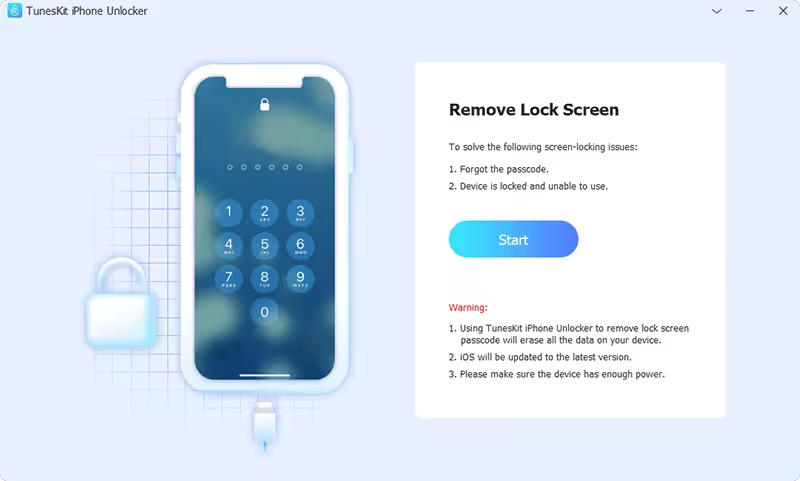
TunesKit iPhone Unlocker is a desktop utility designed to help users regain access to supported iPhone, iPad, and iPod touch devices when they have forgotten a passcode or are locked out. It is available for Windows and Mac and supports a broad range of iOS devices and versions. The current TunesKit technical documentation lists support from iOS 7 through iOS 27 for its general unlocking features, while specific Activation Lock functionality has much narrower device and iOS-version requirements. (TunesKit)
One of the most important things to understand about iPhone unlocking software is that “unlocking an iPhone” can mean several different things. Forgetting a screen passcode, removing an Apple Account/Activation Lock, recovering a disabled device, and removing a Screen Time passcode are different problems. They do not necessarily have the same solution.
For example, Apple itself provides an official recovery process for a forgotten iPhone passcode, but that process involves erasing the iPhone and then restoring it from a backup if one exists. (Apple Support) Activation Lock is different: Apple requires the linked Apple Account credentials or, in qualifying cases, proof of purchase through an Activation Lock support request. (Apple Support)
This guide explains what TunesKit iPhone Unlocker does, whether it works, whether it is safe, what devices it supports, how much it costs, what “free” really means, how it compares with iTunes and Apple’s official methods, and how to choose the right solution for a locked iPhone.

Quick Answer: Does TunesKit iPhone Unlocker Work?
Yes, TunesKit iPhone Unlocker can work for supported iPhone, iPad, and iPod touch unlocking scenarios, but its success depends on the device model, iOS version, type of lock, and the specific feature being used.
TunesKit’s current technical specifications list:
- Windows 11, 10, 8.1, 8, and 7
- macOS versions from OS X 10.8 through macOS 26
- iOS 7 through iOS 27 for general unlocking features
- iPhone, iPad, and iPod touch support
- Forgot-passcode scenarios
- Disabled/locked iPhones
- Broken or unresponsive screens
- Face ID or Touch ID problems
- Screen Time passcode issues
- Apple Account password-related situations
- MDM-related situations
- iTunes backup password recovery/removal features
However, the Remove iCloud Activation Lock feature has much narrower compatibility. TunesKit currently lists iOS 12.0 through 16.7.15 and specific older iPhone/iPad/iPod models for that particular function. (TunesKit)
So it would be inaccurate to say that TunesKit can unlock every iPhone in every situation.
TunesKit iPhone Unlocker at a Glance
| Feature | TunesKit iPhone Unlocker |
|---|---|
| Main purpose | iPhone/iPad/iPod unlocking |
| Windows | Yes |
| macOS | Yes |
| iPhone support | Yes |
| iPad support | Yes |
| iPod touch support | Yes |
| Forgot screen passcode | Yes, supported devices |
| Disabled iPhone | Yes, supported scenarios |
| Face ID problems | Supported scenarios |
| Touch ID problems | Supported scenarios |
| Screen Time passcode | Supported |
| Apple Account-related unlocking | Supported features vary |
| MDM-related lock | Supported scenarios |
| iTunes backup password | Supported feature |
| Activation Lock | Separate feature with limited compatibility |
| Free download | Yes |
| Fully free unlocking | No |
| Monthly plan | $34.95 currently listed |
| Annual plan | $49.95 currently listed |
| Lifetime plan | $59.95 currently listed |
| Windows/Mac license | Available |
| Data-loss risk | Yes, depending on operation |
| Best for | Owners locked out of supported devices |
TunesKit’s current store lists $34.95/month, $49.95/year, and $59.95 lifetime for iPhone Unlocker, although prices and promotions can change. (TunesKit)
What Is TunesKit iPhone Unlocker?
TunesKit iPhone Unlocker is software for dealing with several types of locks and access problems on Apple mobile devices.
The software is designed for situations where a user cannot normally access an iPhone, iPad, or iPod touch.
Common scenarios include:
- Forgotten screen passcode
- Disabled iPhone
- Too many incorrect passcode attempts
- Broken touchscreen
- Face ID not working
- Touch ID not working
- Forgotten Screen Time passcode
- Certain Apple Account-related problems
- MDM-related locks
- Forgotten iTunes backup passwords
TunesKit’s current technical page explicitly lists these scenarios under its supported unlocking situations. (TunesKit)
However, this does not mean that every type of lock can be removed from every device.
TunesKit iPhone Unlocker vs iOS System Recovery
These two TunesKit products are easy to confuse.
TunesKit iPhone Unlocker
Designed primarily for:
- Forgotten passcodes
- Disabled devices
- Certain account/lock problems
- Screen Time passcode
- MDM-related situations
- Other supported unlocking tasks
TunesKit iOS System Recovery
Designed primarily for:
- Apple logo loops
- Recovery-mode problems
- DFU-mode problems
- Black screen
- White screen
- Boot loops
- Update failures
- Restore errors
- Other iOS system problems
TunesKit’s current iOS System Recovery specifications list numerous system-related problems, including boot loops, recovery-mode problems, update failures, restore errors, and activation errors. (TunesKit)
Therefore:
Locked out because you forgot your passcode → iPhone Unlocker
iPhone stuck on Apple logo → iOS System Recovery
This distinction can save you from purchasing the wrong product.
Does TunesKit iPhone Unlocker Work?
It can work when the iPhone and locking situation fall within its supported specifications.
TunesKit itself states that its software works when the device, system version, and particular issue are supported. (TunesKit)
The current technical specification page is particularly important because it separates ordinary unlocking compatibility from Activation Lock compatibility.
For general features, TunesKit lists support through iOS 27 and a long list of iPhone generations, including newer models such as the iPhone 17 series. (TunesKit)
However, the Activation Lock feature is much more restricted.
TunesKit currently lists Activation Lock support for selected older devices running:
iOS 12.0–16.7.15
This includes certain models from the iPhone 6s through iPhone X generation and selected iPads and iPod touch devices. (TunesKit)
Therefore, when someone asks:
“Does TunesKit iPhone Unlocker work on the latest iPhone?”
the correct answer is:
Its general unlocking features have broad current iOS support, but individual functions—including Activation Lock removal—have separate and much narrower requirements.
How TunesKit iPhone Unlocker Works in General
TunesKit is desktop software, so the general workflow involves connecting the iPhone to a Windows PC or Mac.
A typical supported passcode-recovery workflow involves:
- Installing TunesKit iPhone Unlocker.
- Connecting the iPhone to the computer.
- Selecting the appropriate unlocking function.
- Identifying the connected device.
- Following the software’s instructions.
- Entering recovery/DFU mode when required.
- Downloading or using the appropriate firmware.
- Performing the supported unlock operation.
- Setting up the iPhone again afterward if the process erased it.
The exact process depends on the lock type.
Because a forgotten passcode normally requires erasing the device, users should have a backup whenever possible.
Can I Unlock My iPhone for Free?
Yes, you can try Apple’s official recovery methods without paying for third-party software, but there is no legitimate universal method that magically removes a forgotten iPhone passcode while preserving all data.
Apple’s official instructions state that if you forget the iPhone passcode, you can erase the iPhone using a computer or recovery mode and then set a new passcode. If you have a previous iCloud or computer backup, you can restore your data afterward. (Apple Support)
This means the genuinely free approach is generally:
Erase → Set up → Restore from backup
rather than:
Unlock → Keep everything exactly as it was
TunesKit can simplify certain unlocking processes, but the commercial version is not completely free.
Is TunesKit iPhone Unlocker Free?
No. TunesKit iPhone Unlocker is not a completely free unlocking program.
You can download the software for free, but unlocking functionality requires a paid license.
TunesKit’s official store currently lists:
- $34.95/month
- $49.95/year
- $59.95 lifetime
The exact price may vary with promotions and region. (TunesKit)
TunesKit also offers a money-back guarantee under its applicable terms and promotes free updates for its software. (TunesKit)
So when searching for:
TunesKit iPhone Unlocker free download
remember that “free download” does not mean “free full version.”
How Much Does an iPhone Unlocker Cost?
The price depends on the software and type of unlock.
For TunesKit iPhone Unlocker, the official store currently shows:
| License | Current listed price |
|---|---|
| Monthly | $34.95 |
| Annual | $49.95 |
| Lifetime | $59.95 |
(TunesKit)
TunesKit’s FAQ confirms the same current pricing structure. (TunesKit)
The lifetime option can be more economical if you expect to use the software repeatedly, while a monthly license may make more sense for a one-time emergency.
However, always check the current checkout page before purchasing because software prices and promotions can change.
Is TunesKit.com Safe?
TunesKit.com is the official website of TunesKit, an established software developer, and TunesKit states that its official software is clean and free from malware.
TunesKit’s current FAQ says the company has operated since 2014 and develops iOS-related utilities for Windows and Mac. It also advises users to download its software from the official website and avoid cracked or repackaged versions. (TunesKit)
The company’s current product pages provide:
- Product documentation
- Technical specifications
- Support
- Pricing
- Privacy information
- Refund information
- Software updates
- Installation guides
That is a stronger trust signal than an anonymous website offering a “free full version.”
Nevertheless, users should distinguish between:
TunesKit.com
and
third-party websites distributing modified TunesKit installers.
Only the official source should be considered the recommended download location.
Is TunesKit Good?
TunesKit can be a useful option for users who specifically need a Windows or Mac utility for supported iPhone unlocking scenarios.
Its strengths include:
- Broad general iOS compatibility
- Windows and Mac support
- Support for older and newer iPhones
- Dedicated unlocking workflows
- Support for iPad and iPod touch
- Free download/trial availability
- Lifetime license option
- Regular software updates
- Separate tools for system recovery and data recovery
TunesKit’s current iPhone Unlocker release history also shows that the product continues to receive updates. Version 4.0, released in June 2026, added a password manager and camera-sound feature and expanded the product’s capabilities. (TunesKit)
However, its limitations are equally important.
TunesKit iPhone Unlocker Pros and Cons
Pros
- Supports Windows and Mac
- Supports many iPhone generations
- Supports iPad and iPod touch
- Current general compatibility extends to iOS 27
- Handles several different lock scenarios
- Provides a free download
- Offers a lifetime license
- Provides technical documentation
- Regular updates
- Dedicated recovery/unlocking workflows
Cons
- Full unlocking requires payment
- Some operations can erase user data
- Activation Lock support is much narrower than general passcode support
- Results depend on device and iOS version
- Official Apple methods should be considered first
- Some advanced operations can be technically complex
- “Unlock” does not mean every Apple security mechanism can be bypassed
Can You Really Unlock a Locked iPhone?
Yes, but the answer depends on what kind of lock you’re dealing with.
There are several different scenarios.
Forgotten Screen Passcode
This can generally be resolved by erasing the iPhone and setting it up again.
Disabled iPhone
A disabled iPhone can generally be restored using Apple’s official recovery process or compatible third-party tools.
Activation Lock
This is different.
Activation Lock is tied to the Apple Account associated with the device. Apple states that the linked Apple Account credentials or device passcode can be required to remove Activation Lock, and Apple offers a support request when the owner has valid proof of purchase. (Apple Support)
MDM Lock
This is usually controlled by an organization.
If the phone belongs to a business or school, the proper route is normally to contact the organization’s administrator.
Therefore, “locked iPhone” is not a single technical problem.
Can I Use iTunes to Unlock My iPhone?
You can use Apple’s official computer-based recovery process to erase and restore a forgotten-passcode iPhone, but iTunes is not a universal unlock tool.
Apple’s current documentation explains that if you forget your passcode, you can erase the iPhone with a computer or recovery mode and then restore it from a backup. (Apple Support)
Historically, iTunes was the central Windows application for many iPhone management functions. Modern Apple device management on Windows is increasingly handled through Apple’s newer applications, while Finder handles many device functions on modern Macs.
The important point is:
Restore is not the same thing as bypassing Activation Lock.
If you restore an iPhone that is still linked to another person’s Apple Account, Activation Lock can remain.
Can iTunes Remove Activation Lock?
No, restoring an iPhone does not legitimately remove another person’s Activation Lock.
Apple specifically recommends checking Activation Lock before buying a used iPhone.
If a used device displays “iPhone Locked to Owner”, Apple says not to take ownership until the previous owner removes the device from their account. (Apple Support)
This is an important distinction because a factory reset does not automatically turn a previously owned Activation-Locked iPhone into an unrestricted device.
Activation Lock vs Screen Passcode
These two locks are frequently confused.
| Lock | What it protects | Normal legitimate solution |
|---|---|---|
| Screen passcode | Access to the device | Erase/reset and restore backup |
| Face ID/Touch ID issue | Biometric access | Use passcode/recovery process |
| Screen Time passcode | Screen Time restrictions | Supported reset/recovery methods |
| Activation Lock | Device ownership | Apple Account credentials or Apple support with proof |
| MDM | Organization management | Contact organization administrator |
| Apple Account lock | Apple account access | Apple’s account recovery process |
This distinction is crucial when evaluating TunesKit iPhone Unlocker.
How to Unlock an iPhone If You Forgot the Passcode
The safest first option is Apple’s official recovery process.
Apple’s current instructions say that a forgotten passcode can require erasing the iPhone with a computer or recovery mode. (Apple Support)
The general process is:
- Connect the iPhone to a computer.
- Put the iPhone into recovery mode if required.
- Use Apple’s device-management software.
- Select the restore/erase option.
- Allow the process to complete.
- Set up the iPhone.
- Restore an available backup.
Important warning
Erasing the iPhone removes data that is not backed up.
Therefore, don’t erase a device casually if you are uncertain about what is stored on it.
Does TunesKit iPhone Unlocker Delete Data?
For a forgotten screen passcode, users should assume that unlocking may require erasing the device.
This is not unique to TunesKit.
Apple’s own forgotten-passcode process involves erasing the iPhone before setting a new passcode. (Apple Support)
Therefore, a user should not purchase an iPhone unlocking application based on the assumption that it will always remove a forgotten passcode while preserving everything stored on the device.
Before starting any operation:
- Check iCloud backups.
- Check computer backups.
- Confirm whether important photos are synchronized.
- Understand the selected mode.
- Read the software’s warning messages.
What If My iPhone Is Disabled?
An iPhone may become disabled after too many incorrect passcode attempts.
Apple’s current documentation explains that if you cannot remember your passcode, you can erase the device with a computer or recovery mode and then set a new passcode. (Apple Support)
TunesKit lists a disabled or locked iPhone as one of its supported general unlocking scenarios. (TunesKit)
Again, the important question is whether you have a backup.
If you do, restoring the backup after the erase can recover much of your previous content.
TunesKit iPhone Unlocker Supported Devices
The current TunesKit technical specification page lists an extensive range of iPhone models.
General unlocking compatibility includes:
- iPhone 17 series
- iPhone 16 series
- iPhone 15 series
- iPhone 14 series
- iPhone 13 series
- iPhone 12 series
- iPhone 11 series
- iPhone XS series
- iPhone XR
- iPhone X
- iPhone 8 series
- iPhone 7 series
- iPhone SE generations
- iPhone 6 series
- iPhone 5 series
- iPhone 4 series
It also lists iPad Pro, iPad Air, iPad mini, and standard iPad models, plus multiple iPod touch generations. (TunesKit)
TunesKit iPhone Unlocker Supported iOS Versions
For general unlocking features, TunesKit currently lists:
iOS 7 through iOS 27. (TunesKit)
This is significantly broader than its Activation Lock compatibility.
For Activation Lock, TunesKit currently lists:
iOS 12.0 through iOS 16.7.15
and selected older hardware. (TunesKit)
Therefore, do not use the phrase:
“TunesKit supports iOS 27 Activation Lock bypass.”
That would be misleading.
The general product compatibility and Activation Lock compatibility are different.
TunesKit iPhone Unlocker for Windows
TunesKit currently lists support for:
- Windows 11
- Windows 10
- Windows 8.1
- Windows 8
- Windows 7
The minimum processor requirement is listed as a 1 GHz processor, with at least 256 MB RAM and approximately 200 MB free disk space. iTunes is also listed as a required component. (TunesKit)
For most modern Windows users, the hardware requirements are extremely modest.
TunesKit iPhone Unlocker for Mac
TunesKit also provides a Mac version.
Its current specification page lists:
- macOS 26
- macOS 15
- macOS 14
- macOS 13
- macOS 12
- macOS 11
- macOS 10.15
- macOS 10.14
- macOS 10.13
- macOS 10.12
- OS X 10.11 and older versions down to OS X 10.8
The Mac minimum RAM requirement is listed as 512 MB. (TunesKit)
If you’re running a very old Mac, however, check compatibility before installation.

What Is New in TunesKit iPhone Unlocker?
TunesKit released iPhone Unlocker V4.0 in June 2026.
According to the company’s release announcement, V4.0 introduced:
- Password Manager
- Ability to view saved Wi-Fi passwords
- Website and app credentials
- Email account passwords
- Apple ID information
- Camera sound control
- An updated interface
The company states that V4.0 supports iOS 7 through iOS 26 and is available for Windows and macOS. (TunesKit)
This means the product has expanded beyond its original basic passcode-unlocking role.
TunesKit iPhone Unlocker Password Manager
The Password Manager introduced in V4.0 is an additional feature rather than the core purpose of the application.
TunesKit says it can scan supported iPhone/iPad devices for stored:
- Wi-Fi passwords
- Website credentials
- App account credentials
- Email account information
- Apple ID information
(TunesKit)
Because this involves sensitive credentials, users should be particularly careful about where they install and run the software.
Never use a modified copy of an application capable of accessing saved passwords.
Is TunesKit iPhone Unlocker Safe for Passwords?
The safest approach is to use the official TunesKit installer on a trusted computer.
Password-management functionality is inherently sensitive.
If a computer is infected with malware, any legitimate password-management application could potentially expose information to that malware.
Therefore:
- Keep Windows/macOS updated.
- Use reputable antivirus/security software.
- Download TunesKit from its official website.
- Don’t use cracked copies.
- Don’t run it on a public computer.
- Don’t share exported credentials unnecessarily.
TunesKit itself states that its official programs are free from malware and recommends avoiding cracked or repackaged versions. (TunesKit)
Is TunesKit iPhone Unlocker Legit?
TunesKit iPhone Unlocker is a legitimate commercial software product sold by TunesKit.
It has:
- An official product page
- Technical specifications
- Release announcements
- Paid licenses
- Customer support
- Documentation
- Refund policies
- Windows and Mac versions
TunesKit states that it has been developing software since 2014. (TunesKit)
That does not mean every unlocking attempt will succeed.
“Legitimate software” and “guaranteed to unlock every device” are two very different claims.
Is TunesKit iPhone Unlocker Better Than iTunes?
It depends on what you need.
iTunes/Apple official recovery
Best when:
- You forgot your passcode.
- You own the phone.
- You have a backup.
- You want the official Apple method.
- You do not want to pay for third-party software.
TunesKit iPhone Unlocker
Potentially useful when:
- You want a guided third-party workflow.
- Your specific device/issue is supported.
- You need additional unlocking-related features.
- You want a dedicated interface.
The biggest advantage of Apple’s method
It is official and free.
The biggest advantage of TunesKit
It packages multiple device-unlocking functions into one dedicated utility.
Which iPhone Unlocker Software Is the Best?
There is no single best iPhone unlocker for every situation.
The right choice depends on the type of lock.
For forgotten passcodes
Start with Apple’s official recovery method.
For system problems
Consider Apple’s recovery/update options first, followed by a reputable repair utility when appropriate.
For Activation Lock
Use Apple’s official account-removal process.
Apple says the previous owner’s Apple Account information is required in normal circumstances, and proof of purchase may be required for an Activation Lock support request. (Apple Support)
For organizational MDM
Contact the organization controlling the device.
For third-party tools
TunesKit, iMyFone Fixppo, and Tenorshare ReiBoot are examples of commercial iOS utilities, but each has different compatibility and pricing.
The “best” product is therefore the one that supports your exact device and exact problem.
Can You Unlock an iPhone Without a Computer?
For some newer iPhone situations, Apple provides on-device recovery/reset options depending on the circumstances.
However, if you’ve completely forgotten the passcode or the device requires recovery-mode restoration, a computer may be necessary.
Apple’s current documentation explicitly describes using a computer or recovery mode to erase an iPhone when the passcode has been forgotten. (Apple Support)
So the answer is:
Sometimes, but not for every locked-iPhone scenario.
What Is the Easiest Way to Unlock an iPhone?
For a forgotten screen passcode, the easiest legitimate approach is usually:
- Confirm you own the iPhone.
- Check whether you have an iCloud/computer backup.
- Use Apple’s official recovery/reset process.
- Erase the iPhone.
- Set it up again.
- Restore your backup.
Apple’s official instructions are designed specifically for forgotten passcodes. (Apple Support)
If you choose TunesKit instead, use its guided workflow only for a device you own or are authorized to manage.
What About a Second-Hand Locked iPhone?
This is one of the most important situations where users should not rely on an unlocker.
If you’re buying a used iPhone, check it before paying.
Apple says that if you see “iPhone Locked to Owner”, you should not take ownership until the previous owner removes the device from their account. (Apple Support)
The safest process is:
- Ask the seller to erase the iPhone.
- Start the setup process.
- Make sure it reaches the Hello screen without asking for the previous owner’s Apple Account.
- Only then complete the purchase.
Do not purchase an Activation-Locked iPhone simply because a seller says:
“You can remove the lock with software.”
That can create unnecessary legal, technical, and financial problems.
Can TunesKit Remove Activation Lock?
TunesKit advertises a separate Activation Unlocker capability, but this is not equivalent to saying every Activation-Locked iPhone can be unlocked.
The current iPhone Unlocker technical specifications list a limited Activation Lock compatibility range of iOS 12.0–16.7.15 and selected older devices. (TunesKit)
TunesKit’s May 2026 release announcement also describes a jailbreak-free Activation Lock feature for iPhone 6s through iPhone X running iOS 12 through 16.7.15. (TunesKit)
Because Activation Lock is an ownership-security feature, only use such functionality on a device you own or are explicitly authorized to manage.
For a normal used-device purchase, Apple’s official recommendation is to have the previous owner remove the device from their Apple Account. (Apple Support)
Important Warning About Activation Lock
Activation Lock exists specifically to prevent someone from using a lost or stolen iPhone.
Therefore, a responsible unlocking guide should not treat Activation Lock as an ordinary forgotten-passcode problem.
If the phone belongs to someone else:
- Ask the owner to remove it from their Apple Account.
- Ask for proof of purchase where applicable.
- Return the device to the seller if the seller cannot remove the lock.
- Do not attempt to defeat ownership protections on a device you are not authorized to use.
Apple provides an official Activation Lock support request when qualifying users have proof of purchase. (Apple Support)
Does Unlocking an iPhone Remove Apple ID?
Not necessarily.
This is another common misunderstanding.
A screen passcode and Apple Account are separate security layers.
Removing a screen passcode may result in the phone being erased, but it does not automatically give you ownership of an iPhone linked to another person’s Apple Account.
Activation Lock can remain.
Apple explicitly warns buyers to check that a used iPhone is no longer linked to the previous owner’s account before taking ownership. (Apple Support)
TunesKit iPhone Unlocker vs Activation Unlocker
TunesKit currently separates its products into:
iPhone Unlocker
and
Activation Unlocker
The official store lists them separately. (TunesKit)
This reinforces the fact that:
Screen-passcode unlocking ≠ Activation Lock removal
If you are unsure which one you need, first identify the exact message displayed on your iPhone.
Common TunesKit iPhone Unlocker Problems
TunesKit Does Not Detect My iPhone
Try:
- Unlocking the phone if possible.
- Using a different USB cable.
- Using another USB port.
- Installing/updating iTunes where required.
- Restarting TunesKit.
- Restarting the computer.
- Checking whether Windows/macOS recognizes the device.
- Entering recovery mode if the software requires it.
iPhone Is Stuck in Recovery Mode
If the device is stuck in recovery mode, you may be dealing with a system problem rather than a simple passcode issue.
TunesKit has a separate iOS System Recovery product specifically designed for recovery-mode and other system problems. (TunesKit)
Apple also provides its own recovery-mode procedures.
TunesKit Says My Device Is Unsupported
Check:
- iPhone model.
- iOS version.
- Selected TunesKit function.
- Windows/macOS version.
- Whether you selected general unlock or Activation Lock.
Remember that Activation Lock has significantly narrower support than general unlocking. (TunesKit)
TunesKit iPhone Unlocker vs ReiBoot
Both are commercial iOS utilities.
TunesKit iPhone Unlocker
Focuses on:
- Passcode unlocking
- Disabled iPhone
- Screen Time
- MDM-related situations
- Account/lock-related functions
- Additional password tools
ReiBoot
Generally focuses more heavily on:
- iOS system repair
- Recovery mode
- DFU/recovery issues
- iPhone stuck problems
- iOS repair
If your phone is locked because you forgot the passcode, a dedicated unlocker makes more sense.
If the phone is stuck on an Apple logo or recovery screen, system-repair software may be more appropriate.
TunesKit iPhone Unlocker vs iMyFone Fixppo
The same distinction applies.
TunesKit iPhone Unlocker is primarily an unlocking product.
Fixppo is heavily positioned around iOS system repair and recovery.
Before buying either product, identify the exact symptom.
For example:
Forgot passcode → Unlocker
Apple logo loop → System repair
Recovery mode problem → Recovery/repair
Activation Lock → Ownership/account issue
This prevents unnecessary purchases.
Is It Worth Paying for an iPhone Unlocker?
It depends.
If Apple’s free recovery method solves your problem, there may be no reason to pay.
However, third-party software can be worthwhile if:
- You want a more guided interface.
- You need one of its additional supported features.
- Your device is compatible.
- You prefer a single utility for several iOS problems.
- You have already confirmed that the free official route does not meet your needs.
The important thing is to test compatibility before buying.
What Should You Do Before Unlocking an iPhone?
Before using any unlocking software, follow this checklist.
1. Confirm ownership
Make sure the device belongs to you or you are authorized to manage it.
2. Identify the lock
Is it:
- Screen passcode?
- Disabled?
- Apple Account?
- Activation Lock?
- Screen Time?
- MDM?
3. Check backups
Look for:
- iCloud backup
- Mac/PC backup
- Finder backup
- Apple Devices/iTunes backup
4. Check device model
Compatibility matters.
5. Check iOS version
Especially important for Activation Lock.
6. Read data-loss warnings
Do not assume unlocking preserves data.
7. Download official software
Avoid cracks and repackaged versions.
Frequently Asked Questions About TunesKit iPhone Unlocker
Does TunesKit iPhone Unlocker work?
Yes, TunesKit iPhone Unlocker works for supported devices and supported unlocking situations. Its current general specifications list iOS 7 through iOS 27, but individual features have different requirements. Activation Lock support is considerably narrower. (TunesKit)
Can I unlock my iPhone for free?
Yes, Apple’s official forgotten-passcode recovery process can be used without purchasing TunesKit, but it generally involves erasing the iPhone. If a backup exists, you can restore it afterward. (Apple Support)
Which iPhone unlocker software is the best?
There is no universal best unlocker. For forgotten passcodes, Apple’s official recovery method should generally be considered first. Third-party tools such as TunesKit can be useful for supported situations when users want additional guided functionality.
Can I use iTunes to unlock my iPhone?
iTunes or Apple’s computer-based recovery tools can restore an iPhone after a forgotten passcode, but restoring the phone does not remove another person’s Activation Lock. Apple requires the linked account credentials or an eligible Activation Lock support process. (Apple Support)
Is TunesKit.com safe?
TunesKit is the official website of the TunesKit software company. TunesKit states that its official applications are clean and advises users to download software directly from its website rather than using cracked or repackaged versions. (TunesKit)
Can you really unlock a locked iPhone?
Yes, some types of locked iPhones can be recovered or reset. A forgotten screen passcode can normally be resolved by erasing and restoring the device. Activation Lock is different and is tied to ownership/account credentials. (Apple Support)
Is TunesKit good?
TunesKit is a useful commercial iOS utility provider, particularly if your specific device and problem are supported. Its iPhone Unlocker supports many iPhone generations and current iOS versions for general unlocking features. (TunesKit)
How much does an iPhone unlocker cost?
TunesKit currently lists iPhone Unlocker at $34.95 monthly, $49.95 annually, or $59.95 for a lifetime license. Prices can change with promotions and regional pricing. (TunesKit)
What is the easiest way to unlock an iPhone?
For a forgotten screen passcode, Apple’s official erase-and-restore process is usually the safest starting point. If you have a backup, you can restore your data after the device is erased. (Apple Support)
How much does it cost to unlock an iPhone?
It can cost nothing if Apple’s official recovery process is sufficient. Third-party software varies in price. TunesKit currently lists $34.95/month, $49.95/year, and $59.95 lifetime for its iPhone Unlocker. (TunesKit)
Does TunesKit iPhone Unlocker erase data?
A forgotten-passcode unlock should be treated as a data-erasing operation because the standard recovery process requires erasing the iPhone. Apple explicitly says a forgotten passcode can require erasing the device. (Apple Support)
Does TunesKit work on iPhone 17?
TunesKit’s current general technical specifications list the iPhone 17, iPhone 17 Pro, iPhone 17 Pro Max, and iPhone Air among supported devices for general features. Individual unlocking functions may have different requirements. (TunesKit)
Does TunesKit work on iOS 27?
The current TunesKit specifications list iOS 27 for general iPhone Unlocker features. This should not be interpreted as support for every individual feature, especially Activation Lock removal. (TunesKit)
Can TunesKit remove Activation Lock?
TunesKit offers Activation Lock-related functionality, but its current specifications list a limited range of devices and iOS versions for this feature. It currently lists iOS 12.0–16.7.15 and selected older devices. (TunesKit)
Can I remove Activation Lock from a used iPhone?
The safest approach is to have the previous owner remove the device from their Apple Account. Apple explicitly recommends not taking ownership of a used iPhone that displays “iPhone Locked to Owner.” (Apple Support)
Does factory resetting an iPhone remove Activation Lock?
No. A factory reset does not automatically remove the previous owner’s Activation Lock. Apple requires the appropriate Apple Account credentials or an eligible support request with proof of purchase. (Apple Support)
Can Apple remove Activation Lock?
Apple provides an Activation Lock support request for qualifying users who can provide proof of purchase documentation. (Apple Support)
Final Verdict: Is TunesKit iPhone Unlocker Worth It?
TunesKit iPhone Unlocker is a legitimate third-party iOS utility that can be useful when you are locked out of a supported iPhone, iPad, or iPod touch. Its current specifications are extensive, with general unlocking support covering iOS 7 through iOS 27 and many generations of Apple devices. (TunesKit)
Its strongest use case is a forgotten screen passcode or another supported device-access problem where you want a dedicated Windows or Mac utility.
However, users should not confuse all iPhone locks.
A forgotten passcode is different from Activation Lock. Apple’s Activation Lock is an ownership-security mechanism tied to the Apple Account associated with the device. Apple recommends that used-device buyers make sure the previous owner’s account has been removed before taking ownership. (Apple Support)
For a forgotten passcode, Apple’s official recovery method is free, but it can require erasing the iPhone. If you have a backup, you can restore your data afterward. (Apple Support)
TunesKit becomes more attractive when you want a dedicated interface and additional unlocking functions. Its current iPhone Unlocker also includes features beyond basic passcode removal, and V4.0 introduced a password manager and other functionality. (TunesKit)
The current official price is $34.95 per month, $49.95 per year, or $59.95 lifetime, although promotional pricing can change. (TunesKit)
Bottom line
Use Apple first when Apple’s free recovery process solves your problem.
Consider TunesKit iPhone Unlocker when you need a third-party guided unlocking solution for a device and scenario explicitly supported by the software.
Do not purchase a second-hand Activation-Locked iPhone expecting an unlocker to make it legitimate. Apple specifically recommends having the previous owner remove Activation Lock before you take ownership. (Apple Support)
And above all, download TunesKit only from the official website and avoid cracked, modified, portable, or unofficial copies, particularly because this software can interact with highly sensitive information stored on an iPhone. (TunesKit)
Download Now
TunesKit iPhone Unlocker
File Details:
- File Size: 58.3 MB
- System Type: N/A
- Setup Type: N/A