Table of Contents
WinISO: Complete Guide to ISO Editing, Windows ISO Files, Bootable Media, and Windows 11
If you regularly work with ISO files, Windows installation images, bootable discs, or CD/DVD/Blu-ray backups, you may have come across WinISO. It is an ISO image utility designed to open, create, edit, convert, mount, and burn disc-image files. The current WinISO store lists WinISO 7.1.1 for 64-bit Windows 10 and Windows 11, while older WinISO 6 versions remain available for legacy Windows systems. (winiso.com)
The keyword WinISO is also commonly associated with searches such as “WinISO free,” “WinISO Windows 11,” “WinISO software,” “WinISO maker,” and “WinISO free alternative.” These searches often mix two different needs: finding an ISO-management application and finding an actual Windows ISO installation file. Understanding that distinction is important.
Microsoft provides official Windows ISO downloads separately. For example, Microsoft’s current Windows 11 download page provides a multi-edition ISO for x64 devices and also provides tools for creating installation media. (Microsoft)
This guide explains what WinISO does, how it can be used with Windows ISO files, how to create or edit ISO images, whether you can run an ISO on a PC, and how Windows 10 and Windows 11 ISO downloads work.
What Is WinISO?
WinISO is a disc-image management and ISO editing application for Windows. It can work with ISO and several other disc-image formats and provides tools for creating, opening, editing, extracting, converting, mounting, and burning image files.
The official WinISO product information describes the software as an all-in-one disc-image utility. Depending on the version, its functions include editing ISO files, creating new images, converting image formats, mounting images, burning images to optical media, and creating bootable disc images. (v6.winiso.com)
An ISO file is essentially a digital representation of the contents of an optical disc. Instead of keeping the files on a physical CD or DVD, the complete disc structure can be stored in one image file.
This makes ISO files useful for:
- Operating-system installation media
- Software installation discs
- Bootable recovery media
- CD/DVD backups
- Virtual machines
- Archiving optical discs
- Creating replacement installation media
- Testing disc images before burning them
WinISO is particularly useful when you need to work with the contents or boot information inside an ISO, rather than simply downloading an ISO file.
What Can WinISO Do?
WinISO includes several functions aimed at users who regularly handle disc images.
ISO Editing
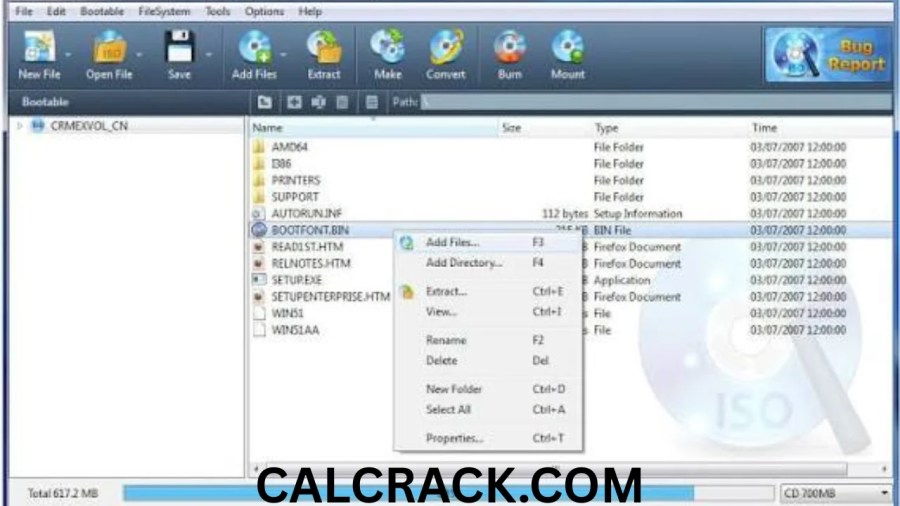
WinISO can open an existing ISO and allow you to add, delete, rename, copy, and extract files. Its official tutorial describes opening an ISO, choosing editing operations, and saving the modified image as a new ISO file. (v6.winiso.com)
This can be useful when you have an ISO containing files that need to be updated without creating the entire image from scratch.
For example, you might have an archive ISO and want to add documentation or another folder. Instead of rebuilding the image with a separate tool, you can open it in WinISO, add the required files, and save the image.
ISO Creation
WinISO can create an ISO image from files and folders. The basic workflow involves creating a new image, adding files or directories, and saving the result as an ISO. (v6.winiso.com)
This is useful when you want to turn a collection of files into a single disc-image file.
ISO Extraction
If you only need files stored inside an ISO, you don’t necessarily need to burn the image to a physical disc. WinISO can extract files from supported disc images to a location on your computer. (v6.winiso.com)
ISO Conversion
WinISO also supports conversion between several disc-image formats. The older Standard 6 documentation specifically lists ISO/BIN conversion and support for formats including NRG, CCD, and MDS. (v6.winiso.com)
Bootable ISO Creation
One of WinISO’s important functions is handling boot information. Its documentation explains that boot information can be imported into an ISO to make the image bootable, after which the image can be saved and used for bootable media. (v6.winiso.com)
This is especially relevant when working with operating-system installation images.
WinISO for Windows 11
WinISO 7 is specifically listed by its developer for Windows 10 and Windows 11 on 64-bit systems. The current store page identifies version 7.1.1 and lists the release date as November 18, 2022. (winiso.com)
If your computer runs Windows 11, WinISO can therefore be used as an ISO-management application. However, it is important to distinguish the application from the Windows operating-system ISO itself.
WinISO does not replace Microsoft’s official Windows download service.
If you need a Windows 11 ISO, Microsoft provides its own official download page. The current page identifies the Windows 11 2025 Update as version 25H2 and provides a direct ISO-download option for x64 devices. (Microsoft)
You can then use the downloaded ISO for purposes supported by Windows and your license, such as installation media creation or mounting the image.
Is WinISO Free?
WinISO has had different versions and editions over the years, so “WinISO free” can refer to more than one product.
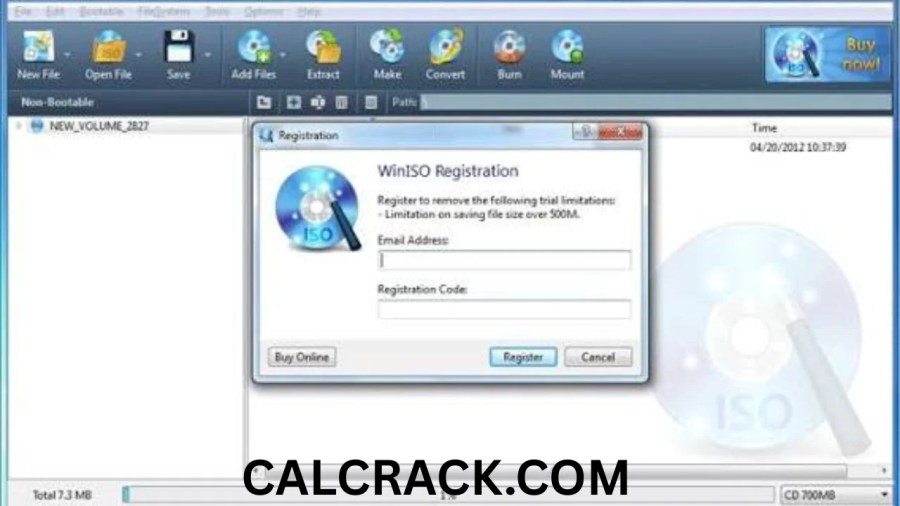
The current official store lists WinISO 7.1.1 at $19.99 and identifies it as the current version for Windows 10/11 64-bit. The same page lists WinISO 6 as a legacy product for Windows XP through Windows 8.1. (winiso.com)
The older WinISO site also lists WinISO 5.3 as completely free, while noting that support is not provided for that older Free WinISO Maker edition. (v6.winiso.com)
Therefore, users searching for “WinISO free” should check which version they are actually getting. An old free version and the current WinISO 7 product are not necessarily the same thing.
For Windows 10 or Windows 11, the current official product page points users toward WinISO 7.
WinISO vs Windows ISO: What Is the Difference?
This is one of the most important points for people searching for WinISO.
WinISO is software for working with ISO files.
A Windows ISO is an installation image containing Windows installation files.
For example:
- WinISO = ISO-management software
- Windows 11 ISO = Windows installation image
- Windows 10 ISO = Windows installation image
- Bootable USB = installation media created from an ISO or another installation method
You don’t need WinISO simply to download a Windows ISO.
Microsoft provides Windows ISO downloads through its official software-download pages. Windows 11’s download page provides an ISO option, while Microsoft’s Windows 10 page provides a Windows 10 disc-image download. (Microsoft)
WinISO becomes useful when you need to inspect, modify, create, convert, mount, or otherwise manage an ISO image.
Can I Get Windows ISO for Free?
Yes, Windows installation ISO files can be downloaded directly from Microsoft’s official software-download pages without paying a separate fee for the ISO file itself.
Microsoft currently provides Windows 11 ISO downloads through its official Windows 11 download page. The ISO is described as a multi-edition image for x64 devices, with the appropriate edition determined during installation according to the applicable product key or licensing situation. (Microsoft)
Microsoft also provides a Windows 10 ISO download page. However, there is an important current distinction: Windows 10 reached the end of support on October 14, 2025. Microsoft states that after this date Windows 10 no longer receives free software updates, technical support, or security fixes. (Microsoft)
So downloading an ISO and having a valid license are separate matters. The ISO can be obtained as installation media, but activation and licensing depend on the Windows edition and your license.
For security and authenticity, downloading Windows installation media directly from Microsoft is preferable to obtaining modified images from unknown third-party websites.
How to Make a Windows ISO File
If you already have Windows installation files and need to create an ISO, the exact process depends on the source of those files.
WinISO provides an ISO-creation workflow where you create a new image, add files or folders, and save the project as an ISO. (v6.winiso.com)
A simplified workflow is:
- Open WinISO.
- Create a new image.
- Add the required files and folders.
- Organize the image contents.
- Add appropriate boot information if the image needs to be bootable.
- Save the project as an ISO file.
- Test or mount the resulting image before using it for installation.
The important part is that simply putting Windows installation files into an ISO does not automatically make it a properly bootable Windows installation image. Boot information and the correct Windows installation structure matter.
For official Windows installation media, Microsoft’s own Media Creation Tool can also create installation media or save a Windows 11 ISO. Microsoft specifically provides an ISO option in its Windows 11 media-creation workflow. (Microsoft)
How to Make a Bootable ISO with WinISO
WinISO provides tools for adding boot information to an ISO.
According to the official tutorial, the general process is to open a non-bootable ISO, select the bootable option, set or import the appropriate boot image, and save the resulting ISO. (v6.winiso.com)
The basic process is:
Step 1: Open the ISO
Launch WinISO and open the image you want to modify.
Step 2: Check the boot information
WinISO can indicate whether an image contains boot information.
Step 3: Set the boot image
Use the bootable tools to select appropriate boot information.
Step 4: Save the image
Save the modified image as an ISO.
Step 5: Test it
Before relying on the ISO for an important installation, test it where practical. A bootable image should be tested to ensure that the expected boot process works.
WinISO’s documentation also describes extracting boot information from existing bootable media and using it when creating another bootable image. (v6.winiso.com)
Can I Run an ISO on a PC?
Yes, but an ISO file itself is not normally an application that you launch like an EXE file.
There are several ways to use an ISO.
Mount the ISO
Modern Windows versions can mount ISO files as virtual discs. Microsoft specifically documents mounting a Windows 11 ISO by right-clicking the file and selecting Mount. The mounted image appears as a virtual DVD drive, from which setup files can be accessed. (Microsoft)
Use the ISO in a Virtual Machine
An ISO can also be attached to a virtual machine as virtual installation media. This is useful when installing Windows or another operating system in a virtual environment.
Create Bootable Installation Media
An ISO can be used to create bootable USB or DVD installation media. Microsoft provides Windows installation-media tools for this purpose. (Microsoft)
Open the ISO Contents
If you simply need to view or extract files, an ISO can be opened or mounted without installing anything from it.
So, when someone asks whether they can “run an ISO,” the answer depends on what they mean by run. You can mount it, extract its contents, use it as virtual media, or use it to create bootable installation media.
How Do I Get My Windows ISO File?
If you need an official Windows ISO, the safest starting point is Microsoft’s software-download website.
For Windows 11, Microsoft currently provides a Download Windows 11 Disk Image (ISO) section. The page lets users select the appropriate edition and language and download the installation image. (Microsoft)
Microsoft also provides a dedicated Windows 10 ISO page. That page identifies Windows 10 version 22H2 and provides installation-image downloads, while warning that Windows 10 support ended on October 14, 2025. (Microsoft)
After downloading an ISO, you can:
- Mount it in Windows.
- Create installation media.
- Use it with a virtual machine.
- Inspect or extract its contents.
- Manage it with ISO software such as WinISO.
Microsoft also provides instructions for checking the integrity and authenticity of downloaded ISO files using SHA-256 hashes and PowerShell’s Get-FileHash command. (Microsoft)
Which Windows OS Is Free?
This question needs a distinction between downloading installation media and licensing Windows.
Microsoft makes Windows installation media available for download, including Windows 11 and Windows 10 ISO files. That does not mean every installation is automatically licensed without activation requirements.
Windows 11 installation media can be downloaded through Microsoft’s official website, but Microsoft’s download instructions state that users need a Windows license for installation. (Microsoft)
Windows 10 installation media is also available, but Windows 10 is now past its standard support period. Microsoft states that free updates, technical support, and security fixes ended after October 14, 2025. (Microsoft)
Therefore, “free Windows ISO” generally means free access to the installation image, not necessarily a free perpetual Windows license.
Is Windows 11 ISO Free to Download?
Yes. Microsoft provides the Windows 11 ISO as a download through its official website.
The current Windows 11 page identifies the 2025 Update as version 25H2 and provides a multi-edition ISO for x64 devices. (Microsoft)
The important distinction is between downloading the ISO and activating Windows. The ISO is installation media. Your activation status depends on your product key, digital license, edition, and licensing circumstances.
Microsoft also provides instructions for creating Windows 11 installation media with a USB flash drive or DVD. Its Media Creation Tool requires a blank USB drive with at least 8 GB when using that method. (Microsoft)
Is Windows 10 Free Now?
Windows 10 installation media remains available from Microsoft, but Windows 10 itself is not simply a permanently free operating system.
More importantly, Windows 10 reached the end of support on October 14, 2025. Microsoft states that after that date it no longer provides free software updates, technical support, or security fixes for the standard Windows 10 release. (Microsoft)
That means someone downloading a Windows 10 ISO today should understand the support situation before installing it on a primary computer.
If a compatible PC can move to Windows 11, Microsoft provides Windows 11 installation options and system-requirement information on its official download page. (Microsoft)
How Much GB Is a Windows 10 ISO File?
There is no single universal ISO size that applies to every Windows 10 download.
The final file size can vary depending on factors such as:
- Architecture
- Language
- Edition
- Release
- Microsoft media configuration
Microsoft’s Windows 10 ISO page provides the available Windows 10 disc image rather than presenting one universal “Windows 10 ISO size” for every possible configuration. (Microsoft)
For practical purposes, you should have several gigabytes of free storage available before downloading an ISO. If you intend to create USB installation media, you should also use a USB drive with enough capacity for the specific installation image and creation process.
The same principle applies to Windows 11. Microsoft specifically says users should have sufficient storage available on the computer, USB device, or external drive where the ISO will be downloaded. (Microsoft)
WinISO Windows 10 and Windows 11 Compatibility
The current WinISO store lists WinISO 7 for Windows 10/11 64-bit. The current listed version is 7.1.1. (winiso.com)
Older WinISO 6 is positioned as a legacy version for Windows XP, Vista, 7, 8, and 8.1. This distinction matters because users searching for “WinISO Windows 7” or “WinISO Windows 10” may encounter different versions. (winiso.com)
For modern computers, checking the operating-system requirements before installing an older WinISO release is important.
WinISO’s documentation also notes that WinISO 7 works properly on high-DPI displays, while WinISO 6 may require a compatibility scaling adjustment on newer Windows versions. (winiso.com)
WinISO Features at a Glance
The most useful WinISO functions include:
- ISO file creation
- ISO editing
- File extraction
- File and folder addition
- File deletion
- File renaming
- ISO conversion
- ISO mounting
- Bootable ISO creation
- Boot information extraction
- ISO burning
- CD/DVD/Blu-ray image management
- Support for multiple image formats
- Large-image handling in supported versions
The official WinISO documentation confirms many of these functions, including editing ISO contents, creating ISO images, making bootable images, mounting images, and burning disc images. (v6.winiso.com)
WinISO for Bootable USB Creation
One common misconception is that WinISO itself is the same thing as a USB installation tool.
WinISO primarily focuses on disc-image management. A Windows ISO can be prepared and managed with WinISO, but creating a bootable USB involves additional media-writing functionality or a dedicated installation-media tool.
Microsoft’s official Windows 11 Media Creation Tool can create bootable installation media on a USB drive. Microsoft specifies an empty USB flash drive with at least 8 GB for that workflow, and warns that existing content on the drive will be deleted. (Microsoft)
Therefore, if your goal is simply install Windows 11 from a USB, Microsoft’s official media-creation process may be more straightforward than manually modifying an ISO.
WinISO becomes particularly relevant when you need to inspect or modify the ISO itself.
WinISO as an ISO Editor
The ISO-editor function is one of the main reasons users search for WinISO software.
You can open an ISO and work with its internal files instead of extracting everything manually. The official tutorial lists operations including adding files, adding directories, deleting content, renaming files, viewing files, extracting content, and copying files. (v6.winiso.com)
This makes WinISO useful for users who work with:
- Installation images
- Bootable images
- Software archives
- Backup images
- Optical-disc projects
- Custom disc images
However, editing a bootable operating-system ISO requires care. Changing or removing important installation files can make the resulting image unusable.
WinISO for ISO Mounting
Mounting an ISO means making Windows treat the image as a virtual optical disc.
This can be useful when you want to access files inside an ISO without burning it to physical media.
WinISO’s older Standard 6 documentation lists virtual-drive and on-the-fly mounting support. (v6.winiso.com)
Modern Windows versions can also mount ISO files directly. Microsoft documents this functionality for Windows 11 installation images, allowing users to right-click the ISO, choose Mount, and then access the virtual disc contents. (Microsoft)
Therefore, you don’t necessarily need third-party ISO software merely to mount an ISO on a modern Windows PC.
Is WinISO Useful for Windows Installation?
WinISO can be useful when your Windows installation workflow involves ISO manipulation.
For example, you might use it to:
- Inspect an installation image
- Extract files
- Create a disc image
- Work with boot information
- Modify an image for a specific technical purpose
- Convert supported image formats
- Burn an image to optical media
However, if you simply want to install Windows 11, Microsoft already provides an official ISO and installation-media workflow. (Microsoft)
This means the right tool depends on your objective. WinISO is primarily an ISO-management application, while Microsoft’s Media Creation Tool and official ISO download pages are designed specifically around Windows installation media.
WinISO vs Built-In Windows ISO Features
Modern Windows already handles some basic ISO tasks.
For example, Windows can mount ISO images, allowing users to access their contents without additional software. Microsoft documents this process for Windows 11 installation images. (Microsoft)
WinISO provides a broader collection of ISO-focused tools, including editing, creation, conversion, boot-image management, and burning.
A simple way to think about it is:
Windows built-in tools: useful for basic ISO mounting and installation.
WinISO: useful when you need deeper ISO editing and disc-image management.
Microsoft Media Creation Tool: useful when you specifically want to create Windows installation media.
WinISO Safety and ISO Download Advice
When dealing with operating-system images, the source of the ISO is important.
A modified Windows ISO from an unknown website may contain unwanted changes, bundled software, or malware. For Windows installation media, Microsoft’s official download pages provide the safest starting point.
Microsoft also provides ISO verification instructions using SHA-256 hashes. If the calculated hash matches Microsoft’s published value, it provides evidence that the downloaded file has not been corrupted or altered. (Microsoft)
The same principle applies to WinISO itself: download the application from its official publisher when possible and verify that you are installing the version you actually need.
Common WinISO Search Terms Explained
WinISO Free
Usually refers to older free WinISO editions such as WinISO 5.3. The current WinISO 7 is listed as a paid product. (winiso.com)
WinISO Windows 11
Usually refers to using WinISO on Windows 11. The current WinISO 7 is designed for Windows 10/11 64-bit. (winiso.com)
WinISO Software
Refers to the ISO and disc-image management application itself.
WinISO Maker
Usually refers to WinISO’s ability to create ISO images from files, folders, or optical-disc content.
WinISO Free Alternative
Users looking for alternatives can consider tools that provide ISO creation, mounting, extraction, or bootable-media functions. The best choice depends on whether the goal is basic mounting, ISO editing, image creation, or Windows installation.
WinISO Windows 7
Older WinISO versions support Windows 7. The official store now categorizes WinISO 6 as a legacy product, while WinISO 7 targets Windows 10 and Windows 11 64-bit. (winiso.com)
WinISO Windows 10
WinISO 7 is listed for Windows 10/11 64-bit, making it the relevant modern version for supported Windows 10 systems. (winiso.com)
Advantages of Using WinISO
WinISO can be useful for users who frequently work with disc images because it combines several operations in one application.
Its notable capabilities include ISO editing, creation, extraction, conversion, boot-image management, mounting, and burning. (v6.winiso.com)
Another benefit is that it can work with more than just a simple “open and burn” workflow. Users can inspect and manipulate files inside supported image formats.
The current WinISO 7 release is also specifically targeted at modern 64-bit Windows 10 and Windows 11 systems. (winiso.com)
Limitations to Consider
WinISO is not necessary for every ISO-related task.
If you only need to mount an ISO, Windows already provides built-in functionality. If you need a Windows 11 installation image, Microsoft provides the ISO directly. And if you need a bootable USB installation drive, Microsoft provides its own media-creation process. (Microsoft)
Another consideration is version compatibility. WinISO 7 is aimed at Windows 10 and 11 64-bit, while older WinISO versions are intended for legacy Windows systems. (winiso.com)
Users should therefore select the appropriate version rather than automatically installing an older release simply because it appears in search results.
Final Thoughts on WinISO
WinISO is an ISO and disc-image management tool rather than a Windows ISO download service. Its main purpose is to help users create, edit, extract, convert, mount, burn, and manage supported disc-image files.
For Windows 10 and Windows 11 users, the current WinISO 7 is listed for 64-bit systems, with version 7.1.1 shown on the official store. (winiso.com)
If your goal is to obtain a genuine Windows ISO, Microsoft provides official Windows 11 and Windows 10 download pages. Windows 11’s current download page offers the 25H2 release and an x64 ISO option, while Microsoft’s Windows 10 page still provides Windows 10 22H2 installation media but notes that standard Windows 10 support ended on October 14, 2025. (Microsoft)
For users who need more than simply mounting an ISO, WinISO’s editing and boot-image tools can provide additional control over disc-image files. Its usefulness therefore depends largely on whether you need basic ISO access or more advanced image-management capabilities.
Can I get Windows ISO for free?
Yes. Microsoft provides official Windows ISO downloads without charging separately for the ISO file. However, downloading installation media should not be confused with receiving a free Windows license. Activation and licensing depend on your Windows edition and license. Microsoft currently provides Windows 11 ISO downloads and continues to provide a Windows 10 ISO download page, although Windows 10 standard support ended on October 14, 2025. (Microsoft)
How to make a Windows ISO file?
You can create an ISO by placing the required files and folders into an ISO project and saving the result as an image. WinISO provides an ISO-creation workflow for creating an image, adding files or directories, and saving the final ISO. If the image needs to boot, appropriate boot information must also be included. (v6.winiso.com)
Can I run ISO on PC?
Yes. An ISO can be mounted as a virtual disc, opened to access its files, used with a virtual machine, or used to create bootable installation media. Modern Windows can mount ISO files directly, and Microsoft documents mounting a Windows 11 ISO through File Explorer. (Microsoft)
How do I get my Windows ISO file?
For an official Windows ISO, use Microsoft’s Windows software-download pages. Microsoft provides a Windows 11 ISO download option and a separate Windows 10 disc-image page. After downloading, you can mount the ISO, create installation media, or use it for a supported installation workflow. (Microsoft)
Which Windows OS is free?
Windows installation media can be downloaded from Microsoft, but that does not automatically mean the operating system is licensed without activation. Windows 11 ISO files are available from Microsoft, while licensing and activation remain separate from the download itself. (Microsoft)
Is Windows 11 ISO free to download?
Yes. Microsoft provides a Windows 11 ISO download through its official website. The current page lists Windows 11 25H2 and provides a multi-edition ISO for x64 devices. A valid Windows license may still be required depending on the installation and activation situation. (Microsoft)
Is Windows 10 free now?
Microsoft still provides Windows 10 installation media, but Windows 10 reached the end of standard support on October 14, 2025. Microsoft states that free software updates, technical support, and security fixes are no longer provided after that date under the standard support lifecycle. (Microsoft)
How much GB is a Windows 10 ISO file?
There is no single fixed size for every Windows 10 ISO. File size can vary by architecture, language, edition, and release. Microsoft recommends having sufficient storage available before downloading the ISO rather than specifying one universal size for every configuration. (Microsoft)
Download Now
WinISO Latest Version
- Download Option 1: Send.cm
- Download Option 2: Userscloud
File Details:
- Size: 21.4 MB
- System Type: 32-bit / 64-bit
- Setup Type: Offline / Standalone