Table of Contents
DLL Escort: Complete Guide to DLL Files, DLL Errors, Services, Drivers, and More
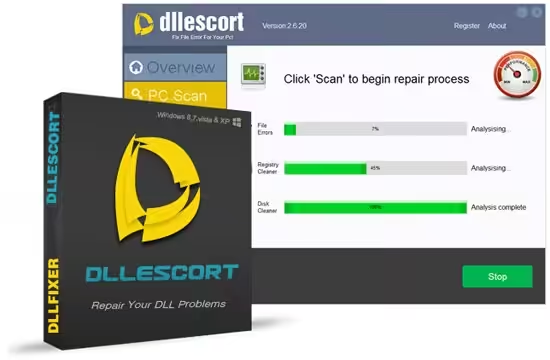
DLL Escort is a Windows utility designed to help users identify and repair problems involving DLL, EXE, SYS, and other system-related files. Older versions of the software were marketed as a DLL error repair and system optimization tool, with features for scanning missing or damaged files and helping users locate DLL files. Available information identifies versions such as DLL Escort 2014, 2021, and 2.6.20, although the software is considerably older than current Windows repair tools. (Software Informer)
Because the name DLL Escort contains “DLL,” it is also useful to understand what DLL files actually are. DLL stands for Dynamic Link Library, and DLLs are an important part of Windows and many Windows applications. Microsoft explains that DLLs contain code and data that can be used by multiple programs, helping software share functionality, reduce duplication, and organize applications into separate modules. (Microsoft Learn)
This complete guide explains DLL Escort, what DLL means, what a DLL service is, where DLL files are located, whether a DLL is a driver, the difference between DLL and PLL, common DLL errors, and safer ways to troubleshoot missing or corrupted DLL files.

DLL Escort
DLL Escort was developed as a Windows-focused utility for dealing with DLL-related problems. Its main purpose was to scan a computer for certain missing, damaged, or problematic system files and provide tools for repairing or obtaining DLL files.
Older software listings describe DLL Escort as a utility capable of working with DLL, EXE, SYS, DRV, OCX, and other file-related errors. It was particularly associated with older versions of Windows, including Windows XP, Vista, Windows 7, and Windows 8. (Software Informer)
The software was also marketed with system-scanning and optimization features. Depending on the version, these included scanning for errors, registry cleanup, disk cleanup, and startup optimization.
However, there is an important distinction between DLL Escort as a software product and DLL files as a Windows technology. DLL Escort is an optional third-party utility. DLL files themselves are fundamental components used throughout Windows and Windows applications.
That distinction is important when troubleshooting DLL errors because installing a DLL repair application is not always the best solution. In many situations, the safest approach is to repair or reinstall the application that produced the error, use Windows’ built-in repair tools, or obtain the required component from the original software developer.
What Does DLL Mean?
DLL means Dynamic Link Library.
A DLL is a file containing code, functions, resources, or data that another program can use. Instead of putting every function directly inside an application’s executable file, developers can place reusable functionality inside DLL files.
Microsoft describes a DLL as a library containing code and data that can be used by more than one program. This approach promotes code reuse and can help reduce memory and disk-space requirements. (Microsoft Learn)
A typical DLL file has the .dll extension.
For example:
example.dll
A Windows application might depend on several DLL files. When the application starts, Windows can load the necessary libraries so the program can access the functions it needs.
This is why deleting or replacing a DLL without understanding what uses it can cause additional problems.
Why Are DLL Files Important?
DLL files are important because modern Windows software is built around reusable components.
Imagine that ten different programs need the same type of Windows functionality. Instead of every program containing a completely separate copy of that functionality, software can rely on shared libraries.
This provides several advantages:
- Code can be reused.
- Applications can be divided into modules.
- Updates can be easier to distribute.
- Memory usage can be reduced in some circumstances.
- Programs can share common functionality.
- Developers can update individual components without rebuilding an entire application.
Microsoft notes that much of Windows functionality is provided through DLLs, while applications may also contain their own DLL modules. (Microsoft Learn)
This is why a DLL error can prevent an application from starting even though the main EXE file itself is still present.
What Is a DLL Service?
The phrase DLL service can be confusing because a DLL and a Windows service are not the same thing.
A DLL is a library containing reusable functions and resources.
A Windows service is a background process or service component designed to perform tasks without requiring the user to interact with a normal application window.
A DLL can be used by a service, but a DLL is not automatically a service.
For example, a Windows service could use a DLL to access particular functions. The service itself controls its background operation, while the DLL provides code or functionality required by that service.
Microsoft’s documentation also explains that DLLs can be loaded by applications or other modules and can contain exported functions that other modules call. (Microsoft Learn)
Therefore, when someone says “DLL service,” they may be referring to a Windows service that depends on a DLL rather than a special category of DLL.
What Is DLL So?
The phrase DLL SO usually refers to two different types of shared libraries used in different operating-system environments.
A DLL normally refers to a Dynamic Link Library used primarily in Windows.
An SO file generally means a shared object used on Linux and Unix-like systems.
For example:
Windows:
example.dll
Linux:
libexample.so
Both concepts involve reusable compiled code, but they belong to different operating-system ecosystems.
Windows applications generally use DLL files, while Linux applications commonly use shared-object files.
Therefore, DLL and SO are related concepts but are not simply two names for exactly the same file format.
Where Do I Find My DLL Files?
DLL files can exist in several different locations on a Windows computer.
Common locations include the Windows system directories and application installation folders.
For example, a 64-bit Windows installation may contain DLL files under locations such as the Windows system directory, while individual applications can store their own private DLL files in their installation folders.
Microsoft explains that when Windows loads a DLL, the system follows a defined search process. Depending on how the application loads the library, locations can include the application folder, current folder, Windows system folder, and Windows folder. (Microsoft Learn)
You can also find DLL files by using Windows File Explorer and searching for:
.dll
However, users should not randomly delete, replace, or download DLL files just because they appear suspicious or unfamiliar.
Some DLL files are essential to Windows, while others belong to individual applications.
A DLL located inside an application’s installation folder may be completely legitimate even though it is not part of Windows itself.
How to Find a Specific DLL File
If an application reports something such as:
“The program can’t start because xyz.dll is missing from your computer.”
you can search your computer for the exact filename.
For example, if the error mentions:
abc.dll
search for:
abc.dll
This can help determine whether the file exists somewhere else on the computer.
If it does exist, the application may have a path or dependency problem.
If it does not exist, the correct solution depends on which program requires it.
In many cases, reinstalling the application is safer than downloading a random DLL from an unknown website.
What Are DLLs Short For?
DLLs is simply the plural form of DLL, and DLL stands for Dynamic Link Libraries.
The singular term is:
Dynamic Link Library
The abbreviation is:
DLL
The plural form is:
DLLs
Microsoft uses the term Dynamic-Link Library to describe these reusable modules containing functions and data. (Microsoft Learn)
DLLs are widely used throughout the Windows software ecosystem.
What Is a DLL With an Example?
A DLL is a reusable software library that provides functions or resources to other programs.
A simple example would be a hypothetical file named:
GraphicsHelper.dll
Suppose a photo-editing application needs functions for resizing images.
Instead of keeping every graphics function inside the main application executable, developers could place certain reusable functions inside a DLL.
The application could then call those functions when required.
Windows itself also uses DLLs extensively. Microsoft gives Comdlg32.dll as an example of a Windows DLL that provides common dialog-box functionality. Multiple applications can use that functionality rather than implementing the same functionality independently. (Microsoft Learn)
Another example is a program that uses:
AudioEngine.dll
The main EXE could rely on the DLL for specific audio-processing functions.
If the DLL is missing, corrupted, incompatible, or cannot be found, the application may fail to start or may display an error.
How Does a DLL Work?
When a program requires a DLL, Windows loads the library into the process that is using it.
There are two major ways applications can dynamically link to DLLs:
Load-time dynamic linking and run-time dynamic linking.
With load-time linking, the required DLL information is resolved as the application loads.
With run-time linking, an application can explicitly load a DLL when it needs it, using Windows functions such as LoadLibrary or LoadLibraryEx, and then locate exported functions with GetProcAddress. (Microsoft Learn)
This flexibility is one reason DLLs are useful to software developers.
An application can load certain functionality only when required rather than keeping every component permanently integrated into its main executable.
DLL Dependencies Explained
One of the most common reasons users experience DLL problems is dependency failure.
Suppose Program A requires:
LibraryA.dll
and LibraryA.dll itself requires:
LibraryB.dll
Now Program A indirectly depends on LibraryB.dll.
If LibraryB.dll is deleted, replaced with an incompatible version, or cannot be found, Program A may stop working.
Microsoft describes this kind of relationship as a DLL dependency. A program or DLL can depend on another DLL, and changing or removing the required library can cause the original program to fail. (Microsoft Learn)
This explains why simply downloading a replacement DLL is not always a complete solution.
The correct version matters.
The architecture can also matter.
For example, a 32-bit application may require a 32-bit library, while a 64-bit application may require a compatible 64-bit library.
Common DLL Errors
Windows users can encounter several types of DLL-related messages.
Common examples include:
- DLL file missing
- DLL not found
- DLL could not be loaded
- DLL entry point not found
- DLL initialization failed
- DLL is corrupted
- DLL is incompatible
- DLL dependency missing
- Application failed to start because a DLL is missing
These errors can appear after installing software, uninstalling applications, updating Windows, replacing hardware, restoring backups, or accidentally deleting files.
Sometimes the problem is not the DLL itself.
For example, an application may be looking for a DLL in the wrong location, or the installed DLL may not be compatible with the application’s expected version.
Is a DLL a Driver?
A DLL is not automatically a driver.
A driver is software that allows Windows and hardware or other system components to communicate.
DLLs are generally libraries used by applications and system components.
However, there is an important technical detail: Microsoft explains that some Windows driver files can be implemented as dynamic-link libraries, although typical Windows kernel-mode drivers commonly use the .sys file extension. (Microsoft Learn)
Microsoft’s documentation gives device driver files with the .drv extension as another example of files implemented as DLLs in Windows. (Microsoft Learn)
So the simple answer is:
A .DLL file is not automatically a driver.
A DLL can support software, Windows components, or even certain driver-related functionality, but you should not assume that every DLL is a hardware driver.
DLL vs EXE
DLL and EXE files are both executable binary formats in the Windows environment, but they have different purposes.
An EXE is normally an executable program that users launch.
A DLL is normally a library loaded by another program or component.
For example:
MyProgram.exe
could use
MyLibrary.dll
The EXE provides the application’s main execution environment, while the DLL provides reusable functionality.
Microsoft specifically notes that a DLL is not a standalone executable in the same sense as an EXE. DLLs run in the context of applications that load them. (Microsoft Learn)
DLL vs SYS
A .sys file is commonly associated with Windows system and driver components.
A .dll file is generally a dynamic-link library.
Although both can contain compiled code, they are used differently.
For ordinary users, a useful rule is:
DLL = reusable library
SYS = commonly associated with system or driver components
There are exceptions and technical complexities, so the extension alone does not tell you everything about what a file does.
What Is PLL and DLL?
In electronics and computer engineering, PLL and DLL can refer to different timing and synchronization technologies.
PLL means Phase-Locked Loop.
DLL in this context can mean Delay-Locked Loop.
These terms are different from the Windows software meaning of DLL.
A Phase-Locked Loop uses feedback to synchronize the phase of an oscillator with a reference signal.
A Delay-Locked Loop uses controlled delay to align timing signals.
They are commonly discussed in areas such as:
- Digital electronics
- Communication systems
- Clock synchronization
- Memory interfaces
- Signal processing
- High-speed hardware
Therefore, when you see “DLL” in a technical electronics document, it does not necessarily mean a Windows Dynamic Link Library.
Context is important.

DLL and Windows Software
Windows relies heavily on dynamic linking.
The Windows API itself is implemented through a collection of DLLs, meaning applications can call Windows functionality through these libraries. (Microsoft Learn)
For example, an application may need Windows functionality for:
- Opening files
- Displaying dialog boxes
- Managing windows
- Processing graphics
- Handling networking
- Accessing system functions
- Managing user input
Rather than implementing all these capabilities independently, programs can use Windows-provided libraries.
This modular approach is one of the fundamental reasons DLLs are so common.
Why Do DLL Errors Happen?
DLL errors can have many causes.
One common cause is an incomplete software installation.
Another possibility is an incomplete uninstall that removes a shared component required by another application.
Other causes include:
- Accidental file deletion
- Malware or unwanted software
- Corrupted system files
- Failed software updates
- Incorrect DLL versions
- Architecture mismatch
- Damaged application installations
- Broken dependencies
- Registry-related problems
- Incorrect file paths
- Conflicting versions of libraries
Microsoft notes that DLL version conflicts can occur when an application expects one version but another application installs a newer or older incompatible version. (Microsoft Learn)
Can DLL Escort Fix Every DLL Error?
No software can realistically guarantee that every DLL problem will be fixed automatically.
DLL Escort was designed specifically around DLL and related system-file problems, but the underlying cause of an error determines the correct solution.
If an application requires a specific proprietary DLL, a generic DLL repair tool may not be the best solution.
If Windows system files are damaged, built-in Windows repair mechanisms may be more appropriate.
If a game is missing a DLL that belongs to a Microsoft runtime package, reinstalling the correct runtime package can be safer than downloading an individual DLL.
Therefore, users should identify the source of the error before attempting repairs.
Is DLL Escort Still Relevant?
DLL Escort is primarily associated with older Windows versions and older software releases.
Available listings identify versions including 2014, 2021, and 2.6.20, with descriptions focused on older Windows environments such as XP, Vista, Windows 7, and Windows 8. (Software Informer)
That means users running modern Windows versions should be cautious before relying on an old DLL repair application.
Older software may not have been designed around current Windows security protections, system architecture, or application requirements.
If you encounter a DLL error on a modern Windows computer, it is generally better to investigate the exact error and use current Windows-supported repair methods whenever possible.
Is DLL Escort Safe?
The safety question requires some caution.
Historical third-party information about DLL Escort is mixed. A FreeFixer entry for dllescort.exe reported that none of the 57 VirusTotal engines it referenced detected the particular file as malicious, but it also noted that the executable was unsigned. (FreeFixer)
Another analysis of an older DLL Escort installer reported a small number of antivirus detections and described several behaviors observed during sandbox analysis. That does not by itself establish that every DLL Escort release is malicious, but it demonstrates why old installers from unknown sources should be treated carefully. (Hybrid Analysis)
A separate 2026 scan listing for an older DLL Escort setup file reported 1 detection out of 68 scanners and classified the result as inconclusive rather than definitively malicious. (herdProtect)
The safest conclusion is that users should not assume that every DLL Escort installer found online is safe.
Avoid modified installers, cracked versions, keygens, repacks, and files from unknown download sources.
Should You Download Individual DLL Files?
Downloading individual DLL files from random websites is generally not the preferred troubleshooting method.
A DLL must match the software that requires it.
If the wrong DLL is installed, the original problem may remain, or additional compatibility problems can appear.
There is also a security risk when downloading executable components from unknown sources.
Microsoft warns about DLL search-order vulnerabilities in which an attacker can place a malicious DLL in a location searched by an application, potentially causing the malicious library to be loaded. (Microsoft Learn)
This is another reason to avoid casually copying DLL files into system directories.
Safer Ways to Fix DLL Errors
When a DLL error appears, start by identifying which application generated the message.
If the problem started immediately after installing an application, reinstalling that application may restore the correct DLL and its dependencies.
If the error involves a Microsoft component, use the appropriate Microsoft-provided repair or installation package.
For Windows system corruption, built-in system repair tools can be more appropriate than third-party DLL download utilities.
If the error appeared after a malware infection, scan the entire system before replacing DLL files.
And if the error involves specialized professional software, contacting the software developer’s support team can be the safest route.
DLL Escort and Modern Windows Troubleshooting
For users researching DLL Escort today, the most important thing is to understand that DLL repair should not simply mean downloading a replacement file.
Modern Windows systems contain complex dependencies between applications, runtimes, drivers, system libraries, and security components.
A missing DLL can be a symptom rather than the actual cause.
For example, if a program suddenly stops working after an update, the real issue may be an incompatible application version rather than a missing DLL.
Likewise, if a game displays a missing runtime DLL message, reinstalling the appropriate runtime package may be more effective than replacing the individual file.
DLL Escort vs Manual DLL Repair
DLL Escort was created to simplify DLL troubleshooting by scanning and identifying certain file problems.
Manual troubleshooting gives users more control.
With manual repair, you can:
- Identify the exact DLL mentioned in the error.
- Determine which application requires it.
- Check whether the file exists.
- Repair or reinstall the application.
- Restore system files using Windows tools.
- Install the correct runtime component.
- Check system integrity.
- Investigate dependencies.
The advantage of a repair utility is convenience.
The advantage of manual troubleshooting is that you are less likely to replace a file without understanding why the application needs it.
For advanced users, manual diagnosis can therefore be preferable.
Frequently Asked Questions About DLL Escort and DLL Files
What does DLL mean?
DLL stands for Dynamic Link Library. A DLL is a Windows library file that contains reusable code, functions, and resources that can be used by applications and other system components.
What is a DLL service?
A DLL is not itself a Windows service. A Windows service is a background process, while a DLL is a reusable library. However, a Windows service can use one or more DLL files to perform specific functions.
What is DLL SO?
DLL and SO are both types of shared libraries, but they are generally associated with different operating systems. DLL files are commonly used in Windows, while SO files, meaning shared objects, are commonly used in Linux and Unix-like systems.
Where do I find my DLL files?
DLL files can be found in Windows system folders, application installation folders, and other directories used by software. You can search File Explorer for a specific .dll filename, but you should avoid deleting or replacing DLL files unless you know which program uses them.
What is DLLs short for?
DLLs is the plural form of DLL, which stands for Dynamic Link Libraries. The singular form is Dynamic Link Library. DLL files allow Windows and applications to share reusable code and resources.
What is DLL with an example?
A DLL is a reusable library containing code or resources that another program can use. For example, an application might use a file such as GraphicsHelper.dll for specific graphics functions instead of including all of that code inside its main EXE file.
What is PLL and DLL?
In electronics, PLL means Phase-Locked Loop, while DLL can mean Delay-Locked Loop. These are timing and synchronization technologies. This meaning of DLL is different from the Windows term Dynamic Link Library.
Is a .DLL a driver?
No, a .DLL file is not automatically a driver. DLL files are generally libraries used by applications and system components. Some driver-related components can use DLL technology, but many Windows drivers commonly use the .SYS extension.
Can DLL Escort fix missing DLL errors?
DLL Escort was designed as a DLL and system-file troubleshooting utility, but it cannot be assumed to fix every DLL error. The correct solution depends on why the DLL is missing, damaged, incompatible, or unable to load.
Should I download a missing DLL from the internet?
You should generally avoid downloading individual DLL files from unknown websites. The safer approach is to identify the application requiring the DLL and repair or reinstall the original software or the appropriate Microsoft component.
Final Verdict on DLL Escort
DLL Escort is an older Windows utility designed around DLL and related system-file problems. Historical descriptions show that it could scan for DLL, EXE, SYS, and other errors, locate missing DLL files, and provide system optimization functions. (Software Informer)
However, understanding DLL files is more important than simply using a DLL repair program.
DLL stands for Dynamic Link Library, and DLLs are fundamental components of Windows software. They allow applications and system components to share functions and resources, which helps software remain modular and reusable. (Microsoft Learn)
A DLL is not automatically a driver, although some driver-related components can use DLL technology. A DLL is also different from a Windows service, while a service may depend on DLLs.
If you encounter a DLL error, avoid immediately downloading an unknown replacement file. First identify the program that needs the DLL and determine whether reinstalling the application, repairing Windows, installing the correct runtime, or contacting the software developer is the appropriate solution.
For people specifically searching for DLL Escort, the software can be understood as an older DLL troubleshooting utility rather than an essential Windows component. Its historical versions may still appear on software-download websites, but users should be particularly careful with old, unsigned, modified, cracked, or repacked installers.
Ultimately, the best way to deal with DLL errors is to diagnose the underlying dependency rather than treating every missing-DLL message as a simple file-download problem.
Download Now
DLL Escort Latest Version
- Download Option 1:
Drop.Download
- Download Option 2:
Usersdrive
File Details:
- File Size: 7.8 MB
- System Type: 32-bit / 64-bit
- Setup Type: Offline / Standalone