Table of Contents
XYLIO Future DJ Pro: Complete Guide
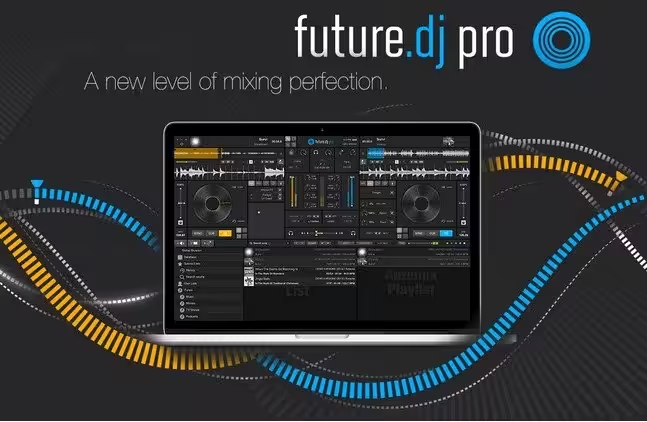
If you are looking for professional DJ software that can handle audio mixing, video mixing, karaoke, live performances, loops, samples, effects, and modern DJ controllers, XYLIO Future DJ Pro is a name worth exploring. The software is designed for DJs who want more control over their music library and live performances without being limited to a basic two-deck mixing setup.
Future DJ Pro has developed into a feature-rich DJ application with support for multiple decks, beat matching, beat-grid editing, loops, cue points, effects, video, karaoke, MIDI controllers, and advanced mixing functions. Version 2.2 introduced several performance-focused improvements, including Slip Mode, Quantize, Loop Rolls, Slicer, Pitch Play, improved time-stretching, and expanded controller support. (MacUpdater)
This guide explains what XYLIO Future DJ Pro is, what Future DJ Pro 2.2 offers, whether it is suitable for beginners and professional DJs, how it compares with Serato DJ Pro, and whether Serato DJ Pro is worth paying for.

What Is XYLIO Future DJ Pro?
XYLIO Future DJ Pro is professional DJ mixing software developed by Xylio. It is designed for DJs who want to mix music from a computer while using either a mouse and keyboard or external DJ controllers and MIDI hardware.
Unlike simple music players, Future DJ Pro provides tools specifically designed for live DJ performance. These include virtual decks, beat synchronization, looping, cue points, effects, samples, pitch control, waveform displays, music library management, and video capabilities.
The software is particularly interesting for DJs who want to combine traditional audio mixing with video DJing or karaoke. Its feature set also makes it suitable for home DJs, mobile DJs, event performers, club-style setups, and users who want to experiment with mashups.
Future DJ Pro can also work with external controllers, allowing physical knobs, jog wheels, faders, and performance pads to control the software. The official Future DJ Pro manual recommends using at least one MIDI controller for getting the most from the software’s performance controls. (Xylio)
What Is Future DJ Pro 2.2?
Future DJ Pro 2.2 is an important version of the software because it added several performance-oriented tools that make the application more attractive to modern DJs.
Version 2.2 added support for the RANE Four controller and introduced features such as Slip Mode, Quantize, Loop Rolls, Slicer, Pitch Play, improved time-stretching and pitch-shifting, a turntable slow start/stop effect, expanded pad modes, and improved marker management. (MacUpdater)
The version also introduced improved audio routing options for booth output and recording input. These additions are useful for DJs who need more control over their monitoring and recording setup.
One particularly interesting improvement is the use of modern time-stretching and pitch-shifting technology. This helps DJs manipulate tempo and pitch while attempting to maintain better audio quality.
Key Features of XYLIO Future DJ Pro
The biggest advantage of Future DJ Pro is the number of tools it puts into one DJ environment. Instead of being limited to basic playback and crossfading, users can build more complicated live performances.
Some of its important features include:
- Multiple virtual decks
- Audio mixing
- Video mixing
- Karaoke support
- Beat synchronization
- Beat-grid editing
- Cue points
- Loops and loop rolls
- Samples and sample banks
- Pitch control
- Key matching
- MIDI mapping
- DJ controller support
- Audio effects
- Video effects
- Recording
- Waveform displays
- Music library management
- Search and playlist organization
- Slip Mode
- Quantize
- Slicer
- Pitch Play
- Stem-related capabilities through AI-based audio separation
- Support for external audio hardware
These features make Future DJ Pro more than a basic beginner DJ application.
AIUnmixEQ and Advanced Mixing
One of the more interesting features introduced in the Future DJ Pro 2 series is AIUnmixEQ.
AIUnmixEQ uses machine-learning-based audio separation to help DJs manipulate different components of a song during a live mix. The system can separate a track into elements such as vocals, instruments, and drums.
This can be useful when creating mashups or karaoke-style performances. For example, a DJ could emphasize vocals from one song while mixing the instrumental portion of another track.
The software also supports industry-standard STEM files, giving users another way to work with separated musical elements.
For creative DJs, this type of functionality can make Future DJ Pro more interesting than software focused only on traditional beat matching.
How Does Future DJ Pro Work for Live DJing?
Future DJ Pro is built around the idea of controlling music in real time.
A typical setup can involve loading one song onto one deck and another song onto a second deck. The DJ can then adjust tempo, beat match the tracks, set cue points, create loops, apply effects, and use the crossfader to transition between songs.
With compatible hardware, the experience becomes more physical. Jog wheels can be used for scratching and nudging, while faders and knobs provide hands-on control over the mix.
The software also supports additional deck configurations, meaning advanced DJs are not necessarily restricted to a simple two-track workflow.
For live performers, this flexibility is one of the major reasons to consider Future DJ Pro.
Is XYLIO Future DJ Pro Beginner-Friendly?
Yes, but there is an important distinction.
Future DJ Pro can be used by beginners, but its large number of features may initially feel overwhelming. Someone who has never used DJ software may only need a small portion of what the program provides.
A beginner can start with:
- Loading two songs.
- Playing each song on a different deck.
- Adjusting volume.
- Learning the crossfader.
- Using sync.
- Setting cue points.
- Creating simple loops.
- Learning basic effects.
Once these fundamentals become comfortable, the user can move into beat-grid editing, MIDI mapping, sampling, video mixing, and advanced performance features.
Therefore, Future DJ Pro is better described as beginner-accessible but professionally capable rather than a software package made exclusively for beginners.
Is XYLIO Future DJ Pro Good for Professional DJs?
Future DJ Pro has enough advanced functionality to appeal to experienced DJs, particularly performers who need video, karaoke, controller support, multiple decks, samples, and creative mixing.
However, professional DJs should always evaluate hardware compatibility before choosing their primary software.
This is especially important for DJs who perform in clubs or venues where specific controllers, mixers, CDJs, or DVS systems are expected.
Future DJ Pro can be a strong choice for independent performers, mobile DJs, event DJs, and creative performers. DJs whose workflow is heavily centered around the Serato ecosystem may find Serato DJ Pro more convenient.
Is XYLIO Future DJ Pro Good for Video DJs?
One of Future DJ Pro’s biggest advantages is its support for video.
Traditional DJ applications are primarily focused on audio. Future DJ Pro is designed to accommodate video mixing as well, making it useful for performers who want visuals alongside music.
A video DJ may use the software to combine music tracks with video files, transitions, visual effects, and other performance elements.
This makes the software particularly interesting for:
- Wedding DJs
- Party DJs
- Mobile DJs
- Karaoke performers
- Event entertainers
- Club performers
- Visual DJs
- DJs who create promotional performances
If video is an important part of your work, Future DJ Pro deserves more consideration than software that focuses entirely on audio.
Is XYLIO Future DJ Pro Good for Karaoke?
Yes. Karaoke is another area where Future DJ Pro can be useful.
Karaoke performers often need to manage audio, video, lyrics, playlists, and quick transitions. A DJ application with video capabilities can simplify that workflow.
Future DJ Pro’s combination of audio and video functionality makes it suitable for entertainment environments where music and visual content need to be controlled together.
This can be particularly helpful for mobile entertainers who do not want to maintain separate applications for every part of a performance.
What Makes Future DJ Pro 2.2 Different?
Future DJ Pro 2.2 is more performance-oriented than earlier versions.
The addition of Slip Mode is useful for DJs who want to scratch, loop, trigger cue points, reverse playback, or perform other manipulations without permanently losing the original playback position.
Quantize helps synchronize performance actions with the beat grid. This can be useful when triggering loops or cue points during a live performance.
Loop Rolls provide another way to create rhythmic effects.
Slicer and Loop Slicer allow sections of a track to be manipulated creatively.
Pitch Play adds another performance option for changing the pitch of triggered material.
The updated time-stretching and pitch-shifting technology is also important for DJs who regularly make large tempo adjustments. (MacUpdater)
Future DJ Pro Music Library Management
A DJ’s music library is just as important as the mixing engine.
Future DJ Pro is designed to help users organize and search their music so that tracks can be found quickly during a performance.
Good library management becomes especially important when a DJ has hundreds or thousands of songs.
A useful DJ library should make it easy to locate tracks by artist, title, genre, BPM, key, playlist, or other information.
Future DJ Pro’s library and search-oriented workflow is intended to reduce the amount of time a DJ spends looking for music and increase the time available for performing.
Does Future DJ Pro Support DJ Controllers?
Yes. Controller compatibility is one of the important parts of Future DJ Pro.
The software has received support for various controllers over its development. Version 2.2, for example, added support for the RANE Four. Previous releases also expanded support for Pioneer DJ and Hercules controllers. (MacUpdater)
Controller support means you can use physical hardware instead of relying entirely on your computer’s keyboard and mouse.
For beginners, a controller can make learning DJ techniques easier because the layout resembles traditional DJ equipment.
For experienced DJs, controllers provide faster access to jog wheels, performance pads, EQ controls, effects, and faders.
Is XYLIO Future DJ Pro Worth It?
Whether Future DJ Pro is worth it depends on your requirements.
It can be a good choice if you want:
- Audio and video mixing in one application
- Karaoke capabilities
- Multiple deck options
- Advanced loops
- Creative effects
- Controller support
- MIDI mapping
- Samples
- Beat synchronization
- Modern performance features
- AI-assisted audio separation
- A flexible DJ environment
It may be less attractive if your entire workflow depends on a particular club-standard hardware ecosystem or if you specifically want the huge hardware integration and established professional ecosystem associated with Serato.
The right question is not simply whether Future DJ Pro is good. The better question is whether it fits your particular DJ setup.
Is Serato DJ Pro Worth It?
Yes, Serato DJ Pro can be worth it, particularly for DJs who want professional DJ software with strong hardware integration, advanced performance tools, and a widely recognized workflow.
Serato DJ Pro currently offers features such as four-deck mixing, Stems, sampler functionality, cue points, beat jump, quantize, Slip Mode, MIDI mapping, key analysis, recording, and a large selection of supported DJ hardware. Serato says DJ Pro supports more than 100 pieces of compatible DJ hardware. (Serato)
Serato’s Stems system can isolate vocals, bass, melody, and drums in real time, allowing DJs to create mashups and transitions that would otherwise require significant preparation. (Serato Support)
For DJs who already own compatible Serato hardware, the value can be even greater because certain hardware devices unlock Serato DJ Pro functionality without requiring a separate software activation. Other devices require a Pro license or subscription. (Serato Support)
How Much Does Serato DJ Pro Cost?
Serato’s current pricing structure includes subscription and purchase options. The standard DJ Pro pricing shown by Serato is $11.99 USD per month, while Serato DJ Suite is listed at $14.99 USD per month or a purchase option of $499 USD at the time of this research. (Serato)
The exact cost you see can depend on promotions, region, hardware licensing, and whether you choose DJ Pro or the larger DJ Suite package.
Serato DJ Suite includes additional products and expansions such as DVS, Video, Pitch ‘n Time DJ, Flip, Play, FX, and Serato Studio. (Serato)
This means DJs should compare the actual features they need rather than automatically paying for the most expensive package.
Can You Try Serato DJ Pro Before Buying?
Yes.
Serato provides a 14-day trial for eligible users with supported hardware. The company explains that users with supported Serato DJ Lite controllers or compatible Club Kit hardware can try DJ Pro before purchasing. (Serato Support)
This is useful because DJ software is highly dependent on personal workflow.
A program can look impressive in screenshots but feel uncomfortable once you start mixing. Trying the software with your controller is therefore one of the best ways to decide whether it is worth the investment.

XYLIO Future DJ Pro vs Serato DJ Pro
Future DJ Pro and Serato DJ Pro are both capable DJ applications, but they appeal to somewhat different users.
| Feature | XYLIO Future DJ Pro | Serato DJ Pro |
|---|---|---|
| Audio mixing | Yes | Yes |
| Video mixing | Yes | Available through expansion |
| Karaoke | Strong focus | Available with appropriate tools |
| Multiple decks | Yes | Up to four decks |
| Controller support | Yes | Extensive |
| MIDI mapping | Yes | Yes |
| Beat sync | Yes | Yes |
| Cue points | Yes | Yes |
| Loops | Yes | Yes |
| Samples | Yes | Yes |
| Stems/audio separation | AIUnmixEQ | Serato Stems |
| DVS | Hardware/setup dependent | Available through supported setups |
| Recording | Yes | Yes |
| Beginner use | Suitable | Suitable |
| Professional ecosystem | Smaller | Very strong |
| Club-oriented workflow | Possible | Excellent |
| Video DJ focus | Strong | Available |
| Subscription model | Depends on edition/license | Available |
Serato has a particularly strong advantage in hardware integration and professional DJ adoption. Its current software supports more than 100 pieces of DJ hardware. (Serato)
Future DJ Pro, meanwhile, can be more appealing to users who want audio, video, karaoke, creative performance tools, and a flexible all-in-one environment.
Which Is Better: Future DJ Pro or Serato DJ Pro?
There is no universal winner.
Choose Future DJ Pro if your priority is a flexible DJ application that combines music, video, karaoke, samples, creative effects, and performance tools.
Choose Serato DJ Pro if your priority is professional DJ performance, extensive controller compatibility, established workflows, advanced Stems, club-oriented setups, and a large hardware ecosystem.
For a mobile DJ who performs weddings, parties, karaoke nights, and events, Future DJ Pro can be particularly attractive.
For a club DJ who regularly uses supported professional controllers, mixers, or turntables, Serato DJ Pro may be the safer long-term choice.
Future DJ Pro for YouTube and Content Creators
Future DJ Pro can also be useful for content creators.
DJs who create YouTube mixes, livestreams, promotional videos, mashups, or music demonstrations can benefit from its mixing and performance tools.
The video functionality can be useful when a creator wants to combine music and visuals instead of producing an audio-only mix.
However, DJs should always make sure that the music they use in recorded content is properly licensed. Software cannot remove copyright restrictions associated with commercial music.
Future DJ Pro for Home DJs
For home users, Future DJ Pro offers plenty of room to grow.
A beginner can start with simple mixing and gradually learn:
- Beat matching
- Tempo control
- Cue points
- EQ
- Crossfading
- Loops
- Effects
- Sampling
- Harmonic mixing
- Scratching
- Controller operation
- Video mixing
This makes it suitable for someone who does not want to replace their DJ software after learning the basics.
Future DJ Pro System and Hardware Considerations
DJ software performance depends heavily on the computer and hardware being used.
The software’s manual and documentation emphasize the use of MIDI controllers for getting the most from its performance controls. (Xylio)
If you are planning to use video mixing, real-time audio separation, multiple decks, or several effects simultaneously, a more capable computer is preferable.
A good DJ setup should also include reliable headphones, an appropriate audio interface or sound card, sufficient storage for your music library, and compatible controller hardware.
Before purchasing any software, check whether your specific controller and operating system are supported by the version you intend to use.
Is XYLIO Future DJ Pro Safe?
Future DJ Pro itself should be evaluated based on where you obtain the software.
The safest approach is to obtain software from the developer or a recognized software marketplace rather than random third-party download pages.
This is particularly important with DJ applications because unofficial installers can be modified, bundled with unwanted programs, or distributed with unauthorized activation tools.
Users should avoid cracked versions, keygens, modified installers, and suspicious repacks. Apart from security risks, these versions can cause crashes, missing features, activation problems, and unreliable performance during live events.
For a professional DJ, software stability is extremely important. A program that crashes in the middle of a performance can create a much bigger problem than simply losing a few minutes of work.
Future DJ Pro 2.2 Pros and Cons
Advantages
Future DJ Pro has several strong points.
Wide feature set: It combines traditional DJ mixing with video, karaoke, samples, effects, and creative performance tools.
Advanced performance controls: Slip Mode, Quantize, Slicer, Loop Rolls, Pitch Play, and other features provide plenty of options for live performances.
Controller support: External hardware can make the software much more enjoyable and practical to use.
Video capabilities: DJs who need visual performances have an advantage over audio-only software.
Creative mixing: AIUnmixEQ and stem-oriented functionality provide opportunities for mashups and live remixing.
Flexible use: It can work for beginners, mobile DJs, event performers, and more experienced users.
Disadvantages
There are also limitations to consider.
Learning curve: The large number of features can be intimidating for complete beginners.
Hardware compatibility matters: Not every controller will provide the same experience.
Smaller professional ecosystem: Serato has a particularly strong position in professional DJ hardware and club workflows.
Performance requirements: Advanced features such as video and real-time audio separation can require more processing power.
Software choice is personal: DJs coming from Serato, rekordbox, VirtualDJ, or another established platform may need time to adjust.
Who Should Use XYLIO Future DJ Pro?
Future DJ Pro is a strong candidate for several types of users.
It is suitable for beginner DJs who want software they can continue learning with.
It is also useful for mobile DJs who perform weddings, parties, and private events.
Karaoke DJs can benefit from its combination of music and video functionality.
Video DJs may appreciate its ability to integrate visual content into performances.
Creative DJs can experiment with samples, loops, audio separation, effects, and mashups.
It can also be useful for home DJs who want to practice without immediately investing in a complicated professional setup.
Who Should Choose Serato DJ Pro Instead?
Serato DJ Pro is likely a better choice if you:
- Already own Serato-compatible hardware
- Perform regularly in professional venues
- Need extensive controller integration
- Want a mature club-oriented workflow
- Use Stems heavily
- Need four-deck mixing
- Want advanced library and crate management
- Need professional performance features
- Plan to use DVS or club-style equipment
- Want access to a large established DJ ecosystem
Serato’s current feature set includes four-deck mixing, Stems, 20+ built-in Pro FX, Smart Sync, key analysis, MIDI mapping, Smart Crates, Beat Jump, Slicer, Quantize, Slip Mode, and recording. (Serato)
Final Verdict on XYLIO Future DJ Pro
XYLIO Future DJ Pro is a versatile DJ application that deserves attention from anyone looking for more than basic music mixing. Its combination of audio mixing, video support, karaoke functionality, controller integration, samples, loops, effects, beat synchronization, and creative performance features gives it a broad range of uses.
Future DJ Pro 2.2 is particularly interesting because it introduced several advanced performance features, including Slip Mode, Quantize, Loop Rolls, Slicer, Pitch Play, improved pitch and time manipulation, and expanded controller support. (MacUpdater)
The biggest question is whether it fits your specific workflow.
If you are a mobile DJ, karaoke performer, event DJ, video DJ, or home DJ who wants a flexible all-in-one application, Future DJ Pro can be a very capable choice.
If you are looking for a highly established professional DJ ecosystem with extensive hardware compatibility, advanced Stems, four-deck functionality, and strong club-oriented support, Serato DJ Pro is likely the better investment. Serato currently supports more than 100 pieces of DJ hardware and continues to add compatibility for newer controllers. (Serato)
Ultimately, both applications can produce professional results. The better choice depends on your controller, performance style, budget, and whether your priority is an all-in-one audio/video environment or a deeply integrated professional DJ ecosystem.
Download Links:
Download Now
XYLIO Future DJ Pro
- File Size: 288.8 MB
- System Type: 32-bit / 64-bit
- Setup Type: Offline