Table of Contents
NetLimiter: Complete Setup Guide
If your internet connection becomes slow whenever a large download, cloud-sync application, game launcher, or streaming service starts using the network, NetLimiter can help you identify exactly which application is consuming bandwidth and control how much network speed it receives.
NetLimiter is a Windows network-monitoring and traffic-control utility developed by Locktime Software. It can monitor internet traffic in real time, limit upload and download speeds, prioritize applications, block selected connections, create traffic rules, and maintain long-term usage statistics. (netlimiter.com)
Unlike a basic internet speed monitor, NetLimiter lets you make decisions about how your computer uses its available bandwidth. You can, for example, restrict a background downloader while giving a video call or online game higher priority.
The current stable release listed by the developer is NetLimiter 5.3.26.0, released on November 24, 2025. The official download page currently offers a 28-day trial for Windows 7, Windows 10, Windows 11, and later supported versions. (netlimiter.com)
This guide answers the most common questions about NetLimiter, including whether it is free, whether it is safe, how to limit bandwidth, whether it works on Android or Mac, and what options are available if you need an alternative.

What Is NetLimiter?
NetLimiter is a network traffic monitoring and bandwidth-control application for Windows PCs.
Its main purpose is to give you greater control over network traffic generated by applications and connections on your computer. Instead of seeing only the total internet speed reported by Windows, NetLimiter can show which applications are sending and receiving data.
The software can:
- Monitor network traffic in real time
- Display upload and download speeds
- Set download limits
- Set upload limits
- Prioritize applications
- Block applications from accessing the internet
- Create custom traffic rules
- Set data quotas
- Schedule rules
- View long-term traffic statistics
- Filter traffic by applications, domains, IP addresses, and other criteria
These functions make NetLimiter useful for home users, gamers, developers, administrators, and anyone who needs detailed control over bandwidth. (netlimiter.com)
For example, suppose a game needs a stable connection while Windows or another application is downloading a large update. You can use NetLimiter to restrict the downloader’s bandwidth instead of allowing it to consume the connection whenever it wants.
How Does NetLimiter Work?
NetLimiter works at the network level of your Windows computer and monitors connections made by applications.
When you open its activity interface, you can see applications and their network activity. Depending on the configuration, you can then create rules controlling how those applications communicate.
The three major traffic-control mechanisms are:
Limits
A limit sets a maximum upload or download transfer speed.
For example, you could restrict an application to 2 MB/s download speed.
Priorities
Priorities allow you to give one application’s traffic preference over another application’s traffic.
This can be useful when you want an important application to receive bandwidth before less important background processes.
Blocker
The Blocker can prevent selected applications or connections from accessing the internet. (netlimiter.com)
These tools can also work with quotas and custom filters, allowing users to create more advanced network-management rules.
What Is NetLimiter Used For?
NetLimiter is primarily used for monitoring and controlling network bandwidth on Windows.
Here are some common scenarios.
1. Controlling Background Downloads
Large downloads can consume most of an internet connection. Instead of stopping the application completely, you can set a reasonable download limit.
For example:
- Browser: unrestricted
- Video call: high priority
- Game: high priority
- Cloud synchronization: limited
- Large download: limited
This allows background tasks to continue without overwhelming more important activities.
2. Managing Online Gaming
Online games don’t always require huge bandwidth, but they can be affected when another application suddenly consumes network resources.
NetLimiter can help you identify background traffic and control it.
However, NetLimiter cannot magically eliminate every source of latency. Ping and lag can also be caused by the ISP, Wi-Fi conditions, server distance, routing, congestion, or the game server itself.
3. Controlling Streaming
If several applications are using your connection simultaneously, you can control background traffic so streaming has more available bandwidth.
4. Monitoring Data Usage
NetLimiter provides traffic statistics that allow you to see how much data applications transfer.
Its long-term statistics can help you understand network usage over time. (netlimiter.com)
5. Blocking Internet Access
You can create rules that prevent selected applications from connecting to the internet.
This can be useful when an application should work offline or when you want to prevent unnecessary network activity.
6. Troubleshooting Network Problems
If your internet suddenly becomes slow, NetLimiter can help identify which applications are transferring large amounts of data.
Is NetLimiter Safe?
NetLimiter is a legitimate Windows network-control application developed by Locktime Software.
The developer provides official downloads, documentation, release notes, support resources, and licensing information. The current official site identifies NetLimiter as a Windows network-control and monitoring tool. (netlimiter.com)
NetLimiter’s security documentation also states that user data is not sent to or stored outside the machine by the installed program and that it does not use cloud or online storage for this data. (netlimiter.com)
However, network-control software naturally requires significant access to network functionality. That means you should install it from the official source and avoid modified or cracked versions.
For safer installation:
- Download NetLimiter from its official website.
- Keep Windows updated.
- Use the latest supported NetLimiter release.
- Avoid “NetLimiter cracked” downloads.
- Avoid suspicious license generators.
- Do not install modified versions from unknown websites.
- Review firewall and network rules after installation.
The software itself can block network connections, so incorrect rules can also cause applications to stop communicating. That’s a configuration issue rather than evidence that the application is unsafe.
Is NetLimiter Free?
NetLimiter is not completely free as a full-featured product.
The official download page currently provides a 28-day trial period. (netlimiter.com)
After the trial or subscription period ends, NetLimiter enters Restricted Mode. According to the official documentation, users can still monitor traffic in real time, and existing rules and filters continue functioning, but they cannot create new rules and statistics functionality is disabled. (netlimiter.com)
The current licensing model uses time-limited subscriptions. The official store lists one-year and two-year license periods, with options for manual or automatic renewal. (netlimiter.com)
Therefore, when someone searches for “NetLimiter free,” there are several different meanings:
- Free trial: Yes
- Completely free full version: No
- Free restricted mode after trial: Yes
- Paid full functionality: Yes
This distinction is important because websites offering a “NetLimiter full version free” through unofficial installers may not be trustworthy.
What Is NetLimiter 5?
NetLimiter 5 is the current major generation of the software.
The current stable release listed by the developer is NetLimiter 5.3.26.0. It was released on November 24, 2025, with improvements focused partly on system compatibility and updated frameworks and libraries. (netlimiter.com)
The release also introduced or improved features including:
- Improved tray icon functionality
- A tray widget with useful information and tools
- Additional translations
- A pause option for the traffic chart
- Traffic-chart synchronization fixes (netlimiter.com)
NetLimiter’s release history shows continuing development through the 5.x series. (netlimiter.com)
How to Set a Bandwidth Limit in NetLimiter
One of NetLimiter’s most useful features is its ability to impose download and upload limits on individual applications.
The basic process is:
- Open NetLimiter.
- Find the application in the Activity view.
- Locate its download or upload limit control.
- Open the rule editor.
- Enter the desired speed.
- Enable the rule.
- Save the configuration.
- Make sure the Limiter function is enabled.
The official documentation describes the same general workflow and notes that the Limiter must be enabled for the limit to take effect. (netlimiter.com)
Example
Suppose your internet connection can download at 100 Mbps, but a cloud-storage application is using almost all of it.
You could create a limit so that the cloud application uses only part of the available bandwidth.
This allows other applications to use the remaining capacity.
How Much Bandwidth Should You Give an Application?
There isn’t one universal number.
The appropriate limit depends on:
- Your internet connection
- Upload capacity
- Download capacity
- Number of connected applications
- Type of application
- Number of people sharing the connection
- Whether you prioritize gaming, streaming, browsing, or downloads
NetLimiter’s documentation recommends observing the application’s current transfer rate and adjusting the limit according to your needs. It also suggests reducing a problematic application’s current rate and testing the result. (netlimiter.com)
For example, if an application is consuming a large amount of bandwidth, start with a moderate restriction and see whether other applications perform better.
You can then increase or decrease the limit.
Can NetLimiter Limit Download and Upload Speeds?
Yes.
NetLimiter can control both download and upload transfer speeds for applications and other supported network entities.
This is particularly useful for applications such as:
- Cloud storage
- Torrent clients
- Game launchers
- Backup software
- Browsers
- Synchronization tools
- Download managers
You can create separate rules for download and upload traffic. (netlimiter.com)
For example:
Cloud backup
- Download: 5 MB/s
- Upload: 1 MB/s
This can allow backups to continue without consuming the entire connection.
How to Set an Internet Limit on a Phone?
This is where NetLimiter can be confusing.
NetLimiter is primarily a Windows network-control application, not an Android bandwidth-control app. The official product describes itself as a Windows tool. (netlimiter.com)
If you want to limit mobile data or Wi-Fi usage on an Android phone, use Android’s built-in settings or a suitable Android application instead.
Android versions and manufacturers provide different options, but common features can include:
- Data usage monitoring
- Data warnings
- Data limits
- Background-data restrictions
- Per-app mobile-data controls
These features are separate from NetLimiter.
Is NetLimiter Available for Android?
NetLimiter itself is not a native Android version of the Windows product.
The official NetLimiter website describes the application as a Windows network-control utility. (netlimiter.com)
Therefore, searches such as:
- NetLimiter Android
- NetLimiter APK
- NetLimiter for Android
- NetLimiter mobile
should be approached carefully.
An APK using the NetLimiter name is not automatically an official Android edition.
If your goal is to limit mobile-data usage on Android, Android’s own network controls or a reputable Android-specific application are more appropriate.
Does NetLimiter Work on Mac?
The current NetLimiter product is designed for Windows rather than macOS.
The official download page currently lists Windows 7, Windows 10, Windows 11, and later supported Windows versions. (netlimiter.com)
That means there is no current official native macOS version presented on the main NetLimiter download page.
If you use a Mac and need application-level bandwidth management, you would need a macOS-compatible alternative rather than downloading an unofficial “NetLimiter for Mac” installer.
Does NetLimiter Work on Windows 11?
Yes.
The official download page lists Windows 11 as a supported operating system. (netlimiter.com)
The latest stable release, NetLimiter 5.3.26.0, also focuses on compatibility improvements. (netlimiter.com)
For modern Windows computers, using the latest stable version is preferable to downloading an old NetLimiter 4 installer.
Does NetLimiter Work on Windows 10?
Yes.
Windows 10 is listed among the supported operating systems on the official download page. (netlimiter.com)
If you are running Windows 10, download the current stable release rather than relying on an old version unless you have a specific compatibility reason.
Does NetLimiter Work on Windows 7?
The official download page currently lists Windows 7 among supported systems. (netlimiter.com)
However, users should remember that Windows 7 itself is an old, unsupported operating system from Microsoft’s normal security-support perspective.
The NetLimiter 5.3.26.0 release notes also state that supporting older Windows versions is becoming increasingly difficult and that the developer expected to end new-update support for Windows 7 and Windows 8 in the first half of 2026. (netlimiter.com)
For security and compatibility, upgrading to a supported modern Windows version is generally preferable.
NetLimiter Features
NetLimiter provides considerably more than simple bandwidth limiting.
Real-Time Traffic Monitoring
You can see how much data applications are transferring and monitor current network activity. (netlimiter.com)
Download and Upload Limits
Set maximum transfer speeds for selected applications, connections, or other supported entities. (netlimiter.com)
Priorities
Give selected applications higher traffic priority when multiple applications compete for bandwidth.
Connection Blocker
Block selected applications or connections from communicating over the network. (netlimiter.com)
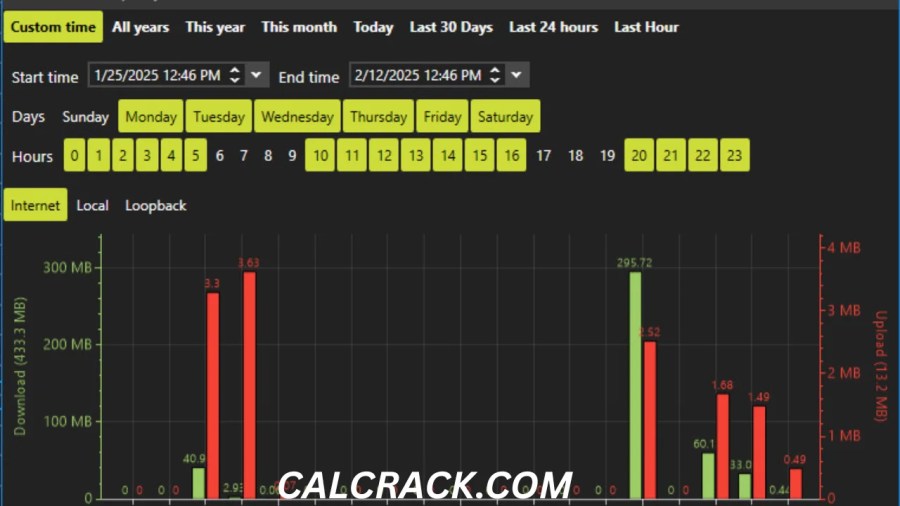
Traffic Charts
Visual charts help you understand network activity and transfer rates.
Long-Term Statistics
NetLimiter can maintain locally stored traffic statistics so you can review usage over time. (netlimiter.com)
Filters
Advanced filters can use information such as application paths, domain names, IP address ranges, and users. (netlimiter.com)
Quotas
Quotas can monitor the amount of transferred data and trigger actions when a specified amount is reached. (netlimiter.com)
Scheduler
Rules can be configured to activate or deactivate according to schedules. (netlimiter.com)
What Are NetLimiter Quotas?
A quota is different from a simple speed limit.
A speed limit says:
“Do not transfer faster than this rate.”
A quota says:
“Monitor how much data has been transferred and take an action when the selected amount is reached.”
For example, you could configure a quota for an application that transfers a certain amount of data each month.
When the quota is exceeded, NetLimiter can trigger an action such as a notification or a predefined rule. (netlimiter.com)
This can be particularly useful when you want to monitor applications that consume large amounts of data.
What Is NetLimiter Priority?
Priority is a way to tell NetLimiter which network traffic should receive preference.
This differs from manually specifying a fixed bandwidth limit.
For example, you could prioritize:
- Video conferencing
- Online gaming
- Web browsing
- Cloud synchronization
- Large downloads
The exact result depends on the traffic competing for bandwidth.
NetLimiter’s documentation explains that priorities allow selected applications to receive preference while lower-priority applications are restricted when necessary. (netlimiter.com)
What Is NetLimiter Blocker?
The Blocker allows you to prevent selected applications or network connections from accessing the internet.
This can be useful when:
- An application should not access the internet
- You want to prevent unwanted background connections
- You need to temporarily stop a program from communicating online
- You want more control over application network activity
The Blocker can be combined with filters and rules for more advanced configurations. (netlimiter.com)
Because blocking network traffic can cause applications to malfunction, create rules carefully.
Can NetLimiter Improve Internet Speed?
NetLimiter cannot increase the maximum speed provided by your internet connection.
What it can do is manage how that available bandwidth is distributed.
For example, suppose your internet connection supports 100 Mbps.
If one application uses 95 Mbps, another application may feel slow.
NetLimiter can restrict the first application to a lower rate, leaving bandwidth available for other activities.
Therefore:
NetLimiter does not make a 100 Mbps connection become 200 Mbps.
Instead, it helps you use the existing 100 Mbps more intelligently.
Can NetLimiter Reduce Lag?
It can sometimes help with network congestion, but it is not a universal ping-fixing tool.
If background applications are saturating your connection, restricting their bandwidth may reduce competition for network resources.
For example:
- Game running
- Cloud backup uploading
- Large Windows download
- Video streaming
- Browser downloads
If the connection becomes congested, NetLimiter can give you more control.
However, gaming latency can also be caused by:
- ISP routing
- Wi-Fi interference
- Distance from the game server
- Server-side congestion
- Router problems
- Packet loss
- Poor wireless signal
NetLimiter cannot fix every one of these issues.
NetLimiter for Gaming
NetLimiter can be useful for PC gamers who share their internet connection with background applications.
A practical gaming configuration might prioritize:
- Game executable
- Voice-chat application
- Game launcher
while limiting:
- Cloud synchronization
- Large downloads
- Backup applications
- Browser downloads
The goal isn’t necessarily to give the game enormous bandwidth. Most online games don’t require extremely high download speeds.
The goal is to prevent other applications from consuming bandwidth at inconvenient times.
NetLimiter for Torrent Applications
Torrent applications can create substantial upload and download traffic.
NetLimiter can help users control this traffic by creating limits for the torrent application’s upload and download speeds.
For example, you could allow torrent traffic to run in the background but restrict it so that normal browsing and video calls remain responsive.
You can also use scheduling to change rules at different times. NetLimiter’s scheduler can automatically enable or disable limits and other rules. (netlimiter.com)
NetLimiter for Streaming
Streaming applications can consume a consistent amount of bandwidth.
If you are simultaneously downloading files, backing up data, or running updates, the connection may become congested.
NetLimiter can help by limiting background applications while leaving more bandwidth available for streaming.
This can be particularly useful on connections shared by multiple users.
NetLimiter for Cloud Backup
Cloud synchronization and backup applications can continuously upload files.
Upload saturation is particularly noticeable on connections with relatively low upload capacity.
You can use NetLimiter to control upload traffic from the backup application.
For example:
| Activity | Suggested approach |
|---|---|
| Video call | High priority |
| Gaming | High priority |
| Cloud backup | Upload limit |
| Large download | Moderate limit |
| Browser | Normal |
These are examples rather than universal recommended settings. Your ideal configuration depends on your connection.
NetLimiter vs Windows Built-In Tools
Windows provides several networking and data-management features, but NetLimiter focuses specifically on application-level traffic control.
Windows built-in features
Good for:
- Basic network configuration
- Wi-Fi management
- Data usage information
- Firewall management
- General troubleshooting
NetLimiter
Designed for:
- Per-application bandwidth limits
- Real-time traffic monitoring
- Application priorities
- Connection blocking
- Detailed traffic rules
- Long-term statistics
- Quotas
- Advanced filtering
NetLimiter is therefore more appropriate for users who want detailed control rather than basic Windows networking functions.
NetLimiter Alternatives
If NetLimiter doesn’t fit your requirements, several types of alternatives exist.
GlassWire
GlassWire focuses strongly on network monitoring, alerts, and traffic visualization.
It can be attractive to users who want an easier-to-understand network-monitoring interface.
Traffic shaping tools
Advanced users can also explore Windows traffic-management and Quality of Service solutions.
Router-based bandwidth control
If you want to manage bandwidth for multiple devices, router-level traffic management may be better.
A Windows application such as NetLimiter primarily controls traffic on the computer where it is installed.
A router can potentially manage:
- Phones
- TVs
- Computers
- Game consoles
- Tablets
- IoT devices
depending on the router’s capabilities.
Is NetLimiter Better Than a Router Bandwidth Limiter?
Not necessarily. They solve different problems.
NetLimiter is better when:
- You need per-application control.
- You want to monitor one Windows computer.
- You need application-specific rules.
- You want to block individual applications.
- You need detailed Windows traffic statistics.
Router controls are better when:
- You manage an entire home network.
- Multiple devices compete for bandwidth.
- You want network-wide Quality of Service.
- You need to control phones, TVs, consoles, and PCs together.
Some advanced users may benefit from using both.
NetLimiter Privacy
Privacy is another consideration when choosing network-monitoring software.
NetLimiter’s official security documentation says that important configuration files are stored locally and that the program does not send and store user data outside the machine through cloud or online storage. (netlimiter.com)
Its long-term traffic statistics are also stored locally according to the documentation.
Still, users should always review the privacy and security documentation for the version they install.
NetLimiter Installation
Installing NetLimiter is generally straightforward.
The official documentation says the installer is a self-executable package that uses Windows Installer and that the latest installation package is available from the NetLimiter download page. (netlimiter.com)
A typical installation process is:
- Download NetLimiter from the official website.
- Run the installer.
- Review the license terms.
- Start the installation.
- Launch NetLimiter.
- Allow required Windows components or permissions if requested.
- Open the Activity view.
- Review current network traffic.
- Create rules only when necessary.
The developer also documents Windows’ Base Filtering Engine (BFE) as an important Windows service for NetLimiter’s functionality. (netlimiter.com)
If BFE is disabled or malfunctioning, network-control functionality may not work correctly.
Is NetLimiter Easy to Use?
For basic monitoring and bandwidth limits, NetLimiter is reasonably straightforward.
The interface becomes more complex when you start using:
- Custom filters
- Multiple rules
- Quotas
- Schedulers
- Connection-specific controls
- User permissions
- Advanced blocker rules
Beginners can start with the simplest features and gradually move into advanced configuration.
A good starting point is:
Monitor → Identify → Limit → Test → Adjust
Don’t create dozens of rules immediately.
NetLimiter Pros and Cons
Pros
- Detailed network monitoring
- Per-application bandwidth control
- Upload and download limits
- Application priorities
- Internet connection blocker
- Traffic charts
- Long-term statistics
- Quotas
- Scheduling
- Advanced filters
- Windows 10 and Windows 11 support
- Free trial available
Cons
- Full functionality requires a paid license
- Primarily designed for Windows
- No official native Android edition
- No current native Mac edition
- Advanced features can take time to learn
- Incorrect rules can block legitimate traffic
- Bandwidth control cannot increase your ISP’s maximum speed
Frequently Asked Questions About NetLimiter
How do I limit bandwidth on my Android phone?
NetLimiter is designed for Windows, not Android. On Android, use the operating system’s built-in data-management controls or a reputable Android-specific network utility.
What is NetLimiter used for?
NetLimiter is used to monitor and control network traffic on Windows. It can limit application bandwidth, prioritize traffic, block connections, track usage, and create advanced network rules. (netlimiter.com)
Is NetLimiter safe?
Yes, NetLimiter is a legitimate Windows network-control product from Locktime Software. Download it from the official website and avoid cracked or modified versions. Its documentation says user data is stored locally rather than through cloud storage. (netlimiter.com)
Is NetLimiter free?
NetLimiter offers a 28-day trial. After the trial or license period expires, it enters Restricted Mode, where real-time monitoring and existing rules remain available but creating new rules and statistics are restricted. (netlimiter.com)
How do I set a bandwidth limit?
Open the Activity view, locate the application, select its download or upload limit, enter your desired speed, enable the rule, and save it. Make sure the Limiter function is enabled. (netlimiter.com)
How do I set an internet limit on my phone?
Use Android’s built-in data settings for mobile-data limits or restrictions. NetLimiter is not the native Android solution.
Is there a way to limit internet speed?
Yes. NetLimiter can set maximum upload and download transfer speeds for supported applications and connections. (netlimiter.com)
How can I slow down internet speed on mobile?
On Android, you can use system-level data restrictions where supported. For example, background data can often be restricted for individual applications. NetLimiter itself is designed for Windows rather than mobile devices.
What app can I use to limit my internet bandwidth?
For Windows PCs, NetLimiter is one option for application-level bandwidth control. On Android, use Android’s built-in data controls or a reputable Android network-management application.
How do I remove network bandwidth limits?
If NetLimiter is limiting an application, open the relevant rule and disable or remove the limit. You can also disable the Limiter function when appropriate. If the limitation comes from your router, Windows, VPN, ISP, or another application, the solution will be different.
Does NetLimiter work on Windows 11?
Yes. Windows 11 is listed as supported by the official NetLimiter download page. (netlimiter.com)
Does NetLimiter work on Windows 10?
Yes. Windows 10 is currently listed among supported operating systems. (netlimiter.com)
Does NetLimiter work on Mac?
The current official NetLimiter product is designed for Windows. The official download page lists Windows platforms rather than macOS. (netlimiter.com)
Does NetLimiter work on Android?
The official NetLimiter product is a Windows network-control application. It is not presented by the developer as a native Android application. (netlimiter.com)
What is the latest NetLimiter version?
The official site currently lists NetLimiter 5.3.26.0 as the latest stable version, released November 24, 2025. (netlimiter.com)
Can NetLimiter increase internet speed?
No. It cannot increase the maximum bandwidth supplied by your ISP. It can improve how that bandwidth is distributed between applications.
Can NetLimiter reduce ping?
It can sometimes reduce congestion-related problems by controlling background traffic, but it cannot fix every cause of high ping or packet loss.
Can NetLimiter block applications?
Yes. Its Connection Blocker can create rules preventing selected applications from accessing the internet. (netlimiter.com)
Can NetLimiter monitor internet traffic?
Yes. NetLimiter provides real-time monitoring and traffic charts, along with long-term traffic statistics. (netlimiter.com)
Does NetLimiter support traffic quotas?
Yes. Quotas can monitor transferred data and trigger predefined actions after a specified amount of traffic is reached. (netlimiter.com)
Can NetLimiter schedule bandwidth limits?
Yes. Its Scheduler can automatically enable or disable limits and other rules at specified times. (netlimiter.com)
Final Verdict: Is NetLimiter Worth It?
NetLimiter is a powerful choice for Windows users who want detailed control over application-level internet traffic.
Its biggest advantage is that it goes beyond simply showing your internet speed. You can identify which applications are consuming bandwidth and then decide what those applications are allowed to do.
For example, you can:
- Limit a large download
- Control cloud-backup uploads
- Prioritize gaming traffic
- Monitor data usage
- Block an application’s internet access
- Create scheduled rules
- Set data quotas
- Investigate unexpected network activity
The current stable version is 5.3.26.0, and the official download page offers a 28-day trial. (netlimiter.com)
However, NetLimiter is not completely free. Full functionality requires a paid license, while the post-trial Restricted Mode retains some monitoring functionality but limits the creation of new rules and statistics. (netlimiter.com)
It is also important to understand its platform limitations. NetLimiter is primarily a Windows application, so people searching for NetLimiter Android or NetLimiter Mac should not assume that unofficial APKs or installers are genuine.
Overall
NetLimiter is worth considering if you need precise bandwidth management on a Windows PC. It is especially useful for gamers, power users, people with limited or shared connections, and anyone who wants to understand exactly how applications use their network.
If you only need basic internet monitoring, Windows’ built-in tools may be enough. But if you want per-application limits, priorities, blocking, quotas, scheduling, filters, and detailed statistics, NetLimiter provides a much deeper level of control. (netlimiter.com)
Download Now
NetLimiter Pro Latest Version
-
- Version: 5.3.26
- File Size: 14.1 MB
- System Type: 32-bit / 64-bit
- Setup Type: Offline
- Version: 5.3.4.0
- File Size: 4.0 MB
- Download from Theuser.cloud
- Download from Usersdrive
NetLimiter Pro RePack
- System Type: 32-bit / 64-bit
- Setup Type: Standalone
- Download from Send.cm
- Download from Userscloud