
Table of Contents
Tenorshare ReiBoot Pro: Complete Guide
Tenorshare ReiBoot Pro is an iOS system repair and recovery tool designed to help users troubleshoot common iPhone, iPad, and iPod touch software problems from a Windows PC or Mac. It is mainly aimed at situations where an Apple device is stuck on the Apple logo, trapped in a boot loop, showing a black or frozen screen, stuck in Recovery Mode, or experiencing problems after an iOS update or restore.
Unlike Apple’s built-in recovery process, ReiBoot provides a dedicated interface for entering and exiting Recovery Mode and offers additional system-repair options. Tenorshare currently says ReiBoot supports the latest iOS/iPadOS versions and a wide range of Apple devices. (Tenorshare)
But is ReiBoot Pro free? Is ReiBoot safe for iPhone? Does it really repair iOS without deleting data? How much does Tenorshare ReiBoot cost? And is there a free iOS system repair tool you can use instead?
This guide answers those questions while covering Tenorshare ReiBoot Pro features, pricing, safety, supported devices, free options, alternatives, installation, and common use cases.
What Is Tenorshare ReiBoot?
Tenorshare ReiBoot is an iOS system recovery and repair program for iPhone, iPad, and iPod touch.
It is designed for software-related problems that may prevent an Apple device from starting or operating normally.
Typical problems include:
- iPhone stuck on the Apple logo
- iPhone stuck in Recovery Mode
- iPhone boot loops
- Black screen
- Frozen screen
- iOS update problems
- iOS restore errors
- iTunes or Finder restore errors
- Failed software updates
- Some system crashes
- Recovery Mode problems
Tenorshare says ReiBoot can repair more than 150 iOS/iPadOS system issues and provides Standard Repair and Deep Repair options. (Tenorshare)
The software runs on a computer. You connect your iPhone or iPad to the computer using a USB cable, launch ReiBoot, and then select the appropriate recovery or repair function.
One important point is that ReiBoot is not a physical hardware repair tool. If your iPhone has a damaged display, broken charging port, water damage, defective battery, or another hardware problem, software recovery may not solve it.
Is ReiBoot Good?
ReiBoot can be a useful tool for software-related iPhone and iPad problems, particularly when normal restarting or Apple’s standard recovery process does not solve the issue.
Its biggest advantage is convenience.
Apple already provides official recovery and restore methods through Finder on Mac and Apple Devices on Windows. However, these methods can sometimes feel technical to inexperienced users.
ReiBoot attempts to simplify the process through a dedicated interface.
For example, if your iPhone is stuck on the Apple logo, the general ReiBoot workflow is:
- Install ReiBoot on your computer.
- Connect the iPhone.
- Let ReiBoot detect the device.
- Select the repair option.
- Download the appropriate firmware.
- Start the repair.
- Wait for the iPhone to restart.
Tenorshare says its Standard Repair mode is designed to repair many iOS problems without erasing personal data. (Tenorshare)
However, “without data loss” should not be interpreted as an absolute guarantee for every situation. Serious device failures, failed operations, or other circumstances can have different outcomes. It is always sensible to maintain a current iPhone backup whenever possible.
Is ReiBoot Free?
ReiBoot has free functionality, but the complete iOS system-repair features are paid.
This is one of the most important things to understand before downloading the software.
Tenorshare’s current comparison shows that the free version can provide one-click entry into Recovery Mode, while the full version adds features such as:
- Exiting Recovery Mode
- iOS system repair
- Standard Repair
- Deep Repair
- Fixing Apple-logo problems
- Fixing black or white screens
- Fixing boot loops
- iOS upgrades and downgrades
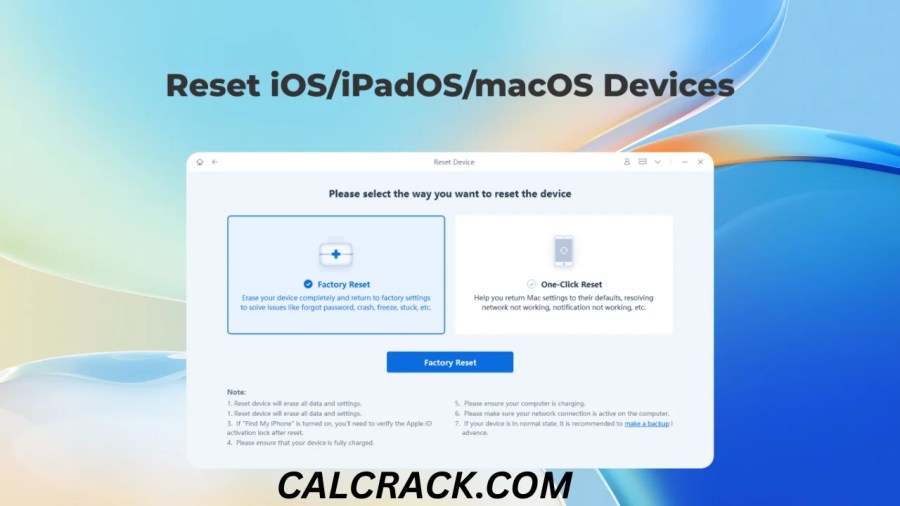
- Factory reset
- Data erasure
- Backup and restore functions
- iTunes/Finder error repair
The current official comparison specifically marks several system-repair features as unavailable in the free version. (Tenorshare)
So if someone searches for “ReiBoot free download”, it is important to distinguish between downloading the application for free and getting every professional repair feature for free.
In simple terms:
Free ReiBoot: Limited recovery functionality.
ReiBoot Pro: Full repair and advanced recovery features require a paid license.
Can I Use ReiBoot for Free?
Yes, but only for the features included in its free functionality.
Tenorshare currently advertises free entry into Recovery Mode. Its official product comparison also shows that the free version can enter Recovery Mode with one click, while exiting Recovery Mode and system-repair features require the full version. (Tenorshare)
If your only goal is to put an iPhone into Recovery Mode, the free functionality may be enough.
If your objective is to repair an iOS system problem, remove a boot loop, repair an Apple-logo freeze, or perform an advanced system repair, you should expect to need a paid ReiBoot license.
Is ReiBoot Safe for iPhone?
ReiBoot is designed as an iOS repair utility, and downloading it from Tenorshare’s official website is the safest way to obtain the software.
Tenorshare states that its purchasing system uses 256-bit SSL and provides a 30-day money-back guarantee. (Tenorshare)
However, software safety and repair safety are two different questions.
A legitimate copy of ReiBoot can be safe to install, but any system-repair operation carries some risk, particularly when firmware is being installed or the device is already experiencing serious problems.
Before using ReiBoot:
- Back up your iPhone if it is still accessible.
- Use a reliable USB cable.
- Make sure your computer has enough free storage.
- Keep your computer connected to power if possible.
- Use a stable internet connection for firmware downloads.
- Do not disconnect the iPhone during the repair.
- Download ReiBoot from Tenorshare rather than an unofficial APK or cracked-software website.
The biggest security risk often comes from unofficial modified versions of paid software.
Avoid:
- ReiBoot cracks
- Pirated ReiBoot Pro
- Key generators
- Modified installers
- Unknown “full version free” downloads
These can expose your computer and personal information to unnecessary security risks.
Is ReiBoot Trustworthy?
Whether a product is “trustworthy” depends on what you expect from it.
ReiBoot is a commercial software product from Tenorshare and has an established product page, licensing system, support process, and refund policy. Tenorshare currently advertises free technical support and a 30-day money-back guarantee. (Tenorshare)
However, ReiBoot is a third-party repair solution, not an Apple-developed application.
That distinction matters.
If your iPhone is having a serious problem, Apple’s own recovery and restore tools should be considered before using third-party software. Apple officially supports using Finder on Mac or the Apple Devices app on Windows to update or restore an iPhone in Recovery Mode. (Apple Support)
A sensible approach is therefore:
Try Apple’s official recovery options first. If those do not meet your needs, evaluate whether a third-party tool such as ReiBoot is worthwhile.
What Is ReiBoot Used For?
ReiBoot is mainly used to troubleshoot and repair iOS and iPadOS software problems.
Some common situations include:
iPhone stuck on Apple logo
If the device repeatedly shows the Apple logo without successfully booting, ReiBoot’s system repair features are designed to address this type of problem.
iPhone boot loop
A boot loop occurs when the iPhone repeatedly restarts instead of reaching the normal Home or Lock Screen.
iPhone stuck in Recovery Mode
ReiBoot can provide a simplified way to enter or exit Recovery Mode. The free functionality includes one-click entry, while the paid version adds one-click exit. (Tenorshare)
Black screen
If the problem is software-related, ReiBoot’s repair features may help troubleshoot a black-screen situation.
Failed iOS update
A failed update can sometimes leave an iPhone stuck or unable to boot normally. ReiBoot is designed to address various update-related problems.
iTunes or Finder errors
Tenorshare also markets ReiBoot as a tool for repairing common iTunes and Finder update or restore problems. (Tenorshare)
How Does Tenorshare ReiBoot Work?
ReiBoot works by communicating with the connected Apple device through your computer.
The exact interface may vary between software versions, but the general process is straightforward.
Step 1: Install ReiBoot
Download and install the software on your Windows PC or Mac.
Step 2: Connect Your iPhone
Use a USB cable to connect the iPhone to the computer.
Step 3: Detect the Device
ReiBoot attempts to recognize the connected Apple device.
Step 4: Choose the Appropriate Function
Depending on the problem, you may see options such as:
- Recovery Mode
- Exit Recovery Mode
- System Repair
- Standard Repair
- Deep Repair
- Reset
Step 5: Download Firmware
For system repair, ReiBoot may need to download an appropriate firmware package.
Tenorshare says the firmware download can be several gigabytes, so a stable internet connection is important. (Tenorshare)
Step 6: Start the Repair
Once the firmware is ready, ReiBoot can begin the selected repair process.
Step 7: Wait for Completion
Do not disconnect the device during the repair.
When successful, the iPhone should restart and attempt to boot normally.
What Is Standard Repair in ReiBoot?
Standard Repair is the less destructive repair option intended for common iOS system problems.
Tenorshare says Standard Repair can fix many system problems without erasing personal data. (Tenorshare)
This makes it the option you would generally consider before a more aggressive repair method when preserving data is important.
Common problems Tenorshare associates with Standard Repair include:
- Apple-logo freezes
- Boot loops
- Black screens
- Frozen screens
- Update failures
- Other common iOS system issues
Still, it is wise to maintain a backup because no repair tool should be treated as an absolute guarantee against data loss.
What Is Deep Repair in ReiBoot?
Deep Repair is intended for more serious iOS system problems.
According to Tenorshare’s current feature comparison, the full version includes Deep Repair for serious iOS problems. (Tenorshare)
Because deeper repair operations can have different consequences than a standard repair, users should carefully read the on-screen instructions before proceeding.
If your device is still accessible, back up your important data first.
Does ReiBoot Repair iPhone Without Data Loss?
ReiBoot’s Standard Repair mode is designed to repair many iOS problems without erasing personal data.
Tenorshare specifically advertises Standard Repair as a no-data-loss repair option. (Tenorshare)
However, it is important to understand the wording correctly.
No third-party repair tool can guarantee that every device in every failure state will emerge with all data intact.
For example, if your device has severe corruption or hardware failure, the situation may be different.
Best practice:
If the iPhone still works enough to access your data:
Back it up before attempting repair.
If the iPhone is completely inaccessible, your options may be more limited.
Can ReiBoot Restore an iPhone?
Yes, ReiBoot includes reset and restore-related functions in its paid version.
Tenorshare lists one-click reset, factory reset, and permanent data erasure among the features included in the full version. (Tenorshare)
However, restoration and repair are not exactly the same thing.
A repair attempts to solve a system problem while preserving data where the selected mode supports it.
A reset or restore may erase the device.
If you need to preserve photos, messages, documents, or other important files, make sure you understand which option you are selecting before continuing.
Can ReiBoot Upgrade or Downgrade iOS?
Yes, Tenorshare currently advertises iOS/iPadOS upgrade and downgrade functionality as part of the full version.
The official product page lists:
- Upgrade iOS/iPadOS without iTunes
- Downgrade iOS/iPadOS without jailbreak
among the paid features. (Tenorshare)
However, iOS downgrading is subject to Apple’s firmware-signing rules and the availability of compatible firmware.
A third-party tool cannot simply guarantee that any old iOS version will always be installable.
Users should therefore verify current compatibility before attempting a downgrade.
Can I Use ReiBoot Without iTunes?
Yes.
One of ReiBoot’s selling points is that many of its repair and recovery functions can be performed without relying on iTunes.
Tenorshare specifically advertises iOS upgrades and downgrades without iTunes and repair of iTunes/Finder-related errors. (Tenorshare)
However, you do not necessarily need ReiBoot simply because you want to avoid iTunes.
Apple’s modern Windows solution is the Apple Devices app, while Macs use Finder for device management and recovery. Apple documents both methods for restoring an iPhone. (Apple Support)
Apple’s Free Alternative to ReiBoot
Before paying for ReiBoot Pro, it is worth knowing that Apple provides its own recovery and restore tools.
If an iPhone displays the Restore screen, Apple recommends connecting it to a computer and using Finder on Mac or the Apple Devices app on Windows. Apple says that selecting Update can reinstall iOS while keeping personal data in supported recovery situations. (Apple Support)
For an iPhone that needs to be restored because it is disabled or the passcode has been forgotten, Apple provides an official restore procedure through a computer. (Apple Support)
Why try Apple’s method first?
- It is official.
- It does not require purchasing third-party repair software.
- It is integrated with Apple’s device-management system.
- It is appropriate for standard recovery and restore situations.
The downside is that Apple tools may not offer the same one-click repair interface or specialized repair modes that third-party software advertises.
Is There a Free iOS System Repair Tool?
There are free Apple recovery tools, but fully free third-party iOS repair software with all the features of ReiBoot Pro is harder to find.
Apple’s official tools provide free recovery and restore functionality.
For example, Apple says that when an iPhone remains on the Restore screen, you can connect it to a Mac or PC and choose Update to reinstall iOS while keeping personal data. (Apple Support)
This makes Apple’s recovery process the most obvious free starting point.
ReiBoot’s own free functionality is more limited. The current comparison shows that one-click Recovery Mode entry is free, while advanced system repair requires the full version. (Tenorshare)
How to Restore an iPhone for Free
If you want to restore an iPhone without purchasing ReiBoot, Apple’s official process is worth trying.
On a Windows PC:
- Install or open the Apple Devices app.
- Connect the iPhone using a USB cable.
- Put the iPhone into Recovery Mode if necessary.
- Select the device in Apple Devices.
- Follow the onscreen recovery instructions.
Apple’s current support documentation describes using Apple Devices on Windows to restore an iPhone. (Apple Support)
On a Mac:
- Connect the iPhone.
- Open Finder.
- Put the iPhone into Recovery Mode if necessary.
- Select the iPhone.
- Choose the appropriate update or restore option.
Apple recommends choosing Update in certain recovery situations when you want to reinstall iOS while keeping personal data. (Apple Support)
How Much Does Tenorshare ReiBoot Cost?
ReiBoot pricing varies according to the license type and promotional offer.
At the time of checking the official Tenorshare purchase page, the listed prices included:
- 1-month license: $24.95
- 1-year license: $51.95
- Lifetime license: $89.95
These prices were displayed as promotional prices and can change. Taxes may also apply depending on location. (Tenorshare)
Tenorshare’s other regional purchase pages can display different promotional prices. For example, the official Mac/Windows purchase page currently lists a $49.95 one-year option, $24.95 monthly option, and $79.95 lifetime option on one regional version of the store. (Tenorshare)
Therefore, don’t rely on an old “ReiBoot price” from another article. Check the current Tenorshare store before purchasing.
Is ReiBoot a One-Time Purchase?
It depends on the license you select.
Tenorshare states that:
- Monthly licenses are recurring by default.
- One-year licenses are recurring by default.
- Lifetime licenses are one-time payments.
The company says users can cancel auto-renewal if they do not want the subscription to continue. (Tenorshare)
This distinction is important when searching for “ReiBoot Pro lifetime license.”
If you want to avoid recurring charges, make sure the checkout page clearly shows the lifetime option before completing the purchase.
Does ReiBoot Have a Money-Back Guarantee?
Yes.
Tenorshare currently advertises a 30-day money-back guarantee for ReiBoot. (Tenorshare)
The company’s purchase page says that if the product does not solve the problem after analyzing the issue, the customer may qualify for a refund under its policy.
Always read the current refund terms before purchasing because refund conditions can change.
How Many Devices Does a ReiBoot License Support?
The current Tenorshare purchase information says the standard ReiBoot license supports 5 mobile devices and 1 PC/Mac. (Tenorshare)
Tenorshare also states that Windows and Mac licenses are not cross-platform. A Windows license cannot simply be used to activate the Mac version, and vice versa. (Tenorshare)
This is important if you regularly use both a Windows computer and a Mac.
ReiBoot for Windows
Tenorshare ReiBoot supports Windows PCs.
The current official requirements page lists:
- Windows 11
- Windows 10
- Windows 8.1
- Windows 8
- Windows 7
- Windows XP
and supports both 32-bit and 64-bit versions according to Tenorshare’s published requirements. (Tenorshare)
For modern users, Windows 10 and Windows 11 are the most relevant supported platforms.
If you are using an older Windows computer, check the current requirements before installation.
ReiBoot for Mac
ReiBoot also supports Mac computers.
Tenorshare currently lists support for multiple macOS versions, including recent releases such as macOS 26 and macOS 15, along with several older versions. (Tenorshare)
This makes ReiBoot useful for users who prefer Apple’s Mac ecosystem but need to repair an iPhone from a computer.
Remember that the Windows and Mac licenses are treated separately by Tenorshare. (Tenorshare)
Which iPhone Models Does ReiBoot Support?
Tenorshare currently lists support for a broad range of iPhone models, including newer generations and many older devices.
Its official product page lists models from the iPhone 5/SE generation through newer devices such as iPhone 17-series models. (Tenorshare)
This broad compatibility is one of the useful aspects of the software.
However, supported features can vary depending on the device model and iOS version.
Which iPad Models Does ReiBoot Support?
Tenorshare says ReiBoot supports:
- iPad
- iPad mini
- iPad Air
- iPad Pro
The current product information states that all listed iPad families are supported. (Tenorshare)
As with iPhone, specific functions can depend on the iPad model and installed operating system.
Which iOS Versions Does ReiBoot Support?
Tenorshare’s current product page lists support for a wide range of iOS versions, including iOS 27, iOS 26, iOS 18, iOS 17, iOS 16, iOS 15, iOS 14, and older releases. (Tenorshare)
It also lists support for multiple iPadOS versions.
Because Apple releases new operating systems frequently, compatibility can change. If you’re troubleshooting a very recent beta or newly released version, verify compatibility on Tenorshare’s current requirements page before beginning a repair.
Tenorshare ReiBoot Features
Here is a quick overview of the main features currently advertised.
| Feature | Free Functionality | ReiBoot Pro |
|---|---|---|
| Enter Recovery Mode | Yes | Yes |
| Exit Recovery Mode | Limited/No | Yes |
| Standard Repair | No | Yes |
| Deep Repair | No | Yes |
| Fix Apple-logo problems | No | Yes |
| Fix black/white screen issues | No | Yes |
| Fix boot loops | No | Yes |
| iOS upgrade | No | Yes |
| iOS downgrade | No | Yes |
| Factory reset | No | Yes |
| Data erasure | No | Yes |
| iTunes/Finder repair | No | Yes |
| Backup and restore | No | Yes |
This comparison reflects Tenorshare’s current official feature comparison and may change as the product is updated. (Tenorshare)
Tenorshare ReiBoot Pros
Easy Interface
One of the biggest reasons users consider ReiBoot is its simplified interface.
Instead of manually navigating several recovery procedures, users can follow on-screen instructions.
Wide Device Support
ReiBoot supports many iPhone and iPad models and a broad range of iOS/iPadOS versions. (Tenorshare)
Recovery Mode Tools
Entering and exiting Recovery Mode can be easier through a dedicated interface.
Standard Repair
Standard Repair is designed to solve many system issues while preserving personal data. (Tenorshare)
Advanced Repair
Deep Repair provides another option for serious software problems.
Windows and Mac Support
You can use ReiBoot from either a Windows PC or a Mac.
Upgrade and Downgrade
The full version includes iOS/iPadOS upgrade and downgrade features, subject to firmware availability and Apple’s signing restrictions. (Tenorshare)
Tenorshare ReiBoot Cons
The Full Version Is Paid
The most important limitation is that advanced repair features require a license.
Free Version Is Limited
The free functionality does not provide the full system-repair toolkit. (Tenorshare)
Firmware Downloads Can Be Large
Repair operations may require downloading large firmware packages. Tenorshare says these downloads can be several gigabytes. (Tenorshare)
Third-Party Software
ReiBoot is not Apple’s official repair application.
Hardware Problems Are Different
A software repair application cannot reliably fix physically damaged components.
License Options Can Be Confusing
Monthly, annual, and lifetime licenses have different billing structures, so users need to check the checkout page carefully. (Tenorshare)
ReiBoot vs Apple’s Official Recovery
Both options can be useful, but they serve somewhat different purposes.
| Category | Tenorshare ReiBoot | Apple Recovery |
|---|---|---|
| Developer | Tenorshare | Apple |
| Cost | Free limited features + paid Pro | Free |
| Windows | Yes | Yes, via Apple Devices |
| Mac | Yes | Yes, via Finder |
| Recovery Mode | Yes | Yes |
| System repair interface | Advanced third-party options | Standard Apple recovery |
| Standard iOS update | Yes | Yes |
| Restore | Yes | Yes |
| Third-party software | Yes | No |
| Specialized repair modes | Yes | More limited |
Apple officially supports updating or restoring iPhones through Finder or Apple Devices when they are in Recovery Mode. (Apple Support)
Therefore, if you want a completely free and official solution, Apple’s recovery tools should be your first choice.
If you want a more specialized interface and additional repair options, ReiBoot may be worth considering.
Is ReiBoot Better Than iTunes?
It depends on the situation.
For standard Apple device management, Apple’s current tools are enough for many users.
However, ReiBoot is designed specifically around system recovery and repair. Its interface includes features such as one-click Recovery Mode tools and dedicated repair modes.
This can be useful for people who find traditional Apple recovery procedures confusing.
But you should not automatically assume that ReiBoot will repair every problem that Apple Devices or Finder cannot. The best solution depends on the cause of the failure.
Can ReiBoot Fix an iPhone Stuck on the Apple Logo?
It is designed to address this problem.
Tenorshare lists fixing an iPhone stuck on the Apple logo among the paid repair features of ReiBoot. (Tenorshare)
A typical workflow involves:
- Connecting the iPhone to a computer.
- Opening ReiBoot.
- Selecting the repair function.
- Choosing Standard Repair.
- Downloading the required firmware.
- Starting the repair.
- Waiting for the iPhone to restart.
Tenorshare recommends Standard Repair when the goal is to fix common system issues without erasing personal data. (Tenorshare)
Can ReiBoot Fix an iPhone Boot Loop?
Yes, boot-loop repair is one of the problems ReiBoot is designed to address.
A boot loop happens when the iPhone continuously restarts without reaching its normal operating state.
Tenorshare lists boot-loop repair as one of ReiBoot Pro’s capabilities. (Tenorshare)
Before using third-party repair software, you can also attempt Apple’s standard restart and recovery procedures.
If the device remains stuck, ReiBoot may provide another recovery option.
Can ReiBoot Fix a Black Screen?
ReiBoot’s paid version is designed to address certain software-related black-screen problems.
Tenorshare specifically lists fixing iPhone black or white screen issues among the features unavailable in the free trial and available in the full version. (Tenorshare)
However, if the black screen is caused by a broken display, damaged internal component, liquid damage, or another hardware fault, software repair may not fix the underlying problem.
Can ReiBoot Fix iOS Update Problems?
Yes, update-related system problems are among the situations ReiBoot targets.
A failed update can leave a device stuck on:
- Apple logo
- Progress bar
- Recovery screen
- Black screen
- Repeated restart
Tenorshare says ReiBoot can repair various iOS update problems and iTunes/Finder update failures. (Tenorshare)
Apple also provides official recovery procedures for failed updates, so try those first if appropriate.
Is iOS System Repair Safe?
System repair can be safe when performed correctly, but there is always some risk when modifying device firmware.
The safest approach is to:
- Back up your data.
- Use an official or reputable tool.
- Verify the firmware.
- Use a reliable cable.
- Keep the computer powered.
- Avoid disconnecting the iPhone during repair.
- Follow every on-screen instruction.
If your device is already inaccessible, you may not be able to create a fresh backup.
In that case, carefully consider whether the repair is necessary and whether professional Apple support would be more appropriate.
Can I Download Tenorshare ReiBoot for iPhone for Free?
You can download the ReiBoot software for use with an iPhone, but the complete Pro repair functionality is not free.
The current Tenorshare comparison makes it clear that advanced features such as Standard Repair, Deep Repair, boot-loop repair, black-screen repair, and iOS upgrade/downgrade are part of the paid version. (Tenorshare)
So “ReiBoot free download” should not be interpreted as “ReiBoot Pro is permanently free.”
If a website claims to provide a cracked or modified ReiBoot Pro installer, avoid it.
How to Use ReiBoot
For a typical iOS system-repair situation, the process is approximately:
1. Download ReiBoot
Obtain the Windows or Mac version from Tenorshare.
2. Install the Software
Follow the installation instructions.
3. Connect Your iPhone
Use a USB cable to connect the device.
4. Launch ReiBoot
Allow the software to detect your iPhone.
5. Select System Repair
Choose the repair option if the device has a software problem.
6. Select Standard Repair
For common issues where data preservation is important, Standard Repair is the option Tenorshare recommends for many situations.
7. Download Firmware
Download the firmware package shown for your device.
8. Start Repair
Begin the repair process.
9. Keep the Device Connected
Do not disconnect the iPhone until the software indicates that the process is complete.
10. Test the iPhone
Once the iPhone restarts, check whether the original problem has been resolved.
What Should You Do Before Using ReiBoot?
A little preparation can prevent many problems.
Back Up Your iPhone
If the device still works, create a backup before repair.
Check Your Cable
A damaged or unreliable USB cable can interrupt communication.
Free Up Computer Storage
Firmware files can be large.
Use Stable Internet
Tenorshare says firmware downloads can be several gigabytes. (Tenorshare)
Don’t Interrupt the Process
Disconnecting the iPhone while firmware is being installed can cause additional problems.
Verify the License
If you only need Recovery Mode, you may not need to purchase Pro.
What Is the Best Free iPhone Recovery Software?
If “free” is the most important requirement, Apple’s own recovery tools are the first option to consider.
Apple provides official recovery and restore functionality through Finder on Mac and Apple Devices on Windows. (Apple Support)
The advantage is that you don’t have to purchase a third-party system-repair license.
If Apple’s standard recovery process doesn’t solve the problem and you need additional repair functionality, you can then consider third-party solutions such as ReiBoot.
Can I Restore My iPhone Online?
Generally, restoring an iPhone is not simply an online browser operation.
The normal official process involves connecting the iPhone to a computer and using Apple’s software.
Apple’s support documentation instructs users to connect the device to a Mac or Windows PC and use Finder or Apple Devices when recovery is required. (Apple Support)
Some third-party services may advertise online or remote repair, but you should be extremely careful before giving another person remote access to your computer or device.
Is ReiBoot Good for iPhone Recovery?
ReiBoot is useful when you want a dedicated recovery and repair interface, especially for software problems that are difficult to troubleshoot manually.
Its strongest features are:
- Recovery Mode management
- Standard Repair
- Deep Repair
- Boot-loop repair
- Apple-logo repair
- Black-screen troubleshooting
- iOS upgrade/downgrade
- iTunes/Finder error repair
Tenorshare currently advertises support for more than 150 iOS/iPadOS issues. (Tenorshare)
But if the iPhone is functioning normally and you only need a routine backup or update, ReiBoot is probably unnecessary.
Is ReiBoot Worth Buying?
ReiBoot Pro can be worth buying if your iPhone has a serious software problem and Apple’s standard recovery tools are not enough for your situation.
The lifetime license can also make sense for users who want ongoing access without a monthly subscription.
However, occasional users should consider the cost carefully.
If Apple can fix your problem through its free recovery tools, there is little reason to pay for third-party software.
ReiBoot is more attractive when:
- Your iPhone is stuck in a boot loop.
- The Apple logo never disappears.
- Recovery Mode is causing problems.
- An iOS update failed.
- You want a simpler repair interface.
- You need specialized repair options.
- Apple’s standard tools did not solve the issue.
ReiBoot may not be necessary when:
- Your iPhone works normally.
- You only need a backup.
- You only need a standard iOS update.
- You only need to restore a device using Apple’s official tools.
- The problem is clearly hardware-related.
Final Verdict: Tenorshare ReiBoot Pro Review
Tenorshare ReiBoot Pro is a feature-rich third-party iOS system recovery and repair tool for Windows and Mac.
It is primarily useful for iPhones and iPads experiencing software problems such as boot loops, Apple-logo freezes, black screens, failed updates, Recovery Mode issues, and certain iTunes/Finder errors.
The biggest advantage is its dedicated repair interface. Tenorshare says the software supports more than 150 iOS/iPadOS problems, while Standard Repair is designed to fix many common issues without erasing personal data. (Tenorshare)
The biggest disadvantage is that the important repair functions are not completely free.
The free functionality is limited, while features such as Standard Repair, Deep Repair, boot-loop repair, black-screen repair, upgrade/downgrade, and advanced recovery require the paid version. (Tenorshare)
Pricing currently varies by license and promotion, with Tenorshare’s official purchase page showing monthly, yearly, and lifetime options. (Tenorshare)
Our practical recommendation
If your iPhone is working normally, you probably do not need ReiBoot.
If your iPhone has a software problem, try Apple’s free recovery tools first. Apple officially supports recovery and restore through Finder on Mac and Apple Devices on Windows. (Apple Support)
If Apple’s tools do not solve the problem or you specifically want additional repair features and a simpler interface, ReiBoot Pro is a reasonable third-party option to consider.
Most importantly, download the software from an official source and avoid cracked ReiBoot Pro APK, key generators, modified installers, and suspicious “lifetime free” downloads.
Frequently Asked Questions About Tenorshare ReiBoot Pro
Can I use ReiBoot for free?
Yes, but the free functionality is limited. Tenorshare currently provides free Recovery Mode entry, while advanced repair functions require the full version. (Tenorshare)
Is ReiBoot safe for iPhone?
ReiBoot is a legitimate commercial iOS repair product when obtained from Tenorshare’s official website. However, users should back up their data and follow repair instructions carefully because firmware operations can carry risks.
Is there a free iOS repair tool?
Apple provides free recovery and restore tools through Finder on Mac and Apple Devices on Windows. (Apple Support)
What is ReiBoot used for?
ReiBoot is used to troubleshoot and repair iOS and iPadOS software problems, including boot loops, Apple-logo freezes, black screens, Recovery Mode problems, update failures, and other system issues. (Tenorshare)
How can I repair my iOS system?
You can start with Apple’s official recovery and update procedures. If those do not resolve the issue, you can consider a third-party tool such as ReiBoot.
Is ReiBoot good?
ReiBoot can be useful for software-related iPhone and iPad problems, particularly when you want a dedicated recovery and repair interface.
How much does ReiBoot cost?
The current Tenorshare purchase page lists promotional prices of $24.95 for one month, $51.95 for one year, and $89.95 for a lifetime license. Prices can change by promotion or region. (Tenorshare)
Is iOS system repair safe?
It can be safe when performed correctly, but no repair process should be considered completely risk-free. Back up your device first whenever possible.
Is there a free iOS system repair tool I can download?
Apple provides free recovery and restore functionality through Apple Devices on Windows and Finder on Mac. (Apple Support)
Can I download Tenorshare ReiBoot for iPhone for free?
You can download ReiBoot, but the advanced Pro repair features are paid. Free functionality is limited. (Tenorshare)
How do I restore an iPhone for free?
Connect the iPhone to a Mac or Windows PC and use Finder or Apple Devices. Apple provides official instructions for restoring iPhones through a computer. (Apple Support)
What is the best free iPhone recovery software?
For standard recovery and restoration, Apple’s own Finder and Apple Devices tools are the safest free starting point.
Can I restore my iPhone online?
A normal iPhone restore requires a computer using Apple’s device-management software rather than simply restoring through a web browser. (Apple Support)
Is using ReiBoot safe?
Using the official ReiBoot software is safer than using modified or cracked copies. Always download it from Tenorshare and back up your device when possible.
What is Tenorshare ReiBoot?
Tenorshare ReiBoot is a Windows and Mac application designed to recover and repair iOS and iPadOS devices. Tenorshare currently advertises compatibility with a wide range of iPhone, iPad, and iPod touch models. (Tenorshare)
How do I use ReiBoot?
Connect your iPhone to your computer, open ReiBoot, allow it to detect the device, choose the appropriate recovery or repair feature, download firmware if required, and follow the onscreen instructions.
Is ReiBoot trustworthy?
ReiBoot is a commercial product from Tenorshare with an official support and licensing system. Tenorshare currently advertises a 30-day money-back guarantee and free technical support. (Tenorshare)
How good is Tenorshare ReiBoot?
ReiBoot is particularly useful for software-related iOS recovery problems. Its value depends on whether you need features beyond Apple’s free recovery tools.
Can ReiBoot fix an iPhone stuck on the Apple logo?
Yes. Fixing an iPhone stuck on the Apple logo is one of the repair scenarios Tenorshare lists for the full version. (Tenorshare)
Can ReiBoot fix a boot loop?
Yes. Tenorshare lists boot-loop repair as one of ReiBoot Pro’s capabilities. (Tenorshare)
Can ReiBoot fix a black screen?
ReiBoot Pro includes a repair feature for certain black- or white-screen software problems. Hardware damage may require professional repair instead. (Tenorshare)
Does ReiBoot erase data?
Its Standard Repair mode is designed to preserve personal data, while other functions such as reset or certain deeper operations can have different effects. (Tenorshare)
Can ReiBoot upgrade or downgrade iOS?
Yes. Tenorshare currently lists iOS/iPadOS upgrade and downgrade functionality in the full version, although compatibility depends on available firmware and Apple’s signing rules. (Tenorshare)
Does ReiBoot work on Windows 11?
Yes. Tenorshare’s current requirements list Windows 11 and Windows 10 among its supported Windows systems. (Tenorshare)
Does ReiBoot work on Mac?
Yes. Tenorshare lists support for multiple macOS versions, including recent versions. (Tenorshare)
Is ReiBoot better than iTunes?
Not necessarily. Apple’s official tools are free and appropriate for many standard recovery tasks. ReiBoot’s advantage is its additional third-party repair interface and specialized recovery features.
Can I use ReiBoot without iTunes?
Yes. ReiBoot is designed to perform its own recovery and repair workflows without requiring iTunes for many operations. (Tenorshare)
Is ReiBoot Pro a lifetime purchase?
A lifetime license is currently available. Tenorshare states that the lifetime license is a one-time payment, while monthly and annual licenses are recurring by default. (Tenorshare)
Does ReiBoot have a free trial?
ReiBoot has limited free functionality, but the full repair capabilities are not included in the free version. Tenorshare’s feature comparison clearly separates free functionality from the full version. (Tenorshare)
What should I try before ReiBoot?
Try restarting the device, checking the cable, updating the computer software, and using Apple’s official recovery/update procedure. If the issue remains unresolved, then consider ReiBoot or professional Apple support.
Can ReiBoot repair hardware problems?
No software should be expected to repair physical hardware damage. Broken screens, damaged charging ports, water damage, defective batteries, and failed internal components may require hardware service.
Is ReiBoot Pro worth buying?
It can be worthwhile if your iPhone has a serious software problem and Apple’s free recovery tools have not solved it. For routine iPhone management, you probably do not need it.
Quick Answer
Tenorshare ReiBoot Pro is a third-party iOS repair tool for Windows and Mac. It can help with problems such as boot loops, Apple-logo freezes, black screens, Recovery Mode issues, failed updates, and certain iTunes/Finder errors. The free version provides limited recovery functionality, while advanced repair requires a paid license. (Tenorshare)
If you need a completely free iPhone recovery solution, start with Apple’s official Finder or Apple Devices recovery tools. (Apple Support)
If you need a more specialized repair interface and are willing to pay for it, ReiBoot Pro can be a useful option—especially for difficult software-related iOS problems.
Download Now
Tenorshare ReiBoot Pro
- Download Option 1:
Send.cm
- Download Option 2:</strong >
Userscloud
File Details:
- File Size: 63.9 MB
- System Type: Not specified
- Setup Type: Not specified